plugin.xml 擴充 org.eclipse.ui.perspectives,指定實作類別(如 com.test.blog.core.ui.perspective.Perspective)。IPerspectiveFactory,覆寫 createInitialLayout(IPageLayout layout):public void createInitialLayout(IPageLayout layout) {
layout.setEditorAreaVisible(false);
String editorArea = layout.getEditorArea();
layout.addView(JobInformationView.ID, IPageLayout.LEFT, 0.45f, editorArea);
layout.addView(DetailLogsView.ID, IPageLayout.BOTTOM, 0.4f, editorArea);
String folderId = "position.statlog";
IFolderLayout bottomFolder = layout.createFolder(folderId, IPageLayout.BOTTOM, 0.5f, JobInformationView.ID);
bottomFolder.addView(SimpleStatsView.ID);
bottomFolder.addView(DetailStatsView.ID);
// 設定不可關閉
layout.getViewLayout(JobInformationView.ID).setCloseable(false);
layout.getViewLayout(SimpleStatsView.ID).setCloseable(false);
layout.getViewLayout(DetailStatsView.ID).setCloseable(false);
}
無需修改 Java 類別,直接在 plugin.xml 定義:
<extension point="org.eclipse.ui.perspectiveExtensions">
  <perspectiveExtension targetID="com.test.blog.core.ui.perspective.Perspective">
    <view id="com.test.blog.core.ui.views.jobinfo.JobInformationView"
          relative="org.eclipse.ui.editorss" relationship="left" ratio="0.45" closeable="false"/>
    <view id="com.test.blog.core.ui.views.detaillog.DetailLogsView"
          relative="org.eclipse.ui.editorss" relationship="bottom" ratio="0.4"/>
    <view id="com.test.blog.core.ui.views.statinfo.SimpleStatsView"
          relative="com.test.blog.core.ui.views.jobinfo.JobInformationView" relationship="bottom" ratio="0.5" closeable="false"/>
    <view id="com.test.blog.core.ui.views.statinfo.DetailStatsView"
          relative="com.test.blog.core.ui.views.statinfo.SimpleStatsView" relationship="stack" closeable="false"/>
  </perspectiveExtension>
</extension>
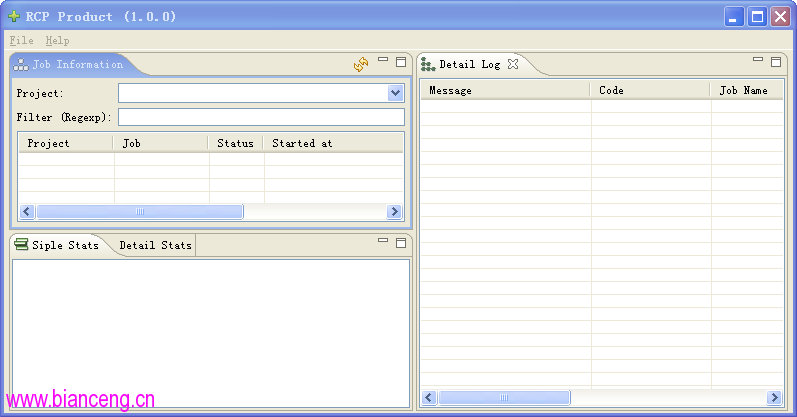
圖 1:Perspective 佈局效果圖