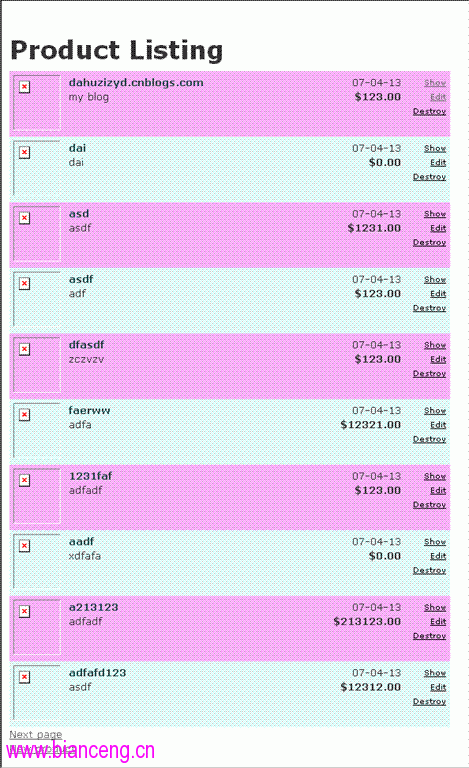
本篇針對 Scaffold 產生的預設列表頁面進行美化,運用 CSS 交替列顏色、圖片縮圖、截斷描述與格式化價格,提升後台管理體驗。
編輯 app/views/admin/list.rhtml,使用 odd_or_even 變數控制列樣式,顯示商品縮圖、標題、截斷描述、上架日期與格式化價格:
<% odd_or_even = 0
for product in @products
  odd_or_even = 1 - odd_or_even %>
<tr valign="top" class="ListLine<%= odd_or_even %>">
  <td><img width="60" height="70" src="<%= product.image_url %>"/></td>
  <td width="60%">
    <span class="ListTitle"><%= h(product.title) %></span><br />
    <%= h(truncate(product.description, 80)) %>
  </td>
  <td align="right">
    <%= product.date_available.strftime("%y-%m-%d") %><br/>
    <strong>$<%= sprintf("%0.2f", product.price) %></strong>
  </td>
  <td class="ListActions">
    <%= link_to 'Show', :action => 'show', :id => product %><br/>
    <%= link_to 'Edit', :action => 'edit', :id => product %><br/>
    <%= link_to 'Destroy', { :action => 'destroy', :id => product }, :confirm => "Are you sure?" %>
  </td>
</tr>
<% end %>
在 public/stylesheets/scaffold.css 新增:
.ListTitle { color: #244; font-weight: bold; font-size: larger; }
.ListActions { font-size: x-small; text-align: right; padding-left: 1em; }
.ListLine0 { background: #e0f8f8; }
.ListLine1 { background: #f8b0f8; }
重新整理列表頁即可看到交替底色、對齊美觀的效果(如下圖)。