透過 XML Schema 定義產生代碼廣泛應用於各類 XML 資料交換,包含 Web 服務。大多數資料綁定工具嚴格依據 Schema 組織產生代碼,甚至根據與應用無關的 Schema 面向。本教學為兩部分系列的第二部分,介紹 JiBX 1.2 如何透過更好解析 Schema 和消除不必要的類別混亂來產生更乾淨的代碼,並示範如何自訂產生代碼以滿足需求,包含輕鬆移除不必要 Schema 組件的自訂。
JiBX 是 XML 資料與 Java 物件的綁定工具,一直被公認為綁定 Java 代碼與 XML 的最快且最靈活方法。但其綁定定義的複雜性及對 XML Schema 定義有限支援常讓使用者失望。幸運的是,JiBX 1.2 版致力於消除這些問題。本教學將示範如何使用 JiBX 1.2 新功能從 XML Schema 定義輕鬆產生 Java 代碼,並讀寫符合產生 Schema 定義的 XML 文件,所有這一切都不需要詳細了解 JiBX 綁定定義。第一部分介紹相反方向,即從 Java 代碼產生 XML Schema 定義。
本教學將引導您完成使用 JiBX 從 XML Schema 定義產生 Java 代碼的過程:先了解如何使用簡單 Schema 及產生符合該 Schema 的預設 Java 資料模型,再使用該模型讀寫 XML 文件;接著看如何使用自訂修改代碼產生以更好滿足需求;最後轉向更複雜的業界標準 Schema 範例,探究自訂簡化產生資料模型並提高可用性的強大之處。閱讀完本教學並嘗試提供的範例後,您將能使用 JiBX 為自己的 Schema 產生自訂的 Java 資料模型。
理解本教學至少需要 Java 代碼和 XML 基礎知識。不需要詳細了解 XML Schema 定義,但略微熟悉 Schema 將幫助更好理解範例。
執行範例需要安裝:Sun's JDK 1.5.0_09(或更高)、IBM Developer Kit for Java technology 1.5.0 SR3、最新版 Apache Ant 建構工具。本教學包含 JiBX 下載及安裝說明。
JiBX 是轉換 Java 資料結構與 XML 文件的工具之一。性能與靈活功能使其脫穎而出:性能領先,在多項參數上優於其他常見工具(如 JAXB 2.0);比幾乎所有其他 Java-XML 工具靈活,使用綁定定義解除 Java 結構與 XML 表示的綁定,使兩者可獨立更改。
1.2 版新增主要功能支援 XML Schema 定義。可使用 JiBX 發行版附帶工具產生匹配 Java 代碼的 Schema 定義,或匹配 Schema 定義的 Java 代碼。無論哪種方式,都會得到一個綁定定義,允許使用 JiBX 轉換 Java 代碼與符合 Schema 定義的 XML 文件。本教學展示第二類產生:從 Schema 定義產生 Java 代碼。
繼續學習前需先安裝 JiBX。下載最新 1.2.x 發行版 ZIP 並解壓縮到便於存取的位置,將得到名為 jibx 的目錄,包含所有 JiBX JAR、文件、範例、甚至原始碼。
下載教學範例代碼(ZIP 形式)。最簡單安裝方式是在 JiBX 安裝根目錄解壓縮 ZIP(或 Windows 將 dwcode2 目錄從 ZIP 複製到 JiBX 安裝根目錄)。這會在 jibx 目錄建立 dwcode2 子目錄,包含範例文件(含 build.xml、custom.xml 等)。
範例代碼包含自動執行 JiBX 工具並處理範例涉及其他步驟的 Ant 建構文件。若直接安裝到 JiBX 安裝目錄,建構可存取 JiBX JAR 而無需額外配置。若安裝在其他位置,仍可使用 Ant 建構,只需編輯範例代碼目錄中的 build.properties,將 jibx-home 屬性值改為 JiBX 安裝路徑。
透過 XML Schema 產生 JiBX 綁定定義及相應 Java 類別非常簡單。本節將說明具體操作。
使用第一部分產生的一個 Schema 作為簡單範例。程式碼清單 1 顯示該 Schema 簡短版本,用於表示線上商店訂單。範例代碼 dwcode2 目錄中的 starter.xsd 提供完整 Schema。
<xs:schema xmlns:xs="https://www.w3.org/2001/XMLSchema" xmlns:tns="https://jibx.org/starter" elementFormDefault="qualified" targetNamespace="https://jibx.org/starter">
<xs:simpleType name="shipping">
<xs:annotation>
<xs:documentation>Supported shipment methods. The "INTERNATIONAL" shipment methods can only be used for orders with shipping addresses outside the U.S., and one of these methods is required in this case.</xs:documentation>
</xs:annotation>
<xs:restriction base="xs:string">
<xs:enumeration value="STANDARD_MAIL"/>
<xs:enumeration value="PRIORITY_MAIL"/>
<xs:enumeration value="INTERNATIONAL_MAIL"/>
...
</xs:restriction>
</xs:simpleType>
<xs:complexType name="item">
<xs:annotation>
<xs:documentation>Order line item information.</xs:documentation>
</xs:annotation>
<xs:sequence/>
<xs:attribute type="xs:string" use="required" name="id">
<xs:annotation>
<xs:documentation>Stock identifier. This is expected to be 12 characters in length, with two leading alpha characters followed by ten decimal digits. </xs:documentation>
</xs:annotation>
</xs:attribute>
<xs:attribute type="xs:int" use="required" name="quantity">
<xs:annotation>
<xs:documentation>Number of units ordered.</xs:documentation>
</xs:annotation>
</xs:attribute>
<xs:attribute type="xs:float" use="required" name="price">
<xs:annotation>
<xs:documentation>Price per unit.</xs:documentation>
</xs:annotation>
</xs:attribute>
</xs:complexType>
<xs:complexType name="address">
<xs:annotation>
<xs:documentation>Address information.</xs:documentation>
</xs:annotation>
<xs:sequence>
<xs:element type="xs:string" name="street1">
<xs:annotation>
<xs:documentation>First line of street information (required). </xs:documentation>
</xs:annotation>
</xs:element>
...
</xs:sequence>
<xs:attribute type="xs:string" name="state">
<xs:annotation>
<xs:documentation>State abbreviation (required for the U.S. and Canada, optional otherwise).</xs:documentation>
</xs:annotation>
</xs:attribute>
<xs:attribute type="xs:string" name="postCode">
<xs:annotation>
<xs:documentation>Postal code (required for the U.S. and Canada, optional otherwise).</xs:documentation>
</xs:annotation>
</xs:attribute>
</xs:complexType>
<xs:complexType name="customer">
<xs:annotation>
<xs:documentation>Customer information.</xs:documentation>
</xs:annotation>
<xs:sequence>
<xs:element type="xs:long" name="customerNumber"/>
...
</xs:sequence>
</xs:complexType>
<xs:element type="tns:order" name="order"/>
<xs:complexType name="order">
<xs:annotation>
<xs:documentation>Order information.</xs:documentation>
</xs:annotation>
<xs:sequence>
<xs:element type="xs:long" name="orderNumber"/>
<xs:element type="tns:customer" name="customer"/>
<xs:element type="tns:address" name="billTo">
<xs:annotation>
<xs:documentation>Billing address information.</xs:documentation>
</xs:annotation>
</xs:element>
...
<xs:element type="tns:item" name="item" minOccurs="0" maxOccurs="unbounded"/>
</xs:sequence>
<xs:attribute type="xs:date" use="required" name="orderDate">
<xs:annotation>
<xs:documentation>Date order was placed with server.</xs:documentation>
</xs:annotation>
</xs:attribute>
...
</xs:complexType>
</xs:schema>
透過 XML Schema 產生 JiBX 綁定和 Java 類別,只需執行 JiBX 發行版 jibx-tools.jar 附帶的 org.jibx.schema.codegen.CodeGen 工具。可直接從命令列執行,或透過 Apache Ant 等建構工具間接執行。
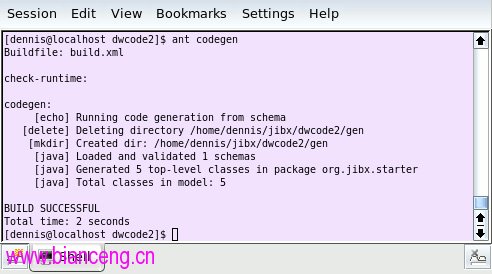
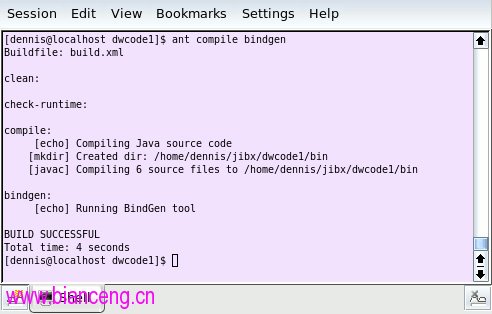
本教學下載部分包含 Ant build.xml 腳本,其中 codegen 目標用於執行產生。在已安裝下載的 dwcode2 目錄中開啟控制台,輸入 ant codegen。若系統安裝 Ant 並按說明安裝下載代碼,應可看到類似圖 1 輸出。
也可直接從控制台執行 CodeGen:在 Java 類路徑包含 jibx-tools.jar,指定 org.jibx.schema.codegen.CodeGen 為執行類別,列出要產生的 Schema 定義。提供的 Ant codegen 目標使用額外參數告訴 CodeGen 使用 gen/src 目錄作為產生資料模型套件結構根目錄,並在產生前刪除該目錄現有文件。從 dwcode2 目錄控制台複製 Ant codegen 目標的 Java 命令列(假設遵循建議安裝說明):
java -cp ../lib/jibx-tools.jar org.jibx.schema.codegen.CodeGen -t gen/src -w starter.xsd
Windows 版本:
java -cp ..\lib\jibx-tools.jar org.jibx.schema.codegen.CodeGen -t gen\src -w starter.xsd
可透過命令列向 CodeGen 傳遞許多其他選項,稍後教學將介紹。現在看看產生的 Java 代碼。
產生的代碼由五個類別組成,對應清單 1 Schema 中五個全域型別定義。程式碼清單 2 顯示產生代碼範例,包含 org.jibx.starter.Order 類別摘錄及完整 org.jibx.starter.Shipping 類別:
/**
 * Order information.
 *
 * Schema fragment(s) for this class:
 * <pre>
 * <xs:complexType xmlns:ns="https://jibx.org/starter" xmlns:xs="https://www.w3.org/2001/XMLSchema" name="order">
 * <xs:sequence>
 * <xs:element type="xs:long" name="orderNumber"/>
 * <xs:element type="ns:customer" name="customer"/>
 * <xs:element type="ns:address" name="billTo"/>
 * <xs:element type="ns:shipping" name="shipping"/>
 * <xs:element type="ns:address" name="shipTo" minOccurs="0"/>
 * <xs:element type="ns:item" name="item" minOccurs="0" maxOccurs="unbounded"/>
 * </xs:sequence>
 * <xs:attribute type="xs:date" use="required" name="orderDate"/>
 * <xs:attribute type="xs:date" name="shipDate"/>
 * <xs:attribute type="xs:float" name="total"/>
 * </xs:complexType>
 * </pre> */
public class Order {
    private long orderNumber;
    private Customer customer;
    private Address billTo;
    private Shipping shipping;
    private Address shipTo;
    private List<Item> itemList = new ArrayList<Item>();
    private Date orderDate;
    private Date shipDate;
    private Float total;
    ...
    /** Get the 'shipTo' element value. Shipping address information. If missing, the
     * billing address is also used as the shipping address. */
    public Address getShipTo() {
        return shipTo;
    }
    /** Set the 'shipTo' element value. Shipping address information. If missing, the
     * billing address is also used as the shipping address. */
    public void setShipTo(Address shipTo) {
        this.shipTo = shipTo;
    }
    /** Get the list of 'item' element items. */
    public List<Item> getItems() {
        return itemList;
    }
    /** Set the list of 'item' element items. */
    public void setItems(List<Item> list) {
        itemList = list;
    }
    ...
}
/**
 * Supported shipment methods. The "INTERNATIONAL" shipment methods can only be used for orders with shipping addresses outside the U.S., and one of these methods is required in this case.
 *
 * Schema fragment(s) for this class:
 * <pre>
 * <xs:simpleType xmlns:xs="https://www.w3.org/2001/XMLSchema" name="shipping">
 * <xs:restriction base="xs:string">
 * <xs:enumeration value="STANDARD_MAIL"/>
 * <xs:enumeration value="PRIORITY_MAIL"/>
 * <xs:enumeration value="INTERNATIONAL_MAIL"/>
 * <xs:enumeration value="DOMESTIC_EXPRESS"/>
 * <xs:enumeration value="INTERNATIONAL_EXPRESS"/>
 * </xs:restriction>
 * </xs:simpleType>
 * </pre> */
public enum Shipping {
    STANDARD_MAIL, PRIORITY_MAIL, INTERNATIONAL_MAIL, DOMESTIC_EXPRESS, INTERNATIONAL_EXPRESS
}
透過清單 2 可見,CodeGen 自動將 Schema 文件轉換為 Javadoc(顯示為每個類別 Javadoc 前導註釋,以及 getShipTo() 和 setShipTo() 方法的註釋部分)。預設情況下,CodeGen 合併類別 Javadoc 中的實際 Schema 定義,對於 getter/setter 存取方法,描述對應的 Schema 組件。
對於重複值(如清單 1 訂單 complexType 定義中的重複項目元素),CodeGen 預設產生 Java 5 型別列表。對於 simpleType 限制列舉(如清單 1 送貨類型),預設產生 Java 5 列舉型別。清單 2 顯示這兩個實例產生的代碼。
除了產生代碼,CodeGen 還產生 JiBX 綁定定義(本例為 binding.xml),告訴 JiBX 綁定編譯器如何在 Java 類別與 XML 間轉換。綁定定義包含 JiBX 轉換的完整資訊,必然複雜。幸運的是,使用 CodeGen 綁定和代碼產生,無需了解綁定定義即可使用 JiBX,本教學不介紹此部分細節。
本節說明如何在執行時執行 JiBX 綁定編譯器和使用 JiBX 處理 XML 文件。
使用產生的綁定定義處理 XML 文件前,需先執行 JiBX 綁定編譯器。依綁定定義指定,編譯器將位元組碼添加到編譯後的類別文件,實際實現與 XML 雙向轉換。每次重新編譯 Java 類別或修改綁定定義都必須執行編譯器,通常最好將編譯器步驟加入專案標準建構流程。
jibx-bind.jar 中的 JiBX 發行版附帶綁定編譯器。JiBX 文件提供透過各種方法執行編譯器的完整資訊,包含如何在執行應用程式時(而非建構時)呼叫編譯器。JiBX 還提供 Eclipse 和 IntelliJ IDEA 外掛,使用這些 IDE 時自動執行編譯器。
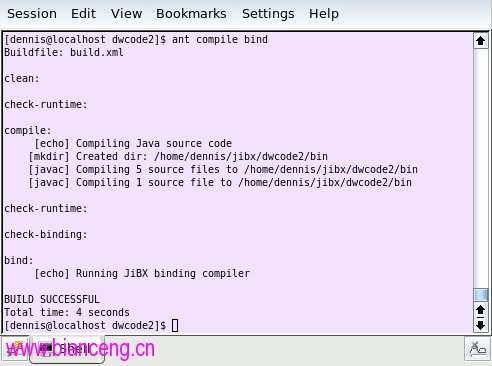
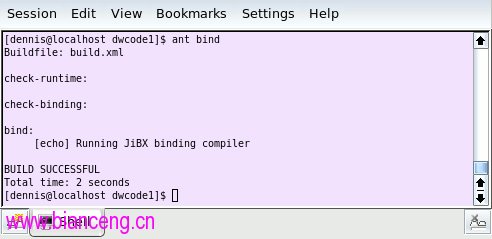
本教學簡化處理,僅透過 Ant 執行編譯器。build.xml 的 compile 目標編譯產生代碼和提供的測試程式準備綁定,bind 目標實際執行編譯器。假設已執行 codegen 目標,圖 2 顯示執行這些目標應見到的輸出(也可在命令列依序列出目標執行全部三個:ant codegen compile bind)。
程式碼清單 3 顯示符合 Schema 的簡單測試文件,包含在教學代碼下載中,名為 starter.xml:
<order orderDate="2008-10-18" shipDate="2008-10-22" xmlns="https://jibx.org/starter">
<orderNumber>12345678</orderNumber>
<customer>
<customerNumber>5678</customerNumber>
<firstName>John</firstName>
<lastName>Smith</lastName>
</customer>
<billTo state="WA" postCode="98059">
<street1>12345 Happy Lane</street1>
<city>Plunk</city>
<country>USA</country>
</billTo>
<shipping>PRIORITY_MAIL</shipping>
<shipTo state="WA" postCode="98034">
<street1>333 River Avenue</street1>
<city>Kirkland</city>
</shipTo>
<item quantity="1" price="5.99" id="FA9498349851"/>
<item quantity="2" price="9.50" id="GC1234905049"/>
<item quantity="1" price="8.95" id="AX9300048820"/>
</order>
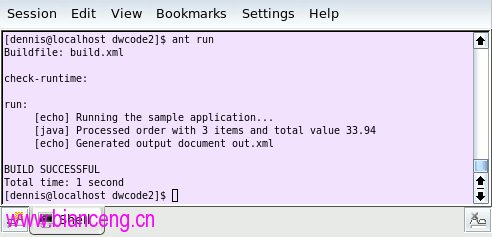
下載包含簡單測試程式(清單 4),示範如何使用 JiBX 解組及編組文件。編組是在記憶體中產生物件 XML 表示的過程,可能包含從初始物件鏈結的物件;解組是編組反向過程,透過 XML 表示在記憶體中建構物件(可能包含鏈結物件)。Ant run 目標執行此測試程式,使用清單 3 文件為輸入並將編組後文件副本寫入 out.xml。
public class Test {
    /**
     * Unmarshal the sample document from a file, compute and set order total, then
     * marshal it back out to another file.
     *
     * @param args
     */
    public static void main(String[] args) {
        if (args.length < 2) {
            System.out.println("Usage: java -cp ... " + "org.jibx.starter.Test in-file out-file");
            System.exit(0);
        }
        try {
            // unmarshal customer information from file
            IBindingFactory bfact = BindingDirectory.getFactory(Order.class);
            IUnmarshallingContext uctx = bfact.createUnmarshallingContext();
            FileInputStream in = new FileInputStream(args[0]);
            Order order = (Order)uctx.unmarshalDocument(in, null);
            // compute the total amount of the order
            float total = 0.0f;
            for (Iterator<Item> iter = order.getItems().iterator(); iter.hasNext();) {
                Item item = iter.next();
                total += item.getPrice() * item.getQuantity();
            }
            order.setTotal(new Float(total));
            // marshal object back out to file (with nice indentation, as UTF-8)
            IMarshallingContext mctx = bfact.createMarshallingContext();
            mctx.setIndent(2);
            FileOutputStream out = new FileOutputStream(args[1]);
            mctx.setOutput(out, null);
            mctx.marshalDocument(order);
            System.out.println("Processed order with " + order.getItems().size() + " items and total value " + total);
        } catch (FileNotFoundException e) {
            e.printStackTrace();
            System.exit(1);
        } catch (JiBXException e) {
            e.printStackTrace();
            System.exit(1);
        }
    }
}
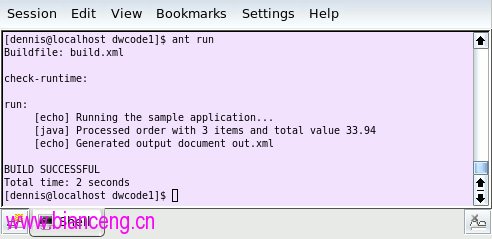
這是第一部分使用的相同測試程式,同樣具有第一部分討論的限制。out.xml 包含解組原始文件獲得的訂單資料重新編組後的輸出。
本節介紹自訂 CodeGen 以控制透過簡單 Schema 產生代碼結構的基礎知識。
CodeGen 支援代碼和綁定產生許多面向的豐富自訂。要套用的自訂集作為 XML 文件傳遞給 CodeGen,包含與 Schema 或 Schema 組件相關的巢狀元素。程式碼清單 5 給出簡單範例:
<schema prefer-inline="true" show-schema="false" enumeration-type="simple" generate-all="false" includes="order item"/>
清單 5 自訂包含單個無命名空間的 schema 元素,及針對特定自訂的幾個屬性(目前僅使用單一 Schema 定義,可用這種簡單自訂形式。稍後將見多 Schema 自訂範例)。第一個屬性 prefer-inline="true" 告訴 CodeGen 內聯僅被參考一次的 Schema 定義,而非預設保留為獨立類別。第二個 show-schema="false" 防止在類別 Javadoc 嵌入 Schema 定義。enumeration-type="simple" 產生簡單型別安全列舉而非 Java 5 列舉。最後一對屬性協同工作:預設 CodeGen 為輸入 Schema 中每個全域型別定義產生獨立頂層類別,並在每個 complexType 產生的 JiBX 綁定中產生對應抽象映射。generate-all="false" 變更此預設行為,僅顯式產生特別包含或被 included 型別參考的 complexType。includes="order item" 給出要產生的名稱,選擇這些名稱以保持與測試程式相容——需要 <order> 元素因它是實例文件根元素,需要 complexType 項目因測試程式計算訂單總數時期望找到此型別獨立頂層類別。
透過使用 Ant custgen 任務而非 codegen 任務(或僅用 full 任務,依序執行完整 clean custgen compile bind run 目標序列),可嘗試這些自訂。程式碼清單 6 顯示產生代碼片段,可與清單 2 預設產生代碼比較。除簡化類別 Javadoc 外,最大差異是 Customer 類別現為內聯,Shipping 類別現為使用自訂型別安全列舉類別的內部類別。
/**
 * Order information. */
public class Order {
    private long orderNumber;
    private long customerCustomerNumber;
    private String customerFirstName;
    private String customerLastName;
    private Address billTo;
    private Shipping shipping;
    private Address shipTo;
    private List<Item> itemList = new ArrayList<Item>();
    private Date orderDate;
    private Date shipDate;
    private Float total;
    ...
    /**
     * Supported shipment methods. The "INTERNATIONAL" shipment methods can only be used for orders with shipping addresses outside the U.S., and one of these methods is required in this case.
     */
    public static class Shipping {
        private final String value;
        public static final Shipping STANDARD_MAIL = new Shipping(
            "STANDARD_MAIL");
        public static final Shipping PRIORITY_MAIL = new Shipping(
            "PRIORITY_MAIL");
        public static final Shipping INTERNATIONAL_MAIL = new Shipping(
            "INTERNATIONAL_MAIL");
        public static final Shipping DOMESTIC_EXPRESS = new Shipping(
            "DOMESTIC_EXPRESS");
        public static final Shipping INTERNATIONAL_EXPRESS = new Shipping(
            "INTERNATIONAL_EXPRESS");
        private static final String[] values = new String[]{"DOMESTIC_EXPRESS", "INTERNATIONAL_EXPRESS", "INTERNATIONAL_MAIL", "PRIORITY_MAIL", "STANDARD_MAIL"};
        private static final Shipping[] instances = new Shipping[]{
            DOMESTIC_EXPRESS, INTERNATIONAL_EXPRESS, INTERNATIONAL_MAIL, PRIORITY_MAIL, STANDARD_MAIL};
        private Shipping(String value) {
            this.value = value;
        }
        public String toString() {
            return value;
        }
        public static Shipping convert(String value) {
            int index = java.util.Arrays.binarySearch(values, value);
            if (index >= 0) {
                return instances[index];
            } else {
                return null;
            }
        }
        public static Shipping fromValue(String text) {
            Shipping value = convert(text);
            if (value == null) {
                throw new IllegalArgumentException("Value \'" + text + "\' is not allowed");
            } else {
                return value;
            }
        }
    }
}
還有許多其他自訂可用於 CodeGen。稍後教學將見到這些自訂部分範例,但為更好說明自訂強大之處,有必要繼續介紹更複雜的 Schema。
獨立 Schema 定義適合簡單演示,但應用到企業應用廣泛使用的複雜 Schema 定義時,無法讓使用者了解工具運作原理。現在以符合業界標準的 HR-XML Schema 定義為例,繼續介紹更實際範例。
HR-XML Consortium 為開發針對人力資源 XML 表示的開放標準而成立,代表 110 多家企業成員,近 50 家技術公司通過符合其標準認證。
本教學使用的 HR-XML Schema 包含 157 個 Schema,混合頂層文件定義和常用組件。CodeGen 輕鬆處理這些 Schema,但產生類別數量和相互關係複雜度掩蓋了 Schema 處理更有趣面向。為專注細節,這裡使用 HR-XML 子集包含 TimeCard 元素一個頂層文件定義,及作為 TimeCard 定義一部分參考的常用組件——共七個 Schema 定義。
可在 hrxml/schemas 目錄找到本教學使用的 HR-XML Schema 定義子集。程式碼清單 7 顯示編輯後的 TimeCard 元素定義主要 Schema,給出 HR-XML Schema 風格樣例,同時使用巢狀及全域型別定義,包含比第一個範例更廣泛的 Schema 結構:
<xs:choice> 組合器(如 TimeCardType 定義中某些內嵌 complexType 所示)<xs:any> 粒子(查看清單開始部分 AdditionalDataType 定義)<xs:simpleType> <union>(查看清單末尾 TimeCardDuration 定義)<xs:simpleType> 限制<xs:schema targetNamespace="https://ns.hr-xml.org/2007-04-15" ... elementFormDefault="qualified" version="2007-04-15"> <xs:import namespace="https://www.w3.org/XML/1998/namespace" ...> <xs:include schemaLocation="../CPO/EntityIdType.xsd"/> ... <xs:complexType name="AdditionalDataType" mixed="true"> ... <xs:sequence minOccurs="0" maxOccurs="unbounded"> <xs:any namespace="##any" processContents="strict" minOccurs="0" maxOccurs="unbounded"/> </xs:sequence> <xs:attribute name="type" type="xs:string"/> </xs:complexType> ... <xs:element name="TimeCard" type="TimeCardType"/> <xs:complexType name="TimeCardType"> <xs:sequence> <xs:element name="Id" type="EntityIdType" minOccurs="0"/> <xs:element name="ReportedResource"> <xs:complexType> <xs:choice> <xs:element name="Person" type="TimeCardPersonType"/> <xs:element name="Resource"> <xs:complexType> <xs:sequence> <xs:element name="Id" type="EntityIdType" minOccurs="0" maxOccurs="unbounded"/> <xs:element name="ResourceName" type="xs:string" minOccurs="0"/> <xs:element name="AdditionalData" type="AdditionalDataType" minOccurs="0" maxOccurs="unbounded"/> </xs:sequence> <xs:attribute name="type" type="xs:string"/> </xs:complexType> </xs:element> </xs:choice> </xs:complexType> </xs:element> <xs:element name="ReportedTime" maxOccurs="unbounded"> <xs:complexType> <xs:sequence> <xs:element name="PeriodStartDate" type="AnyDateTimeType"/> <xs:element name="PeriodEndDate" type="AnyDateTimeType"/> <xs:element name="ReportedPersonAssignment" minOccurs="0"> <xs:complexType> <xs:sequence> <xs:element name="Id" type="EntityIdType" minOccurs="0"/> </xs:sequence> </xs:complexType> </xs:element> <xs:choice maxOccurs="unbounded"> <xs:element name="TimeInterval"> <xs:complexType> <xs:sequence> <xs:element name="Id" type="EntityIdType" minOccurs="0"/> <xs:element name="StartDateTime" type="AnyDateTimeType"/> <xs:choice> <xs:sequence> <xs:element name="EndDateTime" type="AnyDateTimeType"/> <xs:element name="Duration" type="TimeCardDuration" minOccurs="0"/> </xs:sequence> <xs:element name="Duration" type="TimeCardDuration"/> </xs:choice> <xs:element name="PieceWork" minOccurs="0" maxOccurs="unbounded"> ... </xs:element> <xs:element name="RateOrAmount" minOccurs="0" maxOccurs="unbounded"> ... </xs:element> <xs:element name="Allowance" minOccurs="0" maxOccurs="unbounded"> ... </xs:element> ... </xs:sequence> <xs:attribute name="type" type="xs:string" use="required"/> ... </xs:complexType> </xs:element> <xs:element name="TimeEvent"> ... </xs:element> <xs:element name="Expense"> ... </xs:element> <xs:element name="Allowance"> ... </xs:element> </xs:choice> ... </xs:sequence> <xs:attribute ref="xml:lang"/> </xs:complexType> </xs:element> ... </xs:sequence> <xs:simpleType name="TimeCardDuration"> <xs:union memberTypes="xs:duration xs:decimal"/> </xs:simpleType> </xs:schema>