src/main/java/com/aerospike/client/rest/
├── JSONRecord.java      // Record → JSON 轉換
├── RESTController.java  // REST 端點
└── AerospikeRESTfulService.java // 主啟動類<parent>
<groupId>org.springframework.boot</groupId>
<artifactId>spring-boot-starter-parent</artifactId>
<version>0.5.0.M4</version> <!-- 早期版本 -->
</parent>
<dependencies>
<dependency><groupId>org.springframework.boot</groupId><artifactId>spring-boot-starter-web</artifactId></dependency>
<dependency><groupId>org.springframework.boot</groupId><artifactId>spring-boot-starter-actuator</artifactId></dependency>
<dependency><groupId>com.aerospike</groupId><artifactId>aerospike-client</artifactId><version>3.0.9</version></dependency>
<dependency><groupId>commons-cli</groupId><artifactId>commons-cli</artifactId><version>1.2</version></dependency>
</dependencies>關鍵步驟:需手動安裝 Aerospike Java Client 及依賴 gnu-crypto.jar 到本地倉庫:
mvn install:install-file -Dfile=client/depends/gnu-crypto.jar -DgroupId=org.gnu -DartifactId=gnu-crypto -Dversion=2.0.1 -Dpackaging=jar
mvn clean packagepublic class JSONRecord extends JSONObject {
public JSONRecord(Record record) {
put("generation", record.generation);
put("expiration", record.expiration);
put("bins", new JSONObject(record.bins));
if (record.duplicates != null) {
JSONArray duplicates = new JSONArray();
for (Map<String, Object> dup : record.duplicates) {
duplicates.add(new JSONObject(dup));
}
put("duplicates", duplicates);
}
}
}@Controller
public class RESTController {
@Autowired AerospikeClient client;
// 查詢單條記錄
@RequestMapping(value="/as/{namespace}/{set}/getAll/{key}", method=RequestMethod.GET)
@ResponseBody
public JSONRecord getAll(@PathVariable String namespace, @PathVariable String set, @PathVariable String keyvalue) {
Key key = new Key(namespace, set, keyvalue);
Record result = client.get(new Policy(), key);
return new JSONRecord(result);
}
// CSV 文件上傳
@RequestMapping(value="/uploadFlights", method=RequestMethod.POST)
@ResponseBody
public String handleFileUpload(@RequestParam String name, @RequestParam MultipartFile file) {
WritePolicy wp = new WritePolicy();
BufferedReader br = new BufferedReader(new InputStreamReader(file.getInputStream()));
String line;
while ((line = br.readLine()) != null) {
String[] f = line.split(",");
client.put(wp, new Key("test", "flights", f[0].trim()),
new Bin("YEAR", Integer.parseInt(f[1].trim())),
new Bin("DAY_OF_MONTH", Integer.parseInt(f[2].trim())),
// ... 其餘 16 個 Bin 字段
new Bin("DISTANCE", Integer.parseInt(f[18].trim()))
);
}
return "You successfully uploaded " + name;
}
}@Configuration @EnableAutoConfiguration @ComponentScan
public class AerospikeRESTfulService {
@Bean
public AerospikeClient asClient() {
Properties as = System.getProperties();
return new AerospikeClient(as.getProperty("seedHost"), Integer.parseInt(as.getProperty("port")));
}
@Bean
public MultipartConfigElement multipartConfigElement() { return new MultipartConfigElement(""); }
public static void main(String[] args) throws ParseException {
Options options = new Options();
options.addOption("h", "host", true, "Server hostname (default: localhost)");
options.addOption("p", "port", true, "Server port (default: 3000)");
CommandLine cl = new PosixParser().parse(options, args);
Properties as = System.getProperties();
as.put("seedHost", cl.getOptionValue("h", "localhost"));
as.put("port", cl.getOptionValue("p", "3000"));
SpringApplication.run(AerospikeRESTfulService.class, args);
}
}註解說明:
@EnableAutoConfiguration:自動裝配(含嵌入式 Tomcat)@ComponentScan:掃描 rest 包發現 Controller@Configuration + @Bean:將 AerospikeClient 註冊為 Spring BeanMultipartConfigElement:啟用文件上傳支援mvn clean package
java -jar target/aerospike-restful-example-1.0.0.jar -h localhost -p 3000生成可執行 Fat JAR,內嵌 Tomcat,無需外部容器。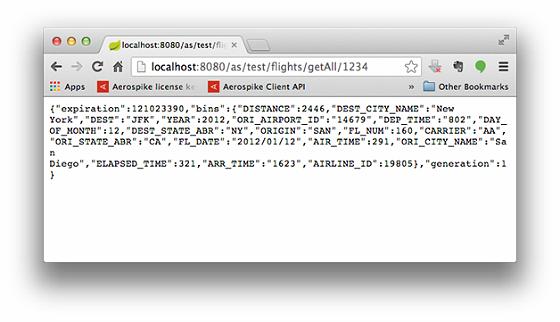
RestTemplate template = new RestTemplate();
MultiValueMap<String, Object> parts = new LinkedMultiValueMap<>();
parts.add("name", "flights_from.csv");
parts.add("file", new FileSystemResource("flights_from.csv"));
String response = template.postForObject("https://localhost:8080/uploadFlights", parts, String.class);
測試數據:2012 年真實航班數據,約 100 萬條,上傳需數分鐘。
Spring Boot + Aerospike 實現高性能 REST 服務,關鍵在於: