Java 不只是做後端,Swing 能構建原生跨平台桌面應用。本文面向零基礎開發者,系統講解 AWT/Swing 區別、窗口與事件模型、核心組件(按鈕、文本框)、容器與佈局管理,附完整可運行代碼與截圖,帶你入門桌面開發。
JFrame frame = new JFrame("標題");
frame.setSize(400, 300);      // 或 frame.pack() 自適應
frame.setVisible(true);       // 必須調用
frame.setDefaultCloseOperation(JFrame.EXIT_ON_CLOSE); // 關閉退出 JVM
addXxxListener 註冊監聽器。ActionListener、WindowListener),通常用適配器類(WindowAdapter)只重寫關心的方法。ActionEvent、WindowEvent)攜帶事件源、時間戳等上下文。
frame.addWindowListener(new WindowAdapter() {
    @Override
    public void windowClosing(WindowEvent e) {
        System.exit(0); // 或 frame.dispose() 僅關閉窗口
    }
    @Override
    public void windowActivated(WindowEvent e) {
        frame.setTitle("激活次數: " + ++count);
    }
});
替代方案:frame.setDefaultCloseOperation(JFrame.EXIT_ON_CLOSE); 一行搞定關閉退出。
JFrame 本身不是容器,組件必須加到 frame.getContentPane()(默認 BorderLayout)。
| 組件 | 特點 | 狀態判斷 | 監聽器 |
|---|---|---|---|
| JButton | 普通按鈕,點擊觸發動作 | 無狀態 | ActionListener |
| JToggleButton | 切換按鈕,按下/彈起兩態 | isSelected() | ActionListener |
| JCheckBox | 復選框,勾選/未勾選 | isSelected() | ItemListener (itemStateChanged) |
| JRadioButton | 單選按鈕,組內互斥 | isSelected() | ActionListener |
ButtonGroup group = new ButtonGroup();
group.add(radio1); group.add(radio2); group.add(radio3);
// 仍需單獨 add 到容器,ButtonGroup 不可視
ActionListener al = e -> {
    Object src = e.getSource();
    if (src == radio1) label.setText("選中 1");
    else if (src == radio2) label.setText("選中 2");
    // ...
};
radio1.addActionListener(al); radio2.addActionListener(al);
new JTextField(15),getText()/setText() 取值賦值。setEchoChar('#') 設置掩碼字符,getPassword() 返回 char[](安全)。new JTextArea(5, 15) 指定行列,setLineWrap(true) 自動換行,不自帶滾動條,需包裹在 JScrollPane 中。
textField.addCaretListener(e -> label.setText(textField.getText()));
| 佈局 | 特點 | 典型用法 |
|---|---|---|
| FlowLayout | 左到右、上到下流式排列,類似 Word 文字 | 簡單表單、工具欄(JPanel 默認) |
| BorderLayout | 東南西北中五區域,每區域最多一組件 | 主窗口整體結構(JFrame ContentPane 默認) |
| GridLayout | 規則網格,每格一組件 | 計算器鍵盤、表格式表單 |
| BoxLayout | 單行/單列盒子排列 | 垂直/水平工具欄、側邊欄 |
public class EditorFrame extends JFrame {
    public EditorFrame() {
        setDefaultCloseOperation(EXIT_ON_CLOSE);
        // ContentPane 默認 BorderLayout
        JPanel toolBar = new JPanel(); // 默認 FlowLayout
        toolBar.add(new JButton("保存"));
        toolBar.add(new JButton("撤銷"));

        JTextArea editor = new JTextArea(20, 60);
        editor.setLineWrap(true);
        JScrollPane scroll = new JScrollPane(editor); // 自動滾動條

        getContentPane().add(toolBar, BorderLayout.NORTH);
        getContentPane().add(scroll, BorderLayout.CENTER);
        pack();
    }
    public static void main(String[] args) {
        new EditorFrame().setVisible(true);
    }
}
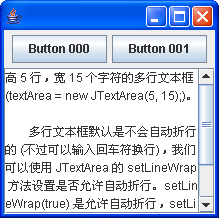
BorderLayout 每區域只能放一組件,若需放多個,先裝入 JPanel(內部用 FlowLayout/BoxLayout),再將 JPanel 放入目標區域。
JTextArea area = new JTextArea(100, 50); // 內容會無限長
JScrollPane scroll = new JScrollPane(area); // 僅佔父佈局一格,內部可滾動
JFrame,構造器中初始化組件、佈局、監聽器。getContentPane(),注意佈局管理器設置。addXxxListener + 匿名內部類/Lambda 實現邏輯。JTextField (單行)、JPasswordField (密碼)、JTextArea (多行+JScrollPane)。ButtonGroup,復選框用 ItemListener。BorderLayout 分區,內層 JPanel + FlowLayout/BoxLayout 微調。SwingUtilities.invokeLater(() -> new MyFrame().setVisible(true))。Swing 雖非現代前端技術,但作為 Java 內建 GUI 框架,無需額外依賴即可構建功能完整的桌面工具、監控面板、測試客戶端。掌握核心組件與佈局,足以應對 80% 內部工具開發需求。