Swing 默認 Metal 外觀與無抗鋸齒渲染,在高 DPI 屏幕上顯得鋸齒明顯、字體模糊、風格過時。本文提供一個開箱即用的工具類 UIs,三行代碼實現:啟用 Nimbus 現代外觀 + 開啟系統級抗鋸齒 + 智能回退設置微軟雅黑/無襯線字體,讓 Swing 應用瞬間擁有原生級視覺質感。
| 場景 | 截圖 |
|---|---|
| 默認 Metal 無抗鋸齒 | 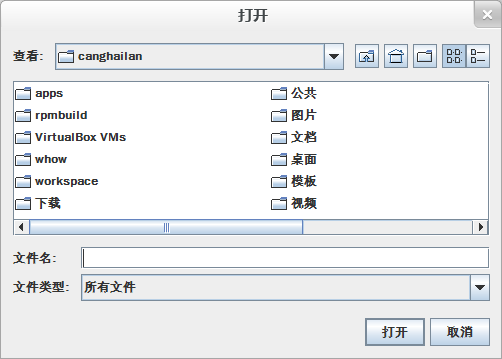 |
| 啟用 Nimbus | 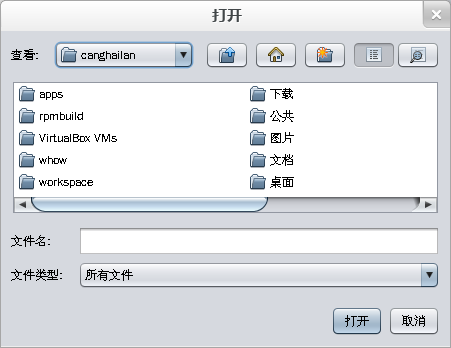 |
| Nimbus + 抗鋸齒 | 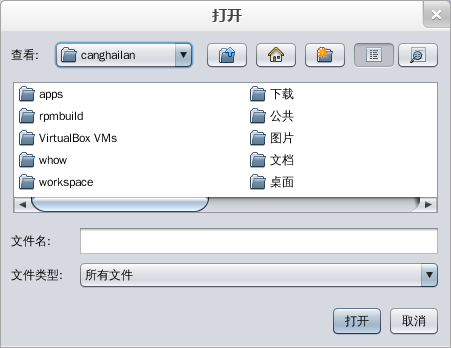 |
| Nimbus + 抗鋸齒 + 微軟雅黑 | 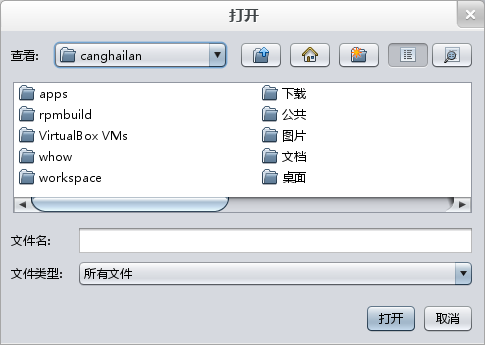 |
package canghailan.ui;

import javax.swing.*;
import javax.swing.plaf.FontUIResource;
import java.awt.*;
import java.util.HashMap;
import java.util.Map;

public class UIs {

    private static final String FALLBACK_FONT = Font.SANS_SERIF;
    private static final Map<String, String> FONT_MAP = new HashMap<>();
    private static final String[] PREFERRED_FONTS = { "微軟雅黑", "arial", "sans-serif" };
    private static final int PREFERRED_SIZE = 12;

    static {
        GraphicsEnvironment env = GraphicsEnvironment.getLocalGraphicsEnvironment();
        for (String name : env.getAvailableFontFamilyNames()) {
            FONT_MAP.put(name.toLowerCase(), name); // 實際字體名大小寫不敏感映射
        }
        FONT_MAP.putIfAbsent("serif", Font.SERIF);
        FONT_MAP.putIfAbsent("sans-serif", Font.SANS_SERIF);
    }

    /** 開啟系統級字體抗鋸齒 (JDK 6+) */
    public static void enableAntiAliasing() {
        System.setProperty("awt.useSystemAAFontSettings", "on"); // 標準屬性
        System.setProperty("swing.aatext", "true");              // Swing 專用屬性
    }

    /** 獲取 Nimbus LookAndFeel 類名,找不到回退跨平台外觀 */
    public static String getLookAndFeel() {
        try {
            for (UIManager.LookAndFeelInfo info : UIManager.getInstalledLookAndFeels()) {
                if ("Nimbus".equals(info.getName())) return info.getClassName();
            }
        } catch (Exception ignored) {}
        return UIManager.getCrossPlatformLookAndFeelClassName();
    }

    /** 按優先級查找可用字體族名 */
    public static String getFontFamily(String[] candidates) {
        for (String f : candidates) {
            String actual = FONT_MAP.get(f.toLowerCase());
            if (actual != null) return actual;
        }
        return FALLBACK_FONT;
    }

    /** 一鍵配置:外觀 + 抗鋸齒 + 全局字體 */
    public static void setUI() {
        enableAntiAliasing(); // 1. 必須在創建任何組件前調用

        // 2. 設置 LookAndFeel
        try { UIManager.setLookAndFeel(getLookAndFeel()); } catch (Exception ignored) {}

        // 3. 遍歷 UIManager 默認表,替換所有 FontUIResource
        String bestFont = getFontFamily(PREFERRED_FONTS);
        for (Map.Entry<Object, Object> entry : UIManager.getDefaults().entrySet()) {
            Object value = entry.getValue();
            if (value instanceof FontUIResource) {
                FontUIResource old = (FontUIResource) value;
                entry.setValue(new FontUIResource(
                    bestFont,
                    old.getStyle(),
                    Math.max(PREFERRED_SIZE, old.getSize()) // 不縮小原有尺寸,只放大
                ));
            }
        }
    }
}
在 main 方法最開頭、創建任何 Swing 組件前調用:
public static void main(String[] args) {
    UIs.setUI(); // 一鍵搞定

    // 後續正常創建 JFrame 等組件
    SwingUtilities.invokeLater(() -> new MyFrame().setVisible(true));
}
awt.useSystemAAFontSettings 和 swing.aatext 在 JVM 啟動時由 AWT/Swing 讀取,組件創建後修改無效。UIManager.getDefaults(),只替換 FontUIResource 實例,保留原樣式與最小尺寸,避免破壞組件佈局。setUI() → 已創建組件不生效。✅ main 首行調用。UIManager.put("Label.font", new Font(...)) → 僅影響 Label,其他組件需逐個 put。✅ 遍歷 defaults 表全量替換。Math.max(preferred, oldSize) 只增不減。UIManager.put("nimbusBase", new Color(0x333333)) 等鍵定製色系,可封裝 setDarkMode()。Font.createFont(Font.TRUETYPE_FONT, inputStream) 註冊後加入候選列表。UIs 放入公共庫,所有 Swing 專案統一引用,保證視覺一致性。最新版本:UIs.java 下載
Swing 不等於醜。通過 UIs.setUI() 三步走——抗鋸齒屬性 → Nimbus 外觀 → 智能字體替換,你的桌面應用即可擁有媲美 Electron/Qt 的現代質感,零成本提升用戶體驗。