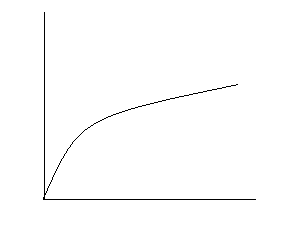
現實物體啟動/停止皆有加減速過程。對應數學曲線:
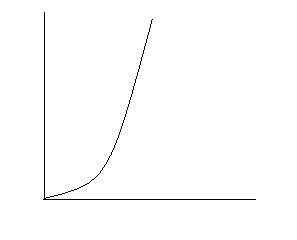
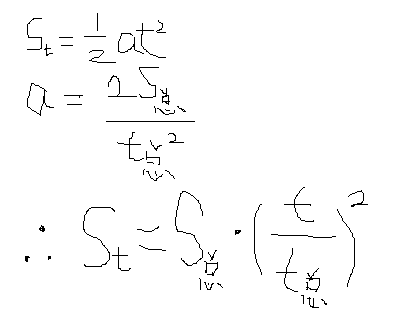
勻加速運動:$v = at$, $s = \frac{1}{2}at^2$。總位移 $S = \frac{1}{2}aT^2$。任意時刻 $t$ 位移比例:
$$\frac{s}{S} = \frac{t^2}{T^2} = \left(\frac{t}{T}\right)^2$$推廣至 N 次方:$\left(\frac{t}{T}\right)^N$。指數越大,曲線越陡峭,加速度越大。WPF 中 $t/T$ 對應 `animationClock.CurrentProgress.Value` (0~1),$S$ 對應 `To - From`。
using System;
using System.Windows;
using System.Windows.Media.Animation;

namespace EaseMoveDemo
{
    public class EaseMoveAnimation : DoubleAnimationBase
    {
        public static readonly DependencyProperty FromProperty =
            DependencyProperty.Register("From", typeof(double?), typeof(EaseMoveAnimation), new PropertyMetadata(null));
        public static readonly DependencyProperty ToProperty =
            DependencyProperty.Register("To", typeof(double?), typeof(EaseMoveAnimation), new PropertyMetadata(null));
        public static readonly DependencyProperty PowerProperty =
            DependencyProperty.Register("Power", typeof(double?), typeof(EaseMoveAnimation), new PropertyMetadata(null));

        public double? From { get => (double?)GetValue(FromProperty); set => SetValue(FromProperty, value); }
        public double? To { get => (double?)GetValue(ToProperty); set => SetValue(ToProperty, value); }

        /// 冪指數,值越大曲線越陡峭,加速度越大。建議 2~5。
        public double? Power { get => (double?)GetValue(PowerProperty); set => SetValue(PowerProperty, value); }

        protected override double GetCurrentValueCore(
            double defaultOriginValue,
            double defaultDestinationValue,
            AnimationClock animationClock)
        {
            double from = (this.From == null ? defaultDestinationValue : (double)this.From);
            double to = (this.To == null ? defaultOriginValue : (double)this.To);
            double delta = to - from;
            double power = this.Power == null ? 2 : (double)this.Power;

            // 加速 (Ease In)
            return delta * Math.Pow(animationClock.CurrentProgress.Value, power) + from;

            // 減速 (Ease Out) - 取倒數指數
            // return delta * Math.Pow(animationClock.CurrentProgress.Value, 1/power) + from;

            // 先加速後減速 (Ease InOut)
            // if (animationClock.CurrentProgress.Value < 0.5)
            //     return delta / 2 * Math.Pow(animationClock.CurrentProgress.Value * 2, power) + from;
            // return delta / 2 * (2 - Math.Pow((1 - animationClock.CurrentProgress.Value) * 2, power)) + from;
        }

        protected override Freezable CreateInstanceCore() => new EaseMoveAnimation();
    }
}
<local:EaseMoveAnimation From="0" To="300" Duration="0:0:2" Power="3" />
N 次方緩動以基本物理運動為基礎,透過單一參數 `Power` 控制曲線劇烈程度,實作簡單且效果直觀。它是自訂緩動函數系列的基石,後續文章將擴展至正弦、指數、圓弧等更豐富的曲線族群。