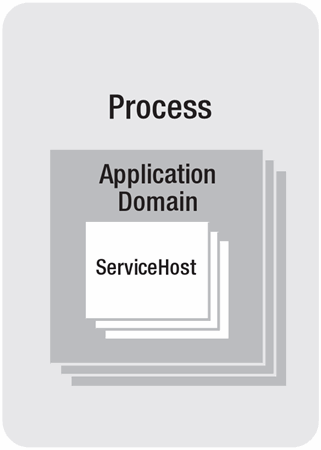
企業級 SOA 成敗關鍵在於服務承載策略。WCF 無內建宿主,提供 ServiceHost 類讓開發者在自有應用程式中承載服務。只需配置端點並調用 Open(),無需關心網絡傳輸細節。ServiceHostBase 整合了綁定、通道、調度器、偵聽器等核心功能,大幅降低宿主應用複雜度。
| 方案 | 優點 | 缺點 | 適用場景 |
|---|---|---|---|
| 自承載 (Console/WinForms/WPF) | 幾行代碼啟動;生命週期靈活控制;易除錯;xcopy 部署;支援所有綁定/傳輸 | 僅應用程式運行時可用;缺乏高可用性、管理、版本控制、自動回收等企業級特性 | 開發/測試/原型;桌面進程間通訊;P2P 場景 |
| Windows Service | 自動啟動;失敗自動恢復;自定義安全身份;運維人員熟悉 SCM 管理;支援所有綁定 | 需 Installutil/安裝包部署;企業級特性仍需自行實作 | 伺服器長期運行服務;需自動啟動與恢復的場景 |
| IIS/WAS 承載 | 進程回收/資源限制/日誌/健康監控內建;WAS 支援非 HTTP 協議;企業級功能最完整 | 配置相對複雜;IIS 5.1/6.0 僅限 HTTP | 生產環境關鍵業務服務;高可用性要求;跨協議需求 |
[ServiceContract]
interface ITradeTrackingService
{
    [OperationContract]
    void PublishQuote(Quote quote);
}

// WinForms 應用中
ServiceHost host = new ServiceHost(typeof(TradeTrackingService));
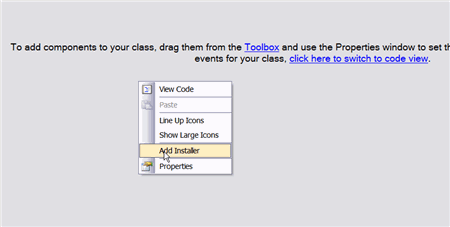
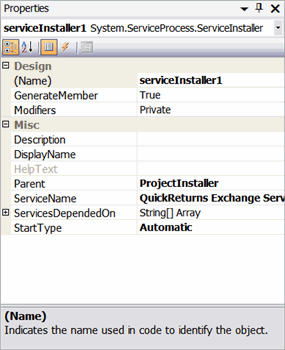
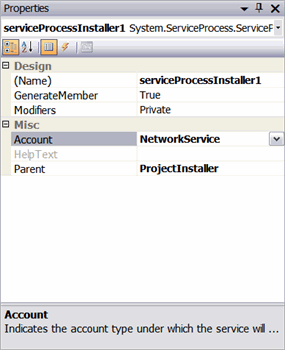
host.Open();public partial class ExchangeWindowsService : ServiceBase
{
ServiceHost host;
protected override void OnStart(string[] args)
{
host = new ServiceHost(typeof(TradeService));
host.Open();
}
protected override void OnStop()
{
if (host != null) host.Close();
}
}
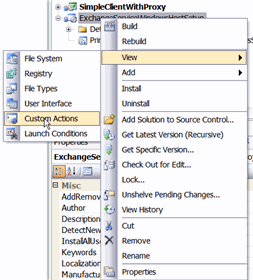
副檔名 .svc,關聯服務實現,IIS 自動創建 ServiceHost。支援內嵌代碼、App_Code、Bin 組件、GAC 組件四種代碼部署方式。
<%@ ServiceHost Language="C#"
    Service="QuickReturns.StockTrading.ExchangeService.TradeService"
CodeBehind="~/App_Code/TradeService.cs" %><system.serviceModel>
<services>
<service name="..." behaviorConfiguration="tradeServiceBehavior">
<endpoint address="" binding="basicHttpBinding" contract="...ITradeService"/>
<endpoint address="mex" binding="mexHttpBinding" contract="IMetadataExchange"/>
</service>
</services>
<behaviors>
<serviceBehaviors>
<behavior name="tradeServiceBehavior">
<serviceMetadata httpGetEnabled="true"/>
</behavior>
</serviceBehaviors>
</behaviors>
</system.serviceModel>繼承 ServiceHostFactory 覆寫 CreateServiceHost,在 .svc 指定 Factory 屬性,獲取 ServiceHost 實例化控制權。
public class TradeServiceCustomHostFactory : ServiceHostFactory
{
    protected override ServiceHost CreateServiceHost(Type serviceType, Uri[] baseAddresses)
    {
        return new TradeServiceCustomHost(serviceType, baseAddresses);
    }
}

public class TradeServiceCustomHost : ServiceHost
{
    protected override void ApplyConfiguration()
    {
        base.ApplyConfiguration();
        // 自定義配置邏輯
    }
}hostingEnvironment idleTimeout/shutdownTimeout 控制閒置與關閉等待時間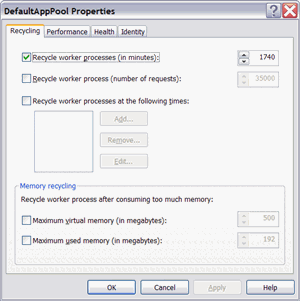
[AspNetCompatibilityRequirements(RequirementsMode = AspNetCompatibilityRequirementsMode.Required)]
public class TradeService : ITradeService { ... }

// Web.config
<serviceHostingEnvironment aspNetCompatibilityEnabled="true" />| 模式 | 說明 |
|---|---|
| NotAllowed | 絕不在 ASP.NET 相容模式運行(非 HTTP 服務) |
| Allowed | 可選擇性運行 |
| Required | 必須運行(需持久會話),驗證所有端點為 HTTP |
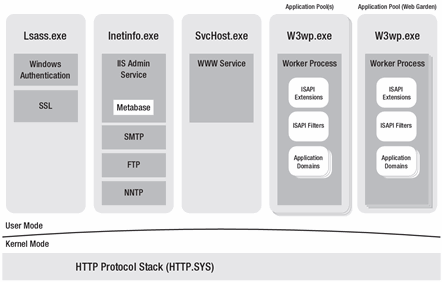
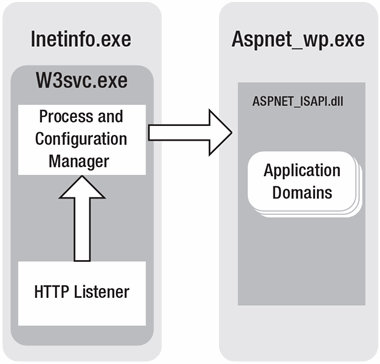
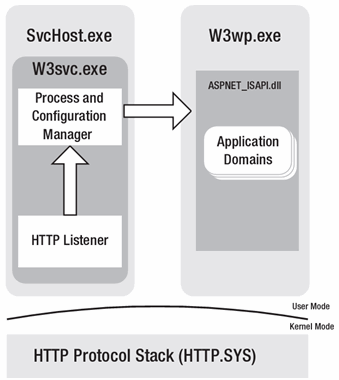
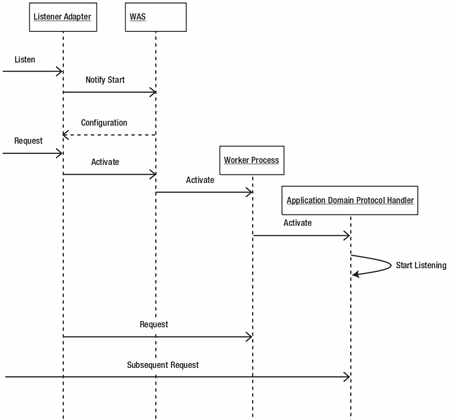
EnsureServiceAvailable 靜態方法啟動 ServiceHost(含所有端點)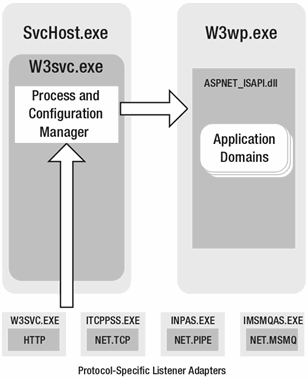
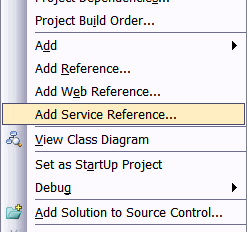
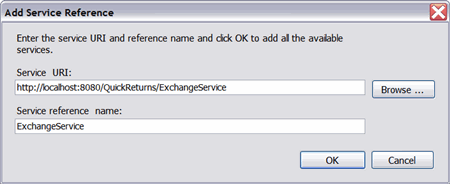
svcutil /config:app.config /out:"ExchangeService.cs" /language:csharp
  /n:*,SimpleClientWithProxy.ExchangeService
  "https://localhost/ExchangeService/ExchangeService.svc"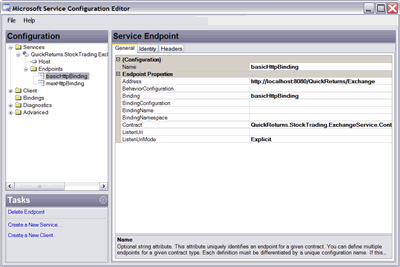
「為什麼不用 IIS?」—— 企業級關鍵業務優先選 IIS/WAS,功能最完整。桌面進程間通訊選 Console/WinForms。Windows Service 為 IIS 替代方案,適用需高級啟動/生命週期控制的伺服器產品。
Chris Peiris:Avanade 解決方案架構師,WCF/BizTalk/EAI 專家,多本技術書合著者。
Dennis Mulder:Avanade 顧問,專注 SOA/集成/軟體工廠,INETA 講師。