昨日在網上發現微軟針對 .NET 3.5 框架發布了圖表控件,第一時間下載體驗,功能強大,基本上能想到的圖表類型都能繪製,為圖形統計與報表顯示提供絕佳方案,同時支援 Web 與 WinForm 兩種模式。缺點較明顯:需最新開發環境,要求 .NET 3.5 SP1 與 VS 2008。
執行範例程式後發現功能極其強大,支援各類圖形顯示:點狀圖、餅圖、柱狀圖、曲線圖、面積圖、排列圖等,亦支援 3D 風格。最實用的是支援圖形上各點的屬性操作:可定義點、標籤、圖形的提示資訊、超連結、JavaScript 動作等,而非僅生成靜態圖片。結合微軟 Ajax 框架,可建立互動式圖形統計報表。
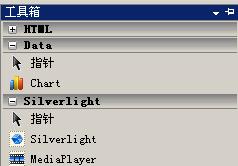
安裝相對簡單:先執行 MSChart.exe,自動偵測環境並安裝至系統目錄。若要在 VS 2008 直接使用,需安裝 MSChart_VisualStudioAddOn.exe 及中文語言包 MSChartLP_chs.exe。安裝完成後,打開 VS 2008 建立專案,工具箱即會出現 Chart 控件。
建立 .NET 3.5 Web 專案,拖放 Chart 控件至頁面。圖表控件主要由以下五大部分組成:
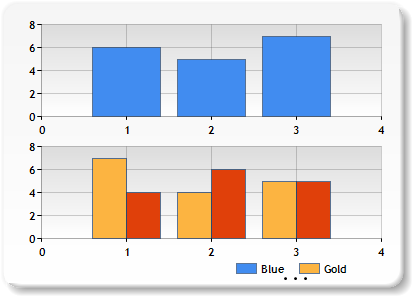
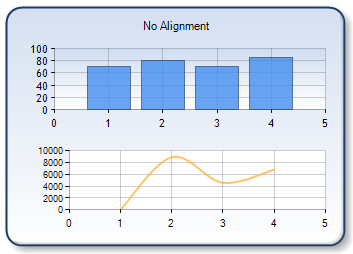
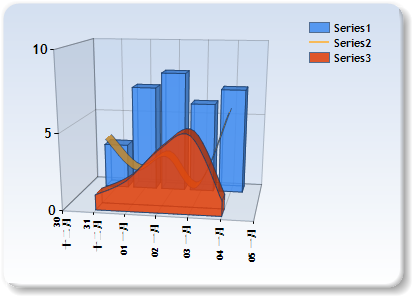
三個特別有用的屬性:
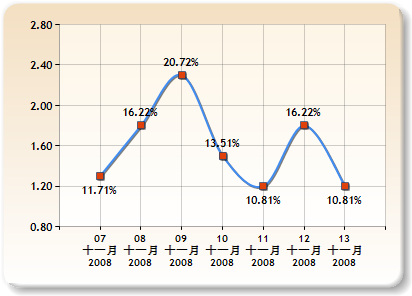
Interactivity and AJAX/Tooltips 及 Client Side Scripts。建議詳閱官方範例 Interactivity and AJAX 部分,精彩豐富。
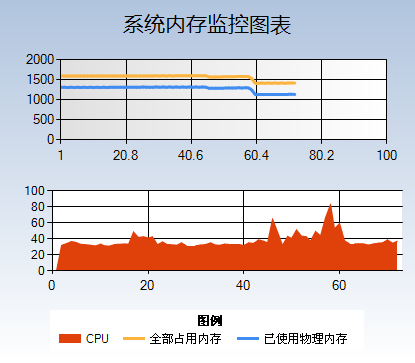
建立系統記憶體即時統計圖表,使用 Ajax 計時器與 Windows API 取得系統記憶體資訊。
<asp:Chart ID="ChartMemory" runat="server" BackColor="LightSteelBlue"
  BackGradientStyle="TopBottom" BackSecondaryColor="White" EnableTheming="False"
  EnableViewState="True" Height="363px" Width="415px">
  <Legends>
    <asp:Legend Alignment="Center" Docking="Bottom" Name="Legend1" Title="圖例"></asp:Legend>
  </Legends>
  <Titles>
    <asp:Title Font="微軟雅黑, 16pt" Name="Title1" Text="系統記憶體監控圖表"></asp:Title>
  </Titles>
  <Series>
    <asp:Series BorderColor="White" BorderWidth="3" ChartArea="ChartArea1"
      ChartType="Spline" Legend="Legend1" Name="已使用物理記憶體" XValueType="Double" YValueType="Double"></asp:Series>
    <asp:Series BorderWidth="3" ChartArea="ChartArea1" ChartType="Spline"
      Legend="Legend1" Name="全部佔用記憶體"></asp:Series>
    <asp:Series ChartArea="ChartArea2" ChartType="StackedArea" Legend="Legend1"
      Name="CPU"></asp:Series>
  </Series>
  <ChartAreas>
    <asp:ChartArea BackColor="224, 224, 224" BackGradientStyle="LeftRight" Name="ChartArea1"></asp:ChartArea>
    <asp:ChartArea Name="ChartArea2"></asp:ChartArea>
  </ChartAreas>
</asp:Chart>建立兩個繪圖區:ChartArea1 顯示記憶體使用情況,ChartArea2 顯示 CPU 使用情況。三個序列分別為:已使用物理記憶體、全部佔用物理記憶體、CPU 使用顯示。注意:必須設定 EnableViewState="True",否則無法記錄狀態。
加入 ScriptManager、UpdatePanel、Timer(間隔 1000ms),將計時器與 Chart 控件放入 UpdatePanel。雙擊計時器編寫 Timer1_Tick 事件:
static PerformanceCounter pc = new PerformanceCounter("Processor", "% Processor Time", "_Total");

protected void Timer1_Tick(object sender, EventArgs e)
{
    MEMORY_INFO MemInfo = new MEMORY_INFO();
    ComputerInfo.GlobalMemoryStatus(ref MemInfo);

    // Used Memory
    Series series = ChartMemory.Series[0];
    int xCount = series.Points.Count == 0 ? 0 : series.Points.Count - 1;
    double lastXValue = series.Points.Count == 0 ? 1 : series.Points[xCount].XValue + 1;
    double lastYValue = (double)(MemInfo.dwTotalPhys - MemInfo.dwAvailPhys) / 1024 / 1024;
    series.Points.AddXY(lastXValue, lastYValue);

    // Total Memory
    series = ChartMemory.Series[1];
    lastYValue = (double)(MemInfo.dwTotalVirtual + MemInfo.dwTotalPhys - MemInfo.dwAvailPhys - MemInfo.dwAvailVirtual) / 1024 / 1024;
    series.Points.AddXY(lastXValue, lastYValue);

    // CPU
    series = ChartMemory.Series[2];
    lastYValue = (double)pc.NextValue();
    series.Points.AddXY(lastXValue, lastYValue);

    // 移除超過 80 點的舊數據
    while (this.ChartMemory.Series[0].Points.Count > 80)
    {
        foreach (Series s in this.ChartMemory.Series)
        {
            s.Points.RemoveAt(0);
        }
    }

    // 調整 X 軸範圍
    double axisMinimum = this.ChartMemory.Series[0].Points[0].XValue;
    this.ChartMemory.ChartAreas[0].AxisX.Minimum = axisMinimum;
    this.ChartMemory.ChartAreas[0].AxisX.Maximum = axisMinimum + 99;
}/// <summary>
/// 取得計算機系統資訊
/// </summary>
public class ComputerInfo
{
[DllImport("kernel32")]
public static extern void GetWindowsDirectory(StringBuilder WinDir, int count);
[DllImport("kernel32")]
public static extern void GetSystemDirectory(StringBuilder SysDir, int count);
[DllImport("kernel32")]
public static extern void GetSystemInfo(ref CPU_INFO cpuinfo);
[DllImport("kernel32")]
public static extern void GlobalMemoryStatus(ref MEMORY_INFO meminfo);
[DllImport("kernel32")]
public static extern void GetSystemTime(ref SYSTEMTIME_INFO stinfo);
public ComputerInfo() { }
}
[StructLayout(LayoutKind.Sequential)]
public struct CPU_INFO
{
public uint dwOemId;
public uint dwPageSize;
public uint lpMinimumApplicationAddress;
public uint lpMaximumApplicationAddress;
public uint dwActiveProcessorMask;
public uint dwNumberOfProcessors;
public uint dwProcessorType;
public uint dwAllocationGranularity;
public uint dwProcessorLevel;
public uint dwProcessorRevision;
}
[StructLayout(LayoutKind.Sequential)]
public struct MEMORY_INFO
{
public uint dwLength;
public uint dwMemoryLoad;
public uint dwTotalPhys;
public uint dwAvailPhys;
public uint dwTotalPageFile;
public uint dwAvailPageFile;
public uint dwTotalVirtual;
public uint dwAvailVirtual;
}
[StructLayout(LayoutKind.Sequential)]
public struct SYSTEMTIME_INFO
{
public ushort wYear;
public ushort wMonth;
public ushort wDayOfWeek;
public ushort wDay;
public ushort wHour;
public ushort wMinute;
public ushort wSecond;
public ushort wMilliseconds;
}
先寫到這裡,第一次寫教程經驗不足,歡迎各位指教。後續視情況決定是否續寫。