在開發企業級應用程式時,保護資料庫連接字串中的敏感資訊(如伺服器位址、帳號密碼)至關重要。早期的 Enterprise Library 1.1 版本需依賴 Cryptography Application Block 才能達成加密,但隨著 .NET Framework 2.0 的推出,內建的 System.Configuration 命名空間已提供強大的配置區段加密功能,讓開發者能輕鬆實現連接字串的加密與解密,無需額外引入第三方組件。
.NET Framework 2.0 內建支援兩種加密機制,開發者可根據部署環境與安全需求選擇:
假設專案中已存在一個標準的 App.config,包含 connectionStrings 區段:
<?xml version="1.0" encoding="utf-8"?>
<configuration>
  <configSections>
    <section name="dataConfiguration" type="Microsoft.Practices.EnterpriseLibrary.Data.Configuration.DatabaseSettings, Microsoft.Practices.EnterpriseLibrary.Data, Version=2.0.0.0, Culture=neutral, PublicKeyToken=null" />
  </configSections>
  <dataConfiguration defaultDatabase="QuickStarts" />
  <connectionStrings>
    <add name="QuickStarts" connectionString="Database=EntLibQuickStarts;Server=RJ-097;Integrated Security=SSPI;" providerName="System.Data.SqlClient" />
  </connectionStrings>
</configuration>
在 Visual Studio 專案中,右鍵點選「參考」→「加入參考」,在 .NET 分頁下勾選 System.Configuration.dll。
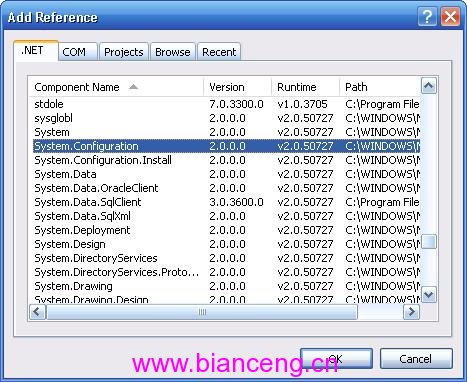
using System.Configuration;
以下範例示範如何使用 RsaProtectedConfigurationProvider 加密 connectionStrings 區段:
/// <summary>
/// 加密設定檔中的連接字串區段
/// </summary>
static void EncryptConfiguration()
{
    // 指定加密提供者,可改為 "DPAPIProtectedConfigurationProvider"
    string provider = "RsaProtectedConfigurationProvider";

    // 開啟目前執行檔的設定檔
    Configuration config = ConfigurationManager.OpenExeConfiguration(ConfigurationUserLevel.None);

    // 取得 connectionStrings 區段
    ConfigurationSection section = config.ConnectionStrings;

    // 若區段尚未加密且未被鎖定,則進行加密
    if (!section.SectionInformation.IsProtected && !section.ElementInformation.IsLocked)
    {
        section.SectionInformation.ProtectSection(provider);
        section.SectionInformation.ForceSave = true; // 強制儲存即使內容未變更
        config.Save(ConfigurationSaveMode.Full);
    }
}
確保應用程式啟動時即執行加密邏輯(僅首次執行會真正加密):
[STAThread]
static void Main()
{
    // 啟動時保護連接字串
    EncryptConfiguration();

    Application.Run(new MainForm());
}
程式首次執行後,打開輸出目錄下的 .exe.config,你會發現 <connectionStrings> 區段已轉換為加密後的 <EncryptedData> 節點:
<connectionStrings configProtectionProvider="RsaProtectedConfigurationProvider">
  <EncryptedData Type="https://www.w3.org/2001/04/xmlenc#Element" xmlns="https://www.w3.org/2001/04/xmlenc#">
    <EncryptionMethod Algorithm="https://www.w3.org/2001/04/xmlenc#tripledes-cbc" />
    <KeyInfo xmlns="https://www.w3.org/2000/09/xmldsig#">
      <EncryptedKey xmlns="https://www.w3.org/2001/04/xmlenc#">
        <EncryptionMethod Algorithm="https://www.w3.org/2001/04/xmlenc#rsa-1_5" />
        <KeyInfo xmlns="https://www.w3.org/2000/09/xmldsig#">
          <KeyName>Rsa Key</KeyName>
        </KeyInfo>
        <CipherData><CipherValue>...</CipherValue></CipherData>
      </EncryptedKey>
    </KeyInfo>
    <CipherData><CipherValue>...</CipherValue></CipherData>
  </EncryptedData>
</connectionStrings>
關鍵點提醒: 加密後的連接字串在 ConfigurationManager 讀取並載入記憶體時,會由 .NET 執行環境自動完成解密,應用程式碼完全無需修改即可透過 ConfigurationManager.ConnectionStrings["Name"].ConnectionString 取得明文連接字串,對上層業務邏輯透明。
aspnet_regiis.exe -px "KeyName" "path\keys.xml" -pri 匯出私鑰,再用 -pi 匯入。掌握這項技術,即能輕鬆滿足合規要求,保護生產環境資料庫連線資訊不被洩露。