VersionCheck 方案,設定 Debug/x86VersionCheckManagedBroken 為啟動專案Program.cs:Environment.OSVersion.Version != new Version(5,1) 硬編碼要求 Windows XP (5.1)
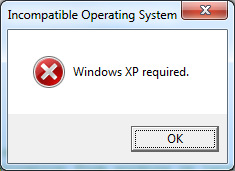
Environment.OSVersion 無效。若為混合模式應用程式(透過 P/Invoke 呼叫原生版本 API),相容模式仍可生效。
// 檢查作業系統是否至少為 Windows XP
if (Environment.OSVersion.Version < new Version(5, 1))
{
    MessageBox.Show("Windows XP or later required.",
        "Incompatible Operating System", MessageBoxButtons.OK, MessageBoxIcon.Error);
    return;
}!= 改為 <:允許 5.1 (XP)、6.0 (Vista)、6.1 (Win 7) 等所有大於等於 5.1 的版本情境:SetWaitableTimerEx (Win 7 新增) 支援計時器合併容錯,節省 CPU/電力。舊版用 SetWaitableTimer。
模式:先試新 API,失敗再落回舊 API
public void Start(long dueTime, int period)
{
    ReasonContext rc = new ReasonContext();
    rc.Version = 0;
    rc.Flags = 1;
    rc.SimpleReasonString = "MyTimer";

    try
    {
        // 嘗試 Win 7 新版 API
        if (!Win32.SetWaitableTimerEx(_hTimer, ref dueTime, period,
            IntPtr.Zero, IntPtr.Zero, ref rc, 5000))
            throw new Win32Exception(Marshal.GetLastWin32Error(), "SetWaitableTimerEx failed.");

        IsCoalescingtimer = true;
    }
    catch (EntryPointNotFoundException)
    {
        // 找不到函數 → 落回舊版
        IsCoalescingtimer = false;
        if (!Win32.SetWaitableTimer(_hTimer, ref dueTime, period,
            IntPtr.Zero, IntPtr.Zero, false))
            throw new Win32Exception(Marshal.GetLastWin32Error(), "SetWaitableTimer failed.");
    }

    _waiterThread = new Thread(WaiterThreadProc);
    _waiterThread.Name = "Waiter thread for WaitableTimer";
    _waiterThread.Start();
}關鍵點:
EntryPointNotFoundException 捕捉「DLL 中找不到函數」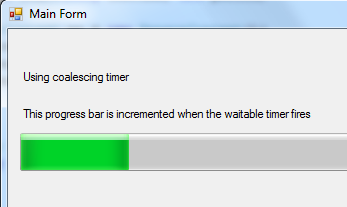
| 錯誤做法 | 正確做法 |
|---|---|
檢查 Version == 5.1 (硬編碼特定版本) | 檢查 Version >= 5.1 (最低版本門檻) |
| 阻擋未測試的未來版本 | 允許未來版本運行,靠功能檢測處理差異 |
依賴 GetVersionEx/Environment.OSVersion | 優先 VerifyVersionInfo (原生) / Version 比較 (受控) |
| 版本檢測決定功能可用性 | 直接檢測功能 (P/Invoke GetProcAddress、COM QueryInterface、捕捉 EntryPointNotFoundException) |