DataContext 是 LINQ to SQL 的核心樞紐,負責查詢轉譯、物件追蹤、變更提交、交易管理與日誌記錄。本文將從手動定義實體、強型別 DataContext、日誌功能、查詢探究、原生 SQL 執行、資料庫建立/刪除、DbDataReader 整合等七大面向,全方位解析 DataContext 的實戰用法。
[Table(Name = "Customers")]
public class Customer
{
    [Column(IsPrimaryKey = true)]
    public string CustomerID { get; set; }

    [Column(Name = "ContactName")]
    public string Name { get; set; }

    [Column]
    public string City { get; set; }
}TableAttribute:指定資料表名稱ColumnAttribute:`IsPrimaryKey`、`Name`(對應不同欄位名)、`DbType`、`CanBeNull` 等using (var ctx = new DataContext(connStr))
{
Table<Customer> customers = ctx.GetTable<Customer>();
var q = from c in customers
where c.CustomerID.StartsWith("A")
select new { 顧客ID = c.CustomerID, 顧客名 = c.Name, 城市 = c.City };
GridView1.DataSource = q;
GridView1.DataBind();
}連線字串可直接傳字串或 `IDbConnection`(如 `SqlConnection`)。
public partial class NorthwindDataContext : DataContext
{
    public Table<Customer> Customers;
    public NorthwindDataContext(string connection) : base(connection) { }
    public NorthwindDataContext(IDbConnection connection) : base(connection) { }
}

// 使用
var ctx = new NorthwindDataContext(connStr);
var q = from c in ctx.Customers where c.CustomerID.StartsWith("A") select c;var ctx = new NorthwindDataContext(connStr);
var sw = new StreamWriter(Server.MapPath("log.txt"), true); // 附加模式
ctx.Log = sw;
var q = from c in ctx.Customers where c.CustomerID.StartsWith("A") select c;
GridView1.DataSource = q; GridView1.DataBind();
sw.Close();log.txt 範例:
SELECT [t0].[CustomerID], [t0].[ContactName], [t0].[City]
FROM [Customers] AS [t0]
WHERE [t0].[CustomerID] LIKE @p0
-- @p0: Input String (Size = 2; Prec = 0; Scale = 0) [A%]
-- Context: SqlProvider(Sql2005) Model : AttributedMetaModel Build: 3.5.20706.1var q = from c in ctx.Customers where c.CustomerID.StartsWith("A") select c;
DbCommand cmd = ctx.GetCommand(q);
Response.Write(cmd.CommandText);
foreach (DbParameter p in cmd.Parameters)
Response.Write($"參數名:{p.ParameterName}, 值:{p.Value}");
// 追蹤變更
var cust = ctx.Customers.First();
cust.Name = "zhuye";
var modified = ctx.GetChangeSet().ModifiedEntities;
Response.Write(((Customer)modified[0]).Name);// 更新
ctx.ExecuteCommand("UPDATE Customers SET City={0} WHERE CustomerID LIKE 'A%'", "Shanghai");
// 查詢對應實體
IEnumerable<Customer> list = ctx.ExecuteQuery<Customer>(
"SELECT * FROM Customers WHERE CustomerID LIKE 'A%'");
GridView1.DataSource = list; GridView1.DataBind();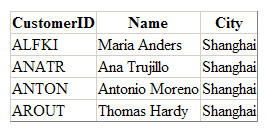
[Table(Name = "test")]
public class TestEntity
{
    [Column(IsPrimaryKey = true, IsDbGenerated = true)]
    public int ID { get; set; }
    [Column(DbType = "varchar(20)")]
    public string Name { get; set; }
}

public partial class TestContext : DataContext
{
    public Table<TestEntity> Tests;
    public TestContext(string conn) : base(conn) { }
}

// 使用
var ctx = new TestContext("server=xxx;database=testdb;uid=xxx;pwd=xxx");
ctx.CreateDatabase();  // 依實體定義建立資料庫與資料表
// ctx.DeleteDatabase(); // 刪除
產生 DDL 相當於:
CREATE TABLE [dbo].[test](
    [ID] [int] IDENTITY(1,1) NOT NULL,
    [Name] [varchar](20) NULL,
    CONSTRAINT [PK_test] PRIMARY KEY CLUSTERED ([ID] ASC)
)using (var conn = new SqlConnection(connStr))
using (var ctx = new DataContext(conn))
{
var cmd = new SqlCommand("SELECT * FROM Customers WHERE CustomerID LIKE 'A%'", conn);
conn.Open();
using (var reader = cmd.ExecuteReader())
{
GridView1.DataSource = ctx.Translate<Customer>(reader);
GridView1.DataBind();
}
}| 功能 | 關鍵 API | 適用場景 |
|---|---|---|
| 查詢轉譯 | LINQ 語法 / GetCommand | 標準 CRUD、強型別優勢 |
| 變更追蹤 | SubmitChanges / GetChangeSet | 樂觀平行存取、批次更新 |
| 日誌記錄 | Log 屬性 | 除錯、效能調優、審計 |
| 原生 SQL | ExecuteCommand / ExecuteQuery | 複雜報表、大量資料操作、SP 呼叫 |
| Schema 管理 | CreateDatabase / DeleteDatabase | 測試環境快速佈署、Code-First 原型 |
| Reader 整合 | Translate<T> | 極致讀取效能、避免物質化開銷 |
下一篇將深入「查詢語法」進階篇,涵蓋 Join、GroupBy、分頁、集合運算等實戰技巧。