示範如何透過自訂 RenderingTemplate 控制項,在 Mobile 顯示頁面(DispForm)覆寫**公告列表**的 **Title 欄位**渲染,將標題文字替換為自訂靜態文字。
Mobile 頁面透過 SPMobileListFieldSelector 模板選擇器,依列表類型與欄位決定使用哪個 RenderingTemplate。搜尋 ID 格式:
MobileCustomListField_{ListTypeID}_{FieldType}_{FieldInternalName}
ListTypeID:列表範本 ID(如 104)或 SPListTemplateType 列舉值(如 Announcements)。FieldType:SPFieldType 列舉值(如 Text、Number)。FieldInternalName:欄位內部名稱(Title 欄位為 Title)。找不到時回退至 MobileDefaultListField。WSS 內建無 MobileCustomListField_Announcements_Text_Title,故可自行建立覆寫。
AnnouncementsItemDisplayPageTitleField.ascx,置於:Local_Drive:\Program Files\Common Files\Microsoft Shared\web server extensions\12\TEMPLATE\CONTROLTEMPLATES<%@ Control Language="C#" %>
<%@ Assembly Name="Microsoft.SharePoint, Version=12.0.0.0, Culture=neutral, PublicKeyToken=71e9bce111e9429c" %>
<%@ Register TagPrefix="mobile" Namespace="System.Web.UI.MobileControls" Assembly="System.Web.Mobile, Version=1.0.3300.0, Culture=neutral, PublicKeyToken=b03f5f7f11d50a3a" %>
<%@ Register TagPrefix="SharePoint" Namespace="Microsoft.SharePoint.WebControls" Assembly="Microsoft.SharePoint, Version=12.0.0.0, Culture=neutral, PublicKeyToken=71e9bce111e9429c" %>
<%@ Register TagPrefix="SPMobile" Namespace="Microsoft.SharePoint.MobileControls" Assembly="Microsoft.SharePoint, Version=12.0.0.0, Culture=neutral, PublicKeyToken=71e9bce111e9429c" %>
<%@ Import Namespace="Microsoft.SharePoint" %>RenderingTemplate,ID 為目標搜尋 ID:
<SharePoint:RenderingTemplate RunAt="Server" ID="MobileCustomListField_Announcements_Text_Title">
  <Template>
    <mobile:Label Text="Title field in Announcements List" RunAt="Server" />
  </Template>
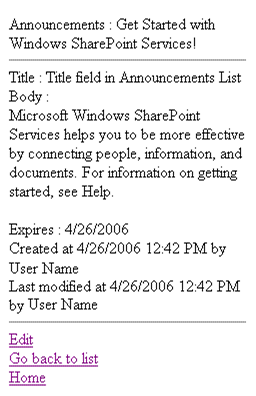
</SharePoint:RenderingTemplate>iisreset 重新載入模板。以 Mobile 裝置/模擬器瀏覽公告列表項目顯示頁面,Title 欄位將顯示 **「Title field in Announcements List」** 而非原始標題內容。
RenderingTemplate 控制,零程式碼編譯即可覆寫 UI。MobileCustomListField_{ListType}_{FieldType}_{InternalName}。.ascx 置於 CONTROLTEMPLATES 目錄,iisreset 生效。