在上一篇「WCF 專題系列(一):深入 WCF 定址 Part 1」中,我們已認識 Web 服務定址規範(WS-Addressing),了解端點參考(Endpoint Reference)與訊息資訊標頭兩大核心結構。這個規範在 Web 服務架構中舉足輕重,後續內容將持續引用。本文將繼續深入 WCF 定址機制,重點探討中繼資料中的端點位址、自訂定址標頭等實務應用。
回到 WCF 架構,端點位址由 EndpointAddress 類別表示,主要包含三個關鍵部分:服務位置的統一資源識別符(URI)、代表服務安全身分的 Identity,以及可選的 Headers 集合。Headers 用於攜帶識別端點或與端點互動所需的額外定址資訊,如圖 1 所示:
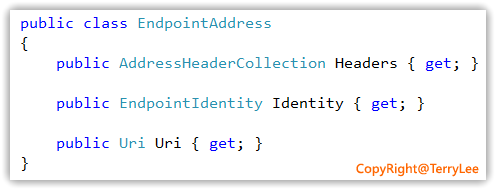
圖 1:EndpointAddress 類別結構示意
在上一篇提到,每個端點參考可包含提供額外識別資訊的參考參數,即定址標頭。在 WCF 中,這些參考參數被建模為 AddressHeader 類別的執行個體,Headers 屬性即為這些執行個體的集合。可透過 AddressHeader.CreateAddressHeader 靜態方法建立標頭實例,程式碼如下:
AddressHeader header = AddressHeader.CreateAddressHeader(
    "basic",
    "https://www.cnblogs.com/terrylee",
"Terrylee");WCF 提供基底位址技術,讓我們在定義端點位址時可彈性選擇相對或絕對路徑。使用絕對位址最直接,直接在端點定義中給出完整 URL:
<service name="TerryLee.WCFAddressing.Service.CalculatorService"
         behaviorConfiguration="calculatorBehavior">
  <endpoint address="https://localhost:8887/CalculatorService"
            binding="basicHttpBinding"
            contract="TerryLee.WCFAddressing.Contract.ICalculator" />
</service>
若服務需公開多個共用相同基底位址的端點,使用相對位址更為優雅。在建立 ServiceHost 時指定基底位址:
using (ServiceHost calculatorServiceHost =
    new ServiceHost(typeof(CalculatorService),
    new Uri("https://localhost:8887/CalculatorService")))
{
    calculatorServiceHost.Opened += delegate
    {
        Console.WriteLine("Service begin to listen via the Address:{0} ",
            calculatorServiceHost.BaseAddresses[0].ToString());
    };
    calculatorServiceHost.Open();
    Console.Read();
}
或在組態檔中集中設定基底位址,端點僅需提供相對路徑:
<service name="TerryLee.WCFAddressing.Service.CalculatorService"
         behaviorConfiguration="calculatorBehavior">
  <host>
    <baseAddresses>
      <add baseAddress="https://localhost:8887/Calculator" />
    </baseAddresses>
  </host>
  <endpoint address="myservice1"
            binding="basicHttpBinding"
            contract="TerryLee.WCFAddressing.Contract.ICalculator" />
  <endpoint address="myservice2"
            binding="wsHttpBinding"
            contract="TerryLee.WCFAddressing.Contract.ICalculator" />
</service>
需注意:基底位址僅簡化伺服器端設定,客戶端仍看到完整絕對位址。服務啟動時會自動解析相對位址,產生對應的絕對位址,這在 WSDL 中可明確觀察:
<wsdl:service name="CalculatorService">
  <wsdl:port name="BasicHttpBinding_ICalculator" binding="tns:BasicHttpBinding_ICalculator">
    <soap:address location="https://localhost:8887/Calculator/myservice1" />
  </wsdl:port>
  <wsdl:port name="WSHttpBinding_ICalculator" binding="tns:WSHttpBinding_ICalculator">
    <soap12:address location="https://localhost:8887/Calculator/myservice2" />
    <wsa10:EndpointReference>
      <wsa10:Address>https://localhost:8887/Calculator/myservice2</wsa10:Address>
      <Identity xmlns="https://schemas.xmlsoap.org/ws/2006/02/addressingidentity">
        <Upn>TerryLee-PC\TerryLee</Upn>
      </Identity>
    </wsa10:EndpointReference>
  </wsdl:port>
</wsdl:service>以下組態範例展示混合情況:
<service name="TerryLee.WCFAddressing.Service.CalculatorService"
         behaviorConfiguration="calculatorBehavior">
  <host>
    <baseAddresses>
      <add baseAddress="https://localhost:8887/Calculator" />
    </baseAddresses>
  </host>
  <endpoint address="" binding="wsHttpBinding" contract="TerryLee.WCFAddressing.Contract.ICalculator" />
  <endpoint address="myservice2" binding="wsHttpBinding" contract="TerryLee.WCFAddressing.Contract.ICalculator" />
  <endpoint address="https://localhost:8886/CalculatorService" binding="wsHttpBinding" contract="TerryLee.WCFAddressing.Contract.ICalculator" />
  <endpoint address="net.tcp://localhost:8885/Calculator" binding="netTcpBinding" contract="TerryLee.WCFAddressing.Contract.ICalculator" />
</service>
啟動 ServiceHost 後,透過以下程式碼可列出所有端點的實際位址與綁定:
ServiceDescription desc = calculatorServiceHost.Description;
foreach (ServiceEndpoint endpoint in desc.Endpoints)
{
    Console.WriteLine("Endpoint - address: {0}", endpoint.Address);
    Console.WriteLine(" binding: {0}", endpoint.Binding.Name);
    Console.WriteLine(" contract: {0}", endpoint.Contract.Name);
}
執行結果如圖 2 所示:
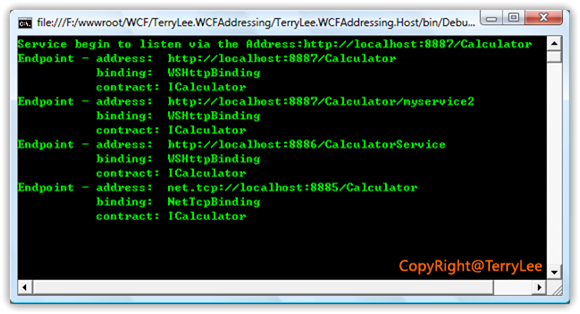
圖 2:端點位址與綁定資訊輸出
端點位址在 WSDL 中以對應 wsdl:port 元素內的端點參考(EndpointReference)呈現,包含端點位址及所有定址屬性:
<wsdl:service name="CalculatorService">
  <wsdl:port name="WSHttpBinding_ICalculator" binding="tns:WSHttpBinding_ICalculator">
    <soap12:address location="https://localhost:8887/Calculator" />
    <wsa10:EndpointReference>
      <wsa10:Address>https://localhost:8887/Calculator</wsa10:Address>
      <Identity xmlns="https://schemas.xmlsoap.org/ws/2006/02/addressingidentity">
        <Upn>TerryLee-PC\TerryLee</Upn>
      </Identity>
    </wsa10:EndpointReference>
  </wsdl:port>
</wsdl:service>某些情境下,我們需要透過自訂定址標頭解決複雜路由問題,例如依據傳入 SOAP 標頭中的特定資訊,將訊息轉發至不同端點。自訂標頭能實現 SOAP 訊息的無限擴展,將任意控制資訊置入標頭。以下程式碼示範以程式碼方式新增自訂標頭:
using (ServiceHost calculatorServiceHost =
    new ServiceHost(typeof(CalculatorService),
    new Uri("https://localhost:8887/CalculatorService")))
{
    calculatorServiceHost.Opened += delegate
    {
        Console.WriteLine("Service begin to listen via the Address:{0} ",
            calculatorServiceHost.BaseAddresses[0].ToString());
    };

    AddressHeader header = AddressHeader.CreateAddressHeader("basic",
        "https://www.cnblogs.com/terrylee", "Terrylee");

    EndpointAddress ea = new EndpointAddress(
        new Uri("https://localhost:8887/CalculatorService"), header);

    calculatorServiceHost.Description.Endpoints.Add(
        new ServiceEndpoint(
            ContractDescription.GetContract(typeof(ICalculator)),
            new WSHttpBinding(),
            ea));

    ServiceMetadataBehavior behavior = new ServiceMetadataBehavior();
    behavior.HttpGetEnabled = true;
    calculatorServiceHost.Description.Behaviors.Add(behavior);
    calculatorServiceHost.Open();
    Console.Read();
}
產生的 WSDL 中,自訂標頭會作為端點參考的參考參數(ReferenceParameters)出現:
<wsdl:service name="CalculatorService">
  <wsdl:port name="WSHttpBinding_ICalculator" binding="tns:WSHttpBinding_ICalculator">
    <soap12:address location="https://localhost:8887/CalculatorService" />
    <wsa10:EndpointReference>
      <wsa10:Address>https://localhost:8887/CalculatorService</wsa10:Address>
      <wsa10:ReferenceParameters>
        <basic xmlns="https://www.cnblogs.com/terrylee">Terrylee</basic>
      </wsa10:ReferenceParameters>
      <Identity xmlns="https://schemas.xmlsoap.org/ws/2006/02/addressingidentity">
        <Upn>TerryLee-PC\TerryLee</Upn>
      </Identity>
    </wsa10:EndpointReference>
  </wsdl:port>
</wsdl:service>
實際攔截的 SOAP 訊息標頭中,也會包含該自訂資訊:
<s:Envelope xmlns:s="https://schemas.xmlsoap.org/soap/envelope/">
  <s:Header>
    <basic xmlns="https://www.cnblogs.com/terrylee">Terrylee</basic>
    <To s:mustUnderstand="1">https://localhost:8887/CalculatorService</To>
    <Action s:mustUnderstand="1">https://tempuri.org/ICalculator/Add</Action>
  </s:Header>
  <s:Body>
    <Add xmlns="https://tempuri.org/">
      <x>1</x>
      <y>2</y>
    </Add>
  </s:Body>
</s:Envelope>
同樣也可透過組態檔宣告式方式設定自訂標頭:
<service name="TerryLee.WCFAddressing.Service.CalculatorService"
         behaviorConfiguration="calculatorBehavior">
  <host>
    <baseAddresses>
      <add baseAddress="https://localhost:8887/Calculator" />
    </baseAddresses>
  </host>
  <endpoint address=""
            binding="wsHttpBinding"
            contract="TerryLee.WCFAddressing.Contract.ICalculator">
    <headers>
      <basic xmlns="https://www.cnblogs.com/terrylee">Terrylee</basic>
    </headers>
  </endpoint>
</service>本文承接第一篇,著重於 WCF 定址的實務操作:指定端點位址(含基底位址技術)、中繼資料中的端點呈現、以及自訂定址標頭的程式碼與組態兩種實作方式。下一篇將繼續探討訊息篩選器等進階主題。