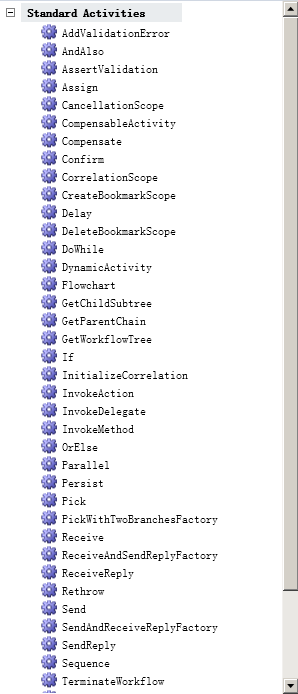
自宿主 WF4 設計器工具箱活動無圖標,而 VS2010 官方設計器活動圖標精美。VS 安裝目錄無圖標文件,實際內嵌在程序集資源中。
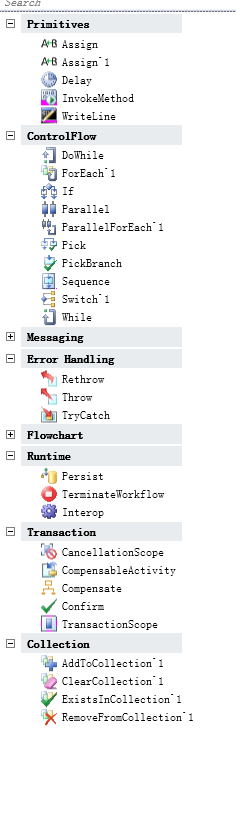
Microsoft.VisualStudio.Activities.dll (位於 GAC 或 VS 安裝目錄)
private static void LoadToolboxIconsForBuiltInActivities() {
    var builder = new AttributeTableBuilder();
    Assembly asm = Assembly.LoadFile(@"C:\Microsoft.VisualStudio.Activities.dll");
    var reader = new ResourceReader(asm.GetManifestResourceStream(
        "Microsoft.VisualStudio.Activities.Resources.resources"));

    foreach (Type type in asm.GetTypes()) {
        if (type.Namespace == "System.Activities.Statements")
            CreateToolboxBitmapAttributeForActivity(builder, reader, type);
    }
    MetadataStore.AddAttributeTable(builder.CreateTable());
}private static void CreateToolboxBitmapAttributeForActivity(
AttributeTableBuilder builder, ResourceReader reader, Type activityType) {
string name = activityType.IsGenericType ? activityType.Name.Split('`')[0] : activityType.Name;
Bitmap bmp = ExtractBitmapResource(reader, name);
if (bmp == null) return;
// 通過反射調用內部構造函數
var tbaType = typeof(ToolboxBitmapAttribute);
var imgType = typeof(Image);
var ctor = tbaType.GetConstructor(
BindingFlags.Instance | BindingFlags.NonPublic, null,
new[] { imgType, imgType }, null);
var tba = (ToolboxBitmapAttribute)ctor.Invoke(new object[] { bmp, bmp });
builder.AddCustomAttributes(activityType, tba);
}private static Bitmap ExtractBitmapResource(ResourceReader reader, string bitmapName) {
var enum = reader.GetEnumerator();
while (enum.MoveNext()) {
if (String.Equals(enum.Key, bitmapName)) {
var bmp = (Bitmap)enum.Value;
// 右上角像素作透明色
Color transparent = bmp.GetPixel(bmp.Width - 1, 0);
bmp.MakeTransparent(transparent);
return bmp;
}
}
return null;
}// 初始化時調用
LoadToolboxIconsForBuiltInActivities();調用後工具箱活動圖標完美呈現,與 VS2010 一致。
極少數活動圖標不在該 DLL 中,仍無圖標。
VS2010 RC 或更高版本,引用 System.Activities.Presentation、Microsoft.VisualStudio.Activities。