當應用程式需依使用者介面動態組合篩選條件(如多欄位搜尋、可選排序)時,編譯期無法確定查詢細節,此時動態查詢極為實用。LINQ to SQL 透過 System.Linq.Expressions 命名空間提供的 API,允許在執行期手動建構運算式樹,再由查詢提供者轉譯為 T-SQL。
Expression<TDelegate> 代表 Lambda 運算式的資料結構,可被查詢提供者解析轉譯。Expression 類別提供靜態工廠方法建立節點(如 ParameterExpression、MethodCallExpression)。IQueryable.Provider.CreateQuery<T>(expression) 將運算式樹轉為可執行查詢。IQueryable<Customer> custs = db.Customers;
ParameterExpression param = Expression.Parameter(typeof(Customer), "c");
Expression selector = Expression.Property(param, typeof(Customer).GetProperty("ContactName"));
Expression pred = Expression.Lambda(selector, param);
Expression expr = Expression.Call(typeof(Queryable), "Select",
new Type[] { typeof(Customer), typeof(string) },
Expression.Constant(custs), pred);
IQueryable<string> query = db.Customers.AsQueryable().Provider.CreateQuery<string>(expr);
// 取得 SQL 指令文字
DbCommand cmd = db.GetCommand(query);
Console.WriteLine(cmd.CommandText);
生成 SQL:SELECT [t0].[ContactName] FROM [dbo].[Customers] AS [t0]
ParameterExpression param = Expression.Parameter(typeof(Customer), "c");
Expression left = Expression.Property(param, typeof(Customer).GetProperty("City"));
Expression right = Expression.Constant("London");
Expression filter = Expression.Equal(left, right);
Expression pred = Expression.Lambda(filter, param);
Expression expr = Expression.Call(typeof(Queryable), "Where",
    new Type[] { typeof(Customer) },
    Expression.Constant(custs), pred);
IQueryable<Customer> query = db.Customers.AsQueryable().Provider.CreateQuery<Customer>(expr);
生成 SQL 含 WHERE [t0].[City] = @p0。
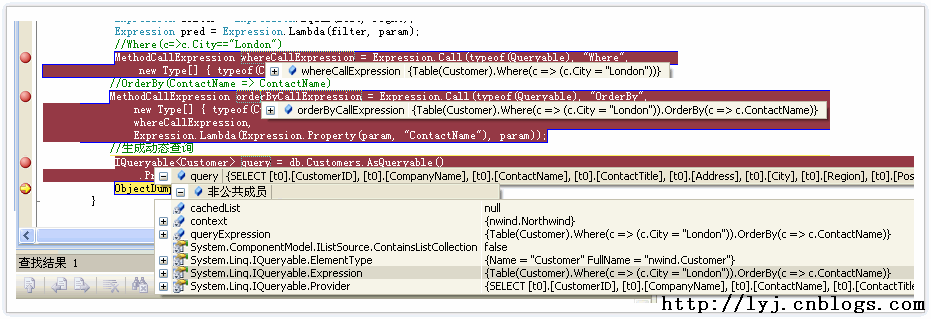
// 建立 Where 運算式
MethodCallExpression whereCall = Expression.Call(typeof(Queryable), "Where", ...);
// 建立 OrderBy 運算式,傳入 whereCall 作為來源
MethodCallExpression orderByCall = Expression.Call(typeof(Queryable), "OrderBy",
    new Type[] { typeof(Customer), typeof(string) },
    whereCall,
    Expression.Lambda(Expression.Property(param, "ContactName"), param));
IQueryable<Customer> query = db.Customers.AsQueryable().Provider.CreateQuery<Customer>(orderByCall);
生成 SQL 含 WHERE [t0].[City] = @p0 ORDER BY [t0].[ContactName]。
// 客戶城市
Expression expr1 = Expression.Call(typeof(Queryable), "Select", ...);
// 員工城市
Expression expr2 = Expression.Call(typeof(Queryable), "Select", ...);
IQueryable<string> q1 = db.Customers.AsQueryable().Provider.CreateQuery<string>(expr1);
IQueryable<string> q2 = db.Employees.AsQueryable().Provider.CreateQuery<string>(expr2);
var q3 = q1.Union(q2);
生成 SQL 使用 UNION 合併兩個子查詢的城市欄位。