專案升級導致 TFS 2005 Team Build 失效,需手工處理編譯、文檔生成、模板建立、腳本合併、安裝包產出等任務。這些任務多屬檔案系統操作與可執行檔呼叫,遂開發 GUI 工具「Batch Job Executor」作為循序工作流執行器,同時展示 Enterprise Library 典型配置與物件建立模式。
核心在配置定義每個 Job Step。配置包含變數與 Batch Job 兩部分:
<batchJobExecutor defaultBatchJob="Batch Job 1">
  <variables>
    <add name="RootLocation" value="E:\Projects\" />
    <add name="OutputLocation" value="E:\Output\" />
  </variables>
  <batchJobs>
    <add name="Batch Job 1" description="First batch job">
      <steps>
        <add name="Create Temp Directory" type="DirectoryCreationJobStep" directoryToCreate="$OutputLocation$" />
        <add name="Notepad" type="ExecutableJobStep" executableFile="Notepad" waitForProcessExit="false">
          <arguments><add name="param1" value="E:\readme.txt" /></arguments>
        </add>
        <add name="Copy to Output" type="DirectoryMoveJobStep" source="$RootLocation$ConsoleApplication2\Bin" destination="$OutputLocation$" />
        <add name="Execute Command" type="ExecutableJobStep" executableFile="$OutputLocation$debug\ConsoleApplication1.exe">
          <arguments>
            <add name="param1" value="1st Parameter" />
            <add name="param2" value="2nd Parameter" />
          </arguments>
        </add>
        <add name="Delete Temp Directory" type="DirectoryDeletionJobStep" directoryToDelete="$OutputLocation$" />
      </steps>
    </add>
  </batchJobs>
</batchJobExecutor>
介面顯示下拉選單選擇 Batch Job,Grid 列出 Steps,點擊 Start 執行並顯示進度。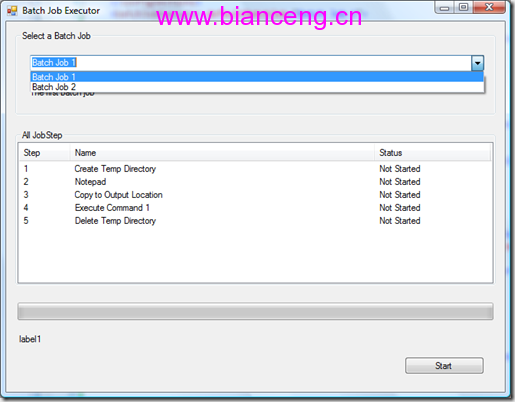
抽象基類 JobStep 定義 Name、Description 與抽象 Execute()。衍生 DirectoryFileJobStep 及四具體實作:DirectoryCreationJobStep、DirectoryMoveJobStep、DirectoryDeletionJobStep、ExecutableJobStep。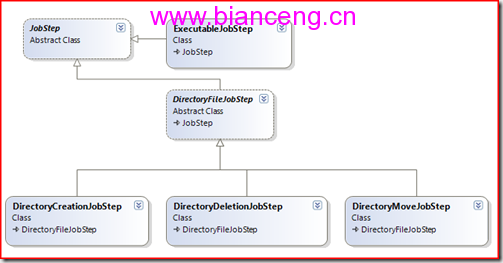
參考 EL 異常處理器定義結構。以 ExecutableJobStep 為例:
[ConfigurationElementType(typeof(ExecutableJobStepData))]
public class ExecutableJobStep : JobStep
{
    private string _executableFile, _arguments;
    private bool _waitForProcessExit;

    public override void Execute()
    {
        Process process = string.IsNullOrEmpty(this.Arguments)
            ? Process.Start(this.ExecutableFile)
            : Process.Start(this.ExecutableFile, this.Arguments);
        if (this._waitForProcessExit) process.WaitForExit();
    }
}
對應配置類別 ExecutableJobStepData 繼承 JobStepData(繼承 NameTypeConfigurationElement),標註 [Assembler(typeof(ExecutableFileJobStepAssembler))]。Assembler 負責解析變數並建立具體物件。
public class ExecutableFileJobStepAssembler : IAssembler<JobStep, JobStepData>
{
    public JobStep Assemble(IBuilderContext context, JobStepData config, IConfigurationSource source, ConfigurationReflectionCache cache)
    {
        var data = config as ExecutableJobStepData;
        var args = new StringBuilder();
        foreach (ArgumentEntry arg in data.Arguments)
            args.Append(BatchJobExecutorSettings.ApplyVariable(arg.Value) + " ");
        return new ExecutableJobStep(
            BatchJobExecutorSettings.ApplyVariable(data.ExecutableFile),
            args.ToString().Trim(),
            data.WaitForProcessExit) { Name = data.Name, Description = data.Description };
    }
}
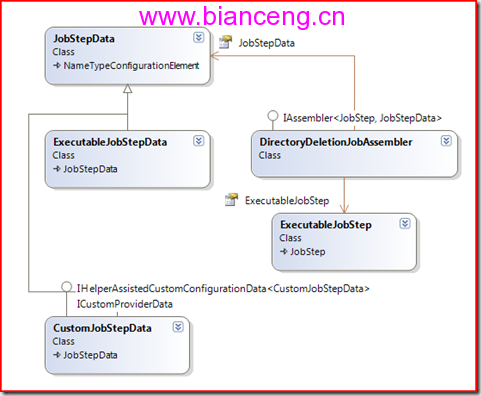
BatchJobExecutorSettings 繼承 SerializableConfigurationSection,管理變數集合、Batch Job 集合與預設 Job 名稱,提供靜態 ApplyVariable 解析 $Var$ 語法。
透過 EnterpriseLibraryFactory 與 AssemblerBasedObjectFactory 建立 Job Step,採用 ICustomFactory 與 IConfigurationNameMapper 實現預設名稱對應。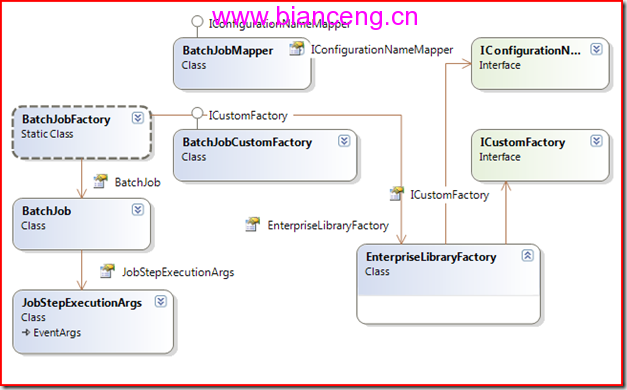
物件建立始終是 EL 核心,ObjectBuilder/ObjectBuilder2 為基石,亦是 Unity 與 Software Factory 根基。
完整原始碼可供下載參考。