承接上一篇「完全不使用設定檔」的程式碼式建置方式,本文示範如何將位址、繫結、行為等可變因素移至設定檔,達成程式碼與設定分離,提升彈性與維護性。
[ServiceContract]
public interface IService
{
    [OperationContract]
    string MyOperation1(string myValue);
}

public class Service : IService
{
    public string MyOperation1(string myValue)
    {
        return "Hello: " + myValue;
    }
}
// 僅指定服務型別,BaseAddress 移至設定檔
ServiceHost host = new ServiceHost(typeof(Service));
host.Open();
<configuration>
  <system.serviceModel>
    <services>
      <service name="WCFService.Service" behaviorConfiguration="NewBehavior">
        <host>
          <baseAddresses>
            <add baseAddress="https://localhost:8080/WCFService/Service" />
          </baseAddresses>
        </host>
        <endpoint address="" binding="basicHttpBinding" contract="WCFService.IService" />
      </service>
    </services>

    <behaviors>
      <serviceBehaviors>
        <behavior name="NewBehavior">
          <serviceMetadata httpGetEnabled="true" httpGetUrl="https://localhost:8001/" />
        </behavior>
      </serviceBehaviors>
    </behaviors>
  </system.serviceModel>
</configuration>
重點:<service name> 必須為服務實作類別的完整型別名;behaviorConfiguration 連結至啟用中繼資料發布的行為;端點 address="" 表示直接使用 baseAddress。
透過 <serviceMetadata httpGetEnabled="true"> 讓服務公開 WSDL,方便用戶端產生 Proxy。httpGetUrl 可自訂 WSDL 發布位址,未指定則預設為 HTTP baseAddress + ?wsdl。
在 Visual Studio 專案右鍵選擇「加入服務參考」,輸入服務的 HTTP baseAddress (如 https://localhost:8080/WCFService/Service),VS 會自動下載中繼資料並產生:
ClientBase<T>)<client>)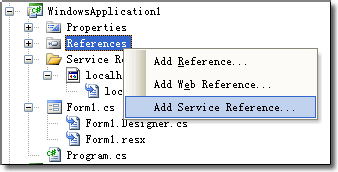
<client>
  <endpoint address="https://localhost:8080/WCFService/Service"
            binding="basicHttpBinding"
            bindingConfiguration="BasicHttpBinding_IService"
            contract="WCFClient.localhost.IService"
            name="BasicHttpBinding_IService" />
</client>
Proxy 類別提供多個建構子多載:
ServiceClient() — 自動尋找唯一對應合約的端點設定ServiceClient(string endpointConfigurationName) — 指定端點設定名稱ServiceClient(string endpointConfigurationName, string remoteAddress)ServiceClient(string endpointConfigurationName, EndpointAddress remoteAddress)本例僅有一個端點,故可使用最簡單建構子:
localhost.ServiceClient proxy = new localhost.ServiceClient();
string result = proxy.MyOperation1("myFirstWCF");
Console.WriteLine(result); // 輸出: Hello: myFirstWCF
| 程式碼式建置 | 設定檔式建置 |
|---|---|
| new ServiceHost(typeof(Service), baseAddress) | <service name="..."> + <host><baseAddresses> |
| host.AddServiceEndpoint(...) | <endpoint ... /> |
| host.Description.Behaviors.Add(metadataBehavior) | <behavior><serviceMetadata /></behavior> |
| ChannelFactory<T>.CreateChannel(binding, address) | new Proxy() 或 new Proxy("endpointName") |
| 維度 | 程式碼式 | 設定檔式 |
|---|---|---|
| 部署彈性 | 低 (需重編譯) | 高 (修改設定檔即可) |
| 可讀性 | 邏輯集中、易追蹤 | 分散、需對照設定檔 |
| 適用場景 | 自我裝載、動態端點、測試專案 | 生產環境、IIS 裝載、多環境部署 |
設定檔式建置是企業級 WCF 應用的主流做法。下一篇將詳細解析設定檔各區段屬性與進階設定技巧。