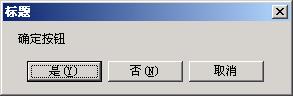
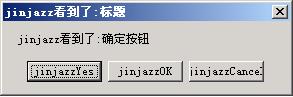
利用 SetWindowsHookEx 安裝 WH_CBT (代碼 5) 掛鉤,在視窗建立前夕(HCBT_CREATEWND)攔截 MessageBox,讀取標題與內容,甚至修改按鈕文字。
using System;
using System.Collections.Generic;
using System.ComponentModel;
using System.Data;
using System.Drawing;
using System.Text;
using System.Windows.Forms;
using System.Reflection;
using System.Xml;
using System.Runtime.InteropServices;

namespace WindowsApplication26
{
    public partial class Form1 : Form
    {
        public class HookMsg
        {
            #region Win32 API 匯入
            private const int WH_CBT = 0x5;
            private const int IDC_OK = 0x1;
            private const int IDC_Text = 0xFFFF;

            [DllImport("user32.dll")]
            protected static extern IntPtr SetWindowsHookEx(int code, HookProc func, IntPtr hInstance, int threadID);

            [DllImport("user32.dll")]
            protected static extern int UnhookWindowsHookEx(IntPtr hhook);

            [DllImport("user32.dll")]
            protected static extern int CallNextHookEx(IntPtr hhook, int code, IntPtr wParam, IntPtr lParam);

            [DllImport("user32.dll")]
            protected static extern int GetWindowText(IntPtr hwnd, [Out] StringBuilder lpString, int nMaxCount);

            [DllImport("user32.dll")]
            protected static extern int GetClassName(IntPtr hwnd, [Out] StringBuilder lpString, int nMaxCount);

            [DllImport("user32.dll")]
            protected static extern int SetWindowText(IntPtr hWnd, string lpString);

            [DllImport("user32.dll")]
            protected static extern IntPtr GetDlgItem(IntPtr hwnd, int id);

            [DllImport("User32")]
            protected static extern int SetDlgItemText(IntPtr hDlg, int nIDDlgItem, string lpString);

            [DllImport("user32.dll")]
            protected static extern int GetDlgItemText(IntPtr hDlg, int nIDDlgItem, [Out] StringBuilder lpString, int nMaxCount);

            [DllImport("user32.dll", EntryPoint = "MessageBox")]
            protected static extern int _MessageBox(IntPtr hwnd, string text, string caption, int options);

            [DllImport("user32.dll")]
            protected static extern IntPtr GetActiveWindow();

            [DllImport("user32.dll")]
            protected static extern void DestroyWindow(IntPtr hwnd);
            #endregion

            private static IntPtr m_hhook;
            public delegate int HookProc(int code, IntPtr wParam, IntPtr lParam);
            protected static HookProc m_filterFunc;

            static HookMsg()
            {
                if (m_filterFunc == null) m_filterFunc = new HookProc(CoreHookProc);
            }

            public static void Install()
            {
                m_hhook = SetWindowsHookEx(WH_CBT, m_filterFunc, IntPtr.Zero, AppDomain.GetCurrentThreadId());
            }

            public static void Uninstall()
            {
                UnhookWindowsHookEx(m_hhook);
            }

            // 回呼處理
            protected static int CoreHookProc(int code, IntPtr wParam, IntPtr lParam)
            {
                if (code == 5) // HCBT_CREATEWND
                {
                    StringBuilder sb = new StringBuilder(255);

                    // 取得標題
                    GetWindowText(wParam, sb, 255);
                    string strTitle = "jinjazz看到了:" + sb.ToString();

                    // 取得訊息文字
                    GetDlgItemText(wParam, IDC_Text, sb, 255);
                    string strText = "jinjazz看到了:" + sb.ToString();

                    // 取得按鈕樣式組合
                    int style = 0;
                    for (int i = 0; i <= 5; i++)
                    {
                        if (GetDlgItem(wParam, i) != IntPtr.Zero) style += i;
                    }

                    // 修改文字與按鈕
                    SetDlgItemText(wParam, IDC_Text, strText);
                    SetWindowText(wParam, strTitle);
                    SetWindowText(GetDlgItem(wParam, (int)DialogResult.No), "jinjazzOK");
                    SetWindowText(GetDlgItem(wParam, (int)DialogResult.Cancel), "jinjazzCancel");
                    SetWindowText(GetDlgItem(wParam, (int)DialogResult.Abort), "jinjazzAbort");
                    SetWindowText(GetDlgItem(wParam, (int)DialogResult.Ignore), "jinjazzIgnore");
                    SetWindowText(GetDlgItem(wParam, (int)DialogResult.None), "jinjazzNone");
                    SetWindowText(GetDlgItem(wParam, (int)DialogResult.OK), "jinjazzOK");
                    SetWindowText(GetDlgItem(wParam, (int)DialogResult.Retry), "jinjazzRetry");
                    SetWindowText(GetDlgItem(wParam, (int)DialogResult.Yes), "jinjazzYes");
                }
                // return CallNextHookEx(m_hhook, code, wParam, lParam);
                return 0;
            }
        }

        public Form1()
        {
            InitializeComponent();
        }

        private void Form1_Load(object sender, EventArgs e) { }

        private void button1_Click(object sender, EventArgs e)
        {
            MessageBox.Show(this, "確定按鈕 ", "標題");
        }

        private void button2_Click(object sender, EventArgs e)
        {
            MessageBox.Show(this, "確定按鈕 ", "標題", MessageBoxButtons.YesNoCancel);
        }

        private void button3_Click(object sender, EventArgs e)
        {
            MessageBox.Show(this, "確定按鈕 ", "標題", MessageBoxButtons.AbortRetryIgnore);
        }

        private void checkBox1_CheckedChanged(object sender, EventArgs e)
        {
            if (this.checkBox1.Checked) HookMsg.Install();
            else HookMsg.Uninstall();
        }
    }
}| 技術點 | 說明 |
|---|---|
WH_CBT = 5 | Computer-Based Training 掛鉤,可在視窗建立/銷毀/啟用/停用等時機攔截。 |
HCBT_CREATEWND (code==5) | 視窗即將建立時觸發,此時可透過 wParam 取得視窗句柄。 |
IDC_Text = 0xFFFF | MessageBox 內容文字的控制項 ID(經驗值)。 |
GetDlgItemText / SetDlgItemText | 讀寫對話方塊內指定控制項文字。 |
| 按鈕 ID 對應 | OK=1, Cancel=2, Abort=3, Retry=4, Ignore=5, Yes=6, No=7;透過 GetDlgItem 取得句柄後修改文字。 |
| 執行緒範圍 | AppDomain.GetCurrentThreadId() 限定當前執行緒,避免影響其他執行緒。 |