將 RadioButton 置於 GroupBox.Header 內,僅點擊圓圈或文字才能選取,**點擊控制項空白區域無反應**。
Windows 原生對話框(如資料夾選項)點擊 Header 任意區域皆可選取,符合 UX 指引。
<GroupBox Padding="9">
  <GroupBox.Header>
    <RadioButton Content="Header RadioButton" GroupName="header"/>
  </GroupBox.Header>
  <GroupBox.Content>
    <StackPanel>
      <RadioButton Content="Common RadioButton"/>
      <RadioButton Content="Common RadioButton"/>
    </StackPanel>
  </GroupBox.Content>
</GroupBox>
運行效果:
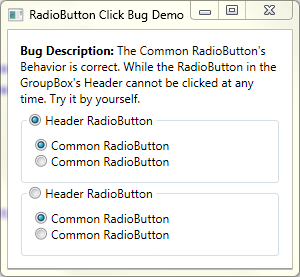
命中測試邏輯僅識別有像素內容區域(文字/圓圈),透明背景區域不觸發 MouseOver,導致點擊無效。設定 Background 也無法修正。
RadioButton 連續兩個 Bug 入榜(另見系列第 2 篇),嚴重影響表單易用性。期待 .NET 4.0 修正,目前僅能靠醜陋 workaround 繞過。