WPF 命令系統將使用者動作(點擊、按鍵)與業務邏輯解耦,核心介面 ICommand 定義 Execute、CanExecute 及 CanExecuteChanged 事件。WPF 內建 RoutedCommand 支援路由事件(隧道/冒泡)傳遞至擁有 CommandBinding 的元素執行。本文示範如何建立自訂快捷鍵命令,實現字體大小調整與顏色隨機變更。
在 Window.Resources 宣告兩個 RoutedUICommand:
<Window.Resources>
    <RoutedUICommand x:Key="IncreaseFontSize" Text="Increase Font Size" />
    <RoutedUICommand x:Key="DecreaseFontSize" Text="Decrease Font Size" />
</Window.Resources>
透過 KeyBinding 綁定快捷鍵(Modifiers+Key 或 Gesture 兩種寫法,建議使用 Gesture 避免歧義):
<Window.InputBindings>
    <KeyBinding Modifiers="Ctrl+Alt" Key="I" Command="{StaticResource IncreaseFontSize}"/>
    <KeyBinding Gesture="Ctrl+Alt+D" Command="{StaticResource DecreaseFontSize}"/>
</Window.InputBindings>
在 CommandBindings 連結 CanExecute(判斷是否可執行)與 Executed(實際執行邏輯):
<Window.CommandBindings>
    <CommandBinding Command="{StaticResource IncreaseFontSize}"
                    CanExecute="CommandBinding_Increase_CanExecute"
                    Executed="CommandBinding_Increase_Executed"/>
    <CommandBinding Command="{StaticResource DecreaseFontSize}"
                    CanExecute="CommandBinding_Decrease_CanExecute"
                    Executed="CommandBinding_Decrease_Executed"/>
</Window.CommandBindings>
private void CommandBinding_Increase_CanExecute(object sender, CanExecuteRoutedEventArgs e)
{
    e.CanExecute = textBlock1.FontSize <= 50; // 超過 50 則不可執行
}
private void CommandBinding_Increase_Executed(object sender, ExecutedRoutedEventArgs e)
{
    textBlock1.FontSize += 5;
}
private void CommandBinding_Decrease_CanExecute(object sender, CanExecuteRoutedEventArgs e)
{
    e.CanExecute = textBlock1.FontSize > 5; // 小於等於 5 則不可執行
}
private void CommandBinding_Decrease_Executed(object sender, ExecutedRoutedEventArgs e)
{
    textBlock1.FontSize -= 5;
}
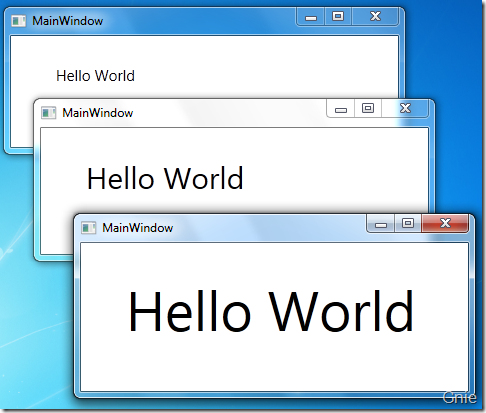
執行程式,按 Ctrl+Alt+I 放大、Ctrl+Alt+D 縮小字體,CanExecute 邏輯自動啟用/停用命令。
為了讓設計人員更容易設定選單標題,建立強型別元資料介面與屬性:
// 介面定義元資料結構
public interface IExtensionMetadata
{
    string MenuCaption { get; }
}

// 屬性實現介面,供命令類別標記
[AttributeUsage(AttributeTargets.Class)]
public class ExtensionMetadataAttribute : Attribute, IExtensionMetadata
{
    private readonly string _menuCaption;
    public ExtensionMetadataAttribute(string menuCaption) { _menuCaption = menuCaption; }
    public string MenuCaption => _menuCaption;
}

// 自訂命令類別
public static class CustomCommand
{
    public static readonly RoutedUICommand ChangeFontColor =
        new RoutedUICommand("Change Font Color", "ChangeFontColor", typeof(MainWindow));
}
在 XAML 中引用命名空間並綁定:
<Window ... xmlns:c="clr-namespace:WpfUserControlTest">
    <Window.InputBindings>
        <KeyBinding Modifiers="Control+Alt" Key="C" Command="c:CustomCommand.ChangeFontColor"/>
    </Window.InputBindings>
    <Window.CommandBindings>
        <CommandBinding Command="c:CustomCommand.ChangeFontColor"
                        CanExecute="CommandBinding_Color_CanExecute"
                        Executed="CommandBinding_Color_Executed"/>
    </Window.CommandBindings>
Code-behind 使用強型別 ExportCollection<IExtension, IExtensionMetadata> 讀取元資料:
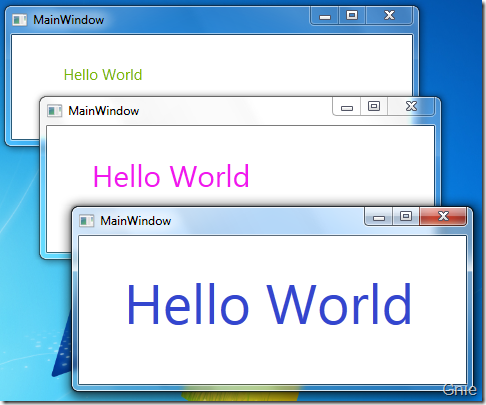
private void CommandBinding_Color_Executed(object sender, ExecutedRoutedEventArgs e)
{
    var rd = new Random();
    textBlock1.Foreground = new SolidColorBrush(Color.FromRgb(
        (byte)rd.Next(255), (byte)rd.Next(255), (byte)rd.Next(255)));
}
RoutedUICommand 適合需顯示文字(如選單項)的命令;純邏輯命令可用 RoutedCommand。Gesture 屬性比 Modifiers+Key 更清晰,支援標準按鍵表示法(如 "Ctrl+Shift+S")。CanExecute 應輕量、無副作用,頻繁被命令管理器呼叫。ExportCollection<T, TMetadata>)提升設計時體驗,減少魔術字串。出處:gnielee 的博客