安全性應用程式區塊透過一或多個安全機制,協助開發人員實作通用安全任務,支援擴展性(不修改程式碼切換驗證/授權方式),功能涵蓋:驗證、授權、角色管理、Profile 管理。
前提:專案有 App.config/Web.config,資料庫已建立相關資料表與預存程序(參考 EntLibQuickStarts 範例資料庫)。
SaltEnabled=TrueDatabase=Database Instance、HashProvider=SHA1ManagedDefaultAuthenticationInstance=Database Provider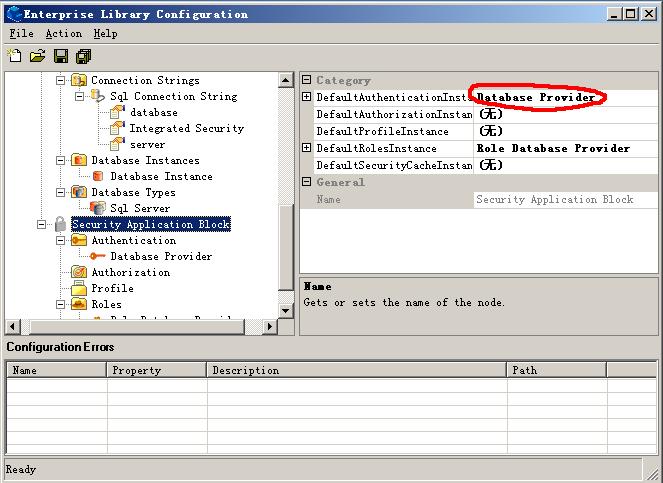
Database=Database InstanceDefaultRolesInstance=RolesDatabase Provider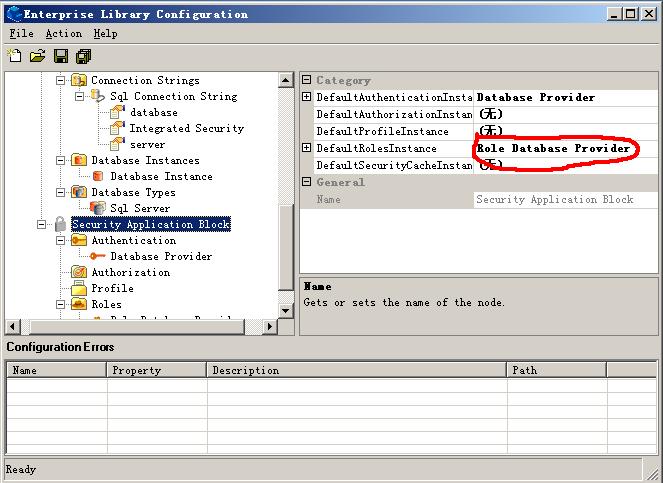
IAuthenticationProvider authprovider = AuthenticationFactory.GetAuthenticationProvider();
public static bool Authenticate(string username, string password)
{
    bool authenticated = false;
    NamePasswordCredential credentials = new NamePasswordCredential(username, password);
    IAuthenticationProvider authprovider = AuthenticationFactory.GetAuthenticationProvider();
    IIdentity identity;
    authenticated = authprovider.Authenticate(credentials, out identity);
    if (!authenticated) throw new SecurityException("Invalid username or password.");

    IRolesProvider rolesprovider = RolesFactory.GetRolesProvider();
    IPrincipal principal = rolesprovider.GetRoles(identity);
    Thread.CurrentPrincipal = principal; // 關鍵:設定當前執行緒主體
    return authenticated;
}
入門篇完成驗證與角色基本設定。進階篇將深入驗證/授權細節、授權規則、角色策略、個人化服務、嚴格帳號管理、Security Cache 及第三方資料庫角色外掛。