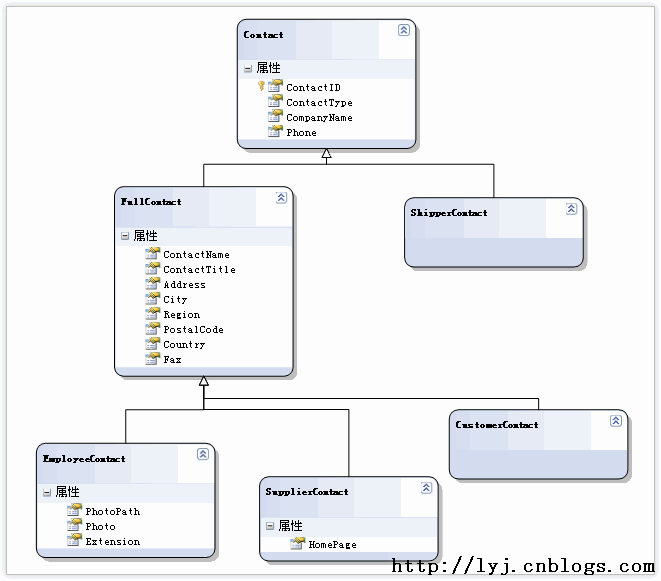
LINQ to SQL 採用單表映射策略實現繼承層次結構,將整個繼承體系的所有類別欄位平展儲存於單一資料表中。每一列代表層次結構中某個類別的屬性,不適用於該列所對應實例類型的欄位則設為 NULL。此策略結構簡單,且對多類別查詢具備優異效能。
若要在 LINQ to SQL 中實現單表繼承映射,必須在根類別上套用下列屬性與設定:
[Table] 屬性。[InheritanceMapping] 屬性(同樣加在根類別上),指定 Code(鑑別器欄位的值)與 Type(對應的類別型別)。[InheritanceMapping] 上設定 IsDefault = true,作為鑑別器值無匹配時的回退對應。ContactType)加上 [Column(IsDiscriminator = true)]。以下為使用 O/R 設計器產生的核心程式碼架構(已簡化):
[Table(Name = "dbo.Contacts")]
[InheritanceMapping(Code = "Unknown", Type = typeof(Contact), IsDefault = true)]
[InheritanceMapping(Code = "Employee", Type = typeof(EmployeeContact))]
[InheritanceMapping(Code = "Supplier", Type = typeof(SupplierContact))]
[InheritanceMapping(Code = "Customer", Type = typeof(CustomerContact))]
[InheritanceMapping(Code = "Shipper", Type = typeof(ShipperContact))]
public partial class Contact : INotifyPropertyChanging, INotifyPropertyChanged
{
    [Column(Storage = "_ContactID", IsPrimaryKey = true, IsDbGenerated = true)]
    public int ContactID { get; set; }

    [Column(Storage = "_ContactType", IsDiscriminator = true)]
    public string ContactType { get; set; }
}

public abstract partial class FullContact : Contact { }
public partial class EmployeeContact : FullContact { }
public partial class SupplierContact : FullContact { }
public partial class CustomerContact : FullContact { }
public partial class ShipperContact : Contact { }
var cons = from c in db.Contacts select c;
foreach (var con in cons) {
    Console.WriteLine($"Company: {con.CompanyName}, Type: {con.GetType()}");
}
var cons = from c in db.Contacts.OfType<CustomerContact>() select c;
生成 SQL 會自動加上 WHERE ContactType = 'Customer'。
is 型別檢查var cons = from c in db.Contacts where c is ShipperContact select c;
同樣轉譯為 WHERE ContactType = 'Shipper',但會選取資料表所有欄位。
as 轉型查詢var cons = from c in db.Contacts select c as FullContact;
查詢整個 Contacts 表,不加 WHERE 條件。
Cast 強制轉型搭配條件var cons = from c in db.Contacts
where c.ContactType == "Customer" && ((CustomerContact)c).City == "London"
select c;
生成 SQL 同時篩選 ContactType 與 City。
插入新紀錄時若 ContactType 為 null,會套用 IsDefault = true 對應的基底類別(Contact);查詢時則依繼承映射邏輯解析。
// 插入 ShipperContact
ShipperContact nsc = new ShipperContact {
    CompanyName = "Northwind Shipper",
    Phone = "(123)-456-7890"
};
db.Contacts.InsertOnSubmit(nsc);
db.SubmitChanges();

// 查詢驗證
var ShipperContacts = from sc in db.Contacts.OfType<ShipperContact>()
                      where sc.CompanyName == "Northwind Shipper"
                      select sc;

// 刪除
db.Contacts.DeleteOnSubmit(nsc);
db.SubmitChanges();
對應 SQL 依序為 SELECT COUNT(*)、INSERT、SELECT COUNT(*)、DELETE,皆自動帶入鑑別器值 'Shipper'。