配置應用程式區塊為應用系統提供通用的配置管理解決方案,支援從多種儲存來源(XML、資料庫、登錄等)讀寫配置。其設計目標在於:
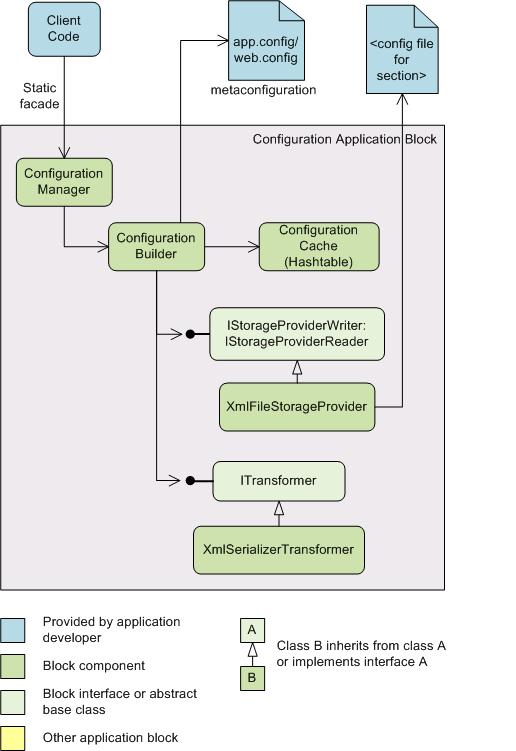
配置區塊將配置中繼資料與實際配置設定分離:中繼資料存放於應用程式組態檔(App.config/Web.config),實際設定可存放於獨立檔案。中繼資料包含儲存位置、Transformer 與 Storage Provider 型別等資訊。
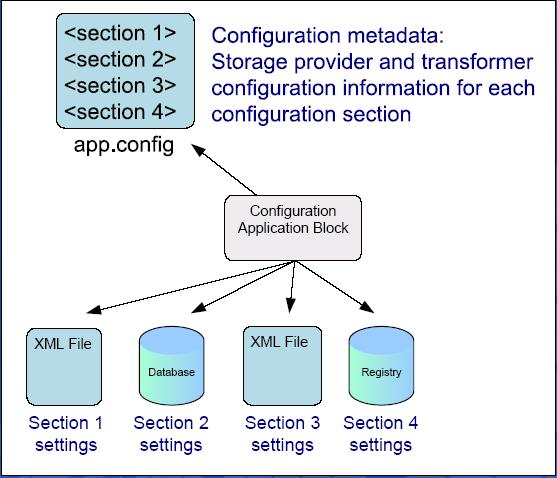
GetConfiguration/WriteConfiguration 簡單 API(外觀模式)XmlFileStorageProviderXmlSerializerTransformer配置區段設定快取於雜湊表。讀取時優先檢查快取;Storage Provider 偵測到儲存層變更時自動清除快取。亦可透過 ConfigurationManager.ClearSingletonSectionCache() 手動清除。

開發者可依實體儲存類型實作自訂 Provider,透過組態工具切換無需修改程式碼,體現「組態驅動」設計哲學。
// 讀取
MyConfigClass configData = ConfigurationManager.GetConfiguration("MySettings") as MyConfigClass;

// 寫入
ConfigurationManager.WriteConfiguration("MySettings", configData);
public object ReadConfiguration(string sectionName)
{
    ValidateSection(sectionName);
    object configurationSection = sections.GetSection(sectionName);
    if (IsConfigurationSectionCached(configurationSection)) return configurationSection;

    IStorageProviderReader storageProviderReader = CreateStorageProvider(sectionName);
    object configurationSettings = storageProviderReader.Read();
    if (configurationSettings == null) return null;

    ITransformer transformer = CreateTransformer(sectionName);
    if (transformer != null)
        configurationSection = transformer.Deserialize(configurationSettings);
    else
        configurationSection = configurationSettings;

    sections.AddSection(sectionName, configurationSection,
        new ConfigurationChangedEventHandler(OnExternalConfigurationChanged),
        storageProviderReader);
    return configurationSection;
}
public void WriteConfiguration(string sectionName, object configValue)
{
    ValidateSection(sectionName);
    ConfigurationChangingEventArgs args = CreateConfigurationChangingEventArgs(sectionName, configValue);
    OnConfigurationChanging(args);
    if (!args.Cancel)
    {
        IStorageProviderWriter configStorageWriter = GetConfigurationStorageWriter(sectionName);
        object writeData = GetSerializedDataToWrite(sectionName, configValue);
        ConfigurationWriterActionCommand writerActionCommand = new ConfigurationWriterActionCommand(configStorageWriter, writeData);

        if (!sections.ContainsSection(sectionName))
            AddSection(sectionName, configValue, configStorageWriter);
        else
            sections.UpdateSection(sectionName, writerActionCommand, configValue);

        OnConfigurationChanged(new ConfigurationChangedEventArgs(configFile.FileName, sectionName));
    }
}
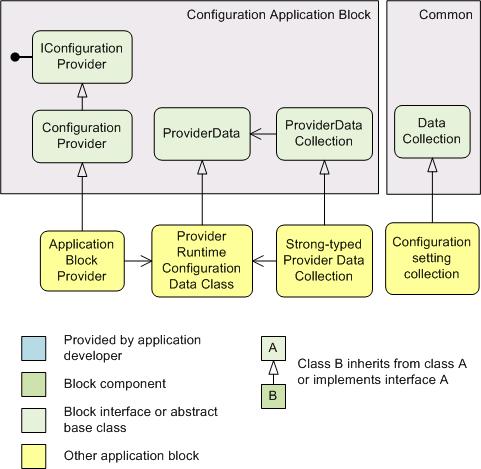
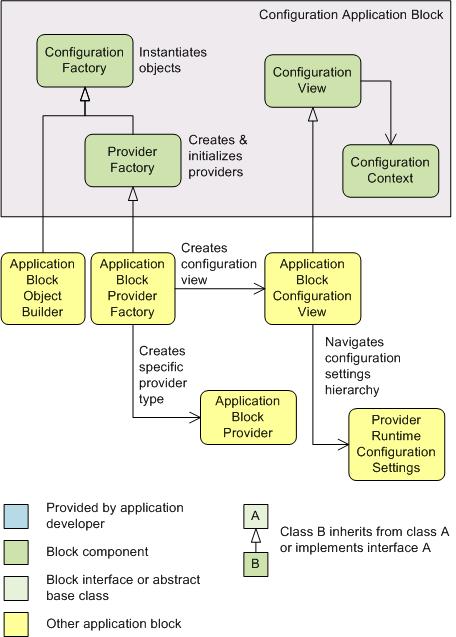
IConfigurationProvider:所有 Provider 必須實作,含 Initialize() 與 ConfigurationNameConfigurationProvider:抽象基類ConfigurationFactory:抽象工廠基類ProviderFactory:實作 IConfigurationProvider 並繼承 ConfigurationFactory引用 MSDN:「設計了配置應用程式區塊,您就可以用最適合應用程式需求的方式儲存配置資料,使您不受儲存方法的限制。」