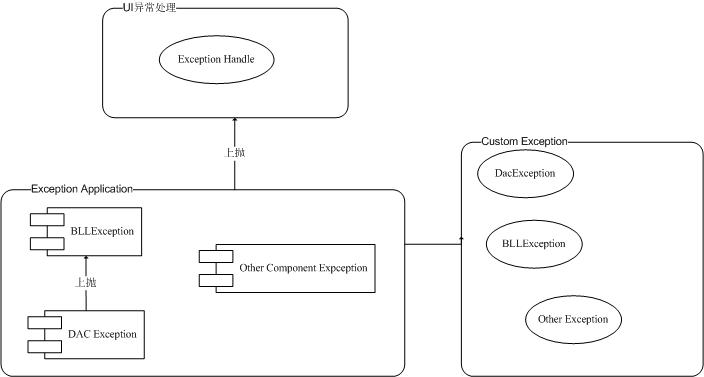
針對典型三層架構,建立分層異常處理機制:自訂異常類別逐層包裝上拋,最終在表現層統一記錄與友善提示。本文提供完整程式碼範例,涵蓋 DAC、BLL、UI 三層。
[Serializable]
public class BLLException : Exception, ISerializable {
    private string myBLLMsg;

    public string MyBLLMsg { get { return myBLLMsg; } }

    public override string Message {
        get { return myBLLMsg == null ? base.Message : myBLLMsg + base.Message; }
    }

    // 多重建構子支援:標準、自訂訊息、內部異常、序列化
    public BLLException() : base() { }
    public BLLException(string message) : base(message) { }
    public BLLException(string message, Exception inner) : base(message, inner) { }
    public BLLException(string message, string myExcuteMsg) : base(message) { this.myBLLMsg = myExcuteMsg; }
    public BLLException(string message, string myExcuteMsg, Exception inner) : base(message, inner) { this.myBLLMsg = myExcuteMsg; }

    protected BLLException(SerializationInfo info, StreamingContext context) : base(info, context) {
        myBLLMsg = info.GetString("MydelMsg");
    }

    public override void GetObjectData(SerializationInfo info, StreamingContext context) {
        info.AddValue("MydelMsg", myBLLMsg);
        base.GetObjectData(info, context);
    }
}
設計亮點:重寫 Message 屬性融合自訂訊息與原始異常;實作 ISerializable 保證跨應用程式域/遠端呼叫時自訂欄位正確序列化。
public class BaseDataHelper : IBaseDataHelper {
    public DataSet BaseQuery(string strSql) {
        try { return DbHelperOra.Query(strSql); }
        catch (DACException ex) { throw new DACException("資料庫存取錯誤", "查詢公用模組錯誤", ex); }
    }

    public int ExecuteSql(string strSql) {
        try { return DbHelperOra.ExecuteSql(strSql); }
        catch (DACException ex) { throw new DACException("資料庫存取錯誤", "執行 SQL 錯誤", ex); }
    }

    public bool ExecuteSqlTran(ArrayList SQLStringList) {
        try { DbHelperOra.ExecuteSqlTran(SQLStringList); }
        catch (DACException ex) { throw new DACException("資料庫存取錯誤", "執行交易錯誤", ex); }
        return true;
    }
    // Hashtable 版本略同
    public object GetSingle(string strSql) {
        try { return DbHelperOra.GetSingle(strSql); }
        catch (DACException ex) { throw new DACException("資料庫存取錯誤", "取得單一物件錯誤", ex); }
    }
}
策略:捕獲底層具體異常(DACException),包裝為含業務語意的新異常上拋,保留 InnerException 完整呼叫堆疊。
public class UserBLL : IUserManager {
    public DataTable GetUserDataTable() {
        try {
            string strsql = "select * from napp_accounts_user";
            return DataAccess.CreateBaseDataHelper().BaseQuery(strsql).Tables[0];
        }
        catch (BLLException ex) { throw new BLLException("查詢使用者業務", ex); }
    }
}
BLL 層捕獲 DAC 層異常,附加業務操作語境("查詢使用者業務")重新拋出,形成清晰的異常鏈。
log4net.ILog logger = log4net.LogManager.GetLogger(typeof(_Default));

protected void Page_Load(object sender, EventArgs e) {
    try {
        DataTable dt = BLLAccess.CreateUserBLL().GetUserDataTable();
        this.GridView1.DataSource = dt;
        this.GridView1.DataBind();
    }
    catch (Exception ex) {
        logger.Error("查詢使用者綁定 GetUserDataTable() Error: " + ex.ToString());
        // 可導向錯誤頁面或顯示友善訊息
    }
}
UI 層統一捕獲所有異常,使用 log4net 記錄完整堆疊(ex.ToString() 包含巢狀 InnerException),避免技術細節外洩給使用者。
innerException