在 WCF 的傳輸安全模式下,客戶端憑證類型支援 None、Windows 與 Certificate 三種,預設採用 Windows 憑證。前幾節已詳細示範 Windows 憑證的用法,本節將聚焦於 Certificate 憑證的完整配置流程。
啟用憑證驗證的第一步是準備雙向憑證。透過 makecert 工具分別建立名為 XuanhunServer 與 XuanhunClient 的憑證,存放於 CurrentUser 存儲區:
makecert -n "CN=XuanhunServer" -sr CurrentUser -ss My -sky exchange
makecert -n "CN=XuanhunClient" -sr CurrentUser -ss My -sky exchange
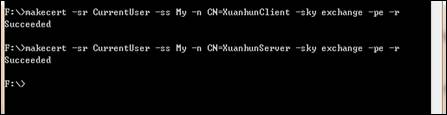
圖 1 建立伺服器與客戶端憑證
在服務端 <behaviors> 區段中加入 serviceCredentials,指定服務憑證並設定客戶端憑證驗證模式為 None(示範用,生產環境建議使用 ChainTrust 或自定義驗證):
<behaviors>
  <serviceBehaviors>
    <behavior name="validateBehavior">
      <serviceCredentials>
        <serviceCertificate
            x509FindType="FindBySubjectName"
            storeLocation="CurrentUser"
            storeName="My"
            findValue="XuanhunServer" />
        <clientCertificate>
          <authentication
              certificateValidationMode="None"
              trustedStoreLocation="CurrentUser" />
        </clientCertificate>
      </serviceCredentials>
    </behavior>
  </serviceBehaviors>
</behaviors>
| 屬性 | 說明 |
|---|---|
| findValue | 尋找值(如主體名稱、指紋) |
| storeLocation | 存儲位置:CurrentUser 或 LocalMachine |
| storeName | 存儲名稱:My、Root、TrustedPeople 等 |
| X509FindType | 尋找類型:FindBySubjectName、FindByThumbprint 等 |
| 模式 | 行為 |
|---|---|
| None | 不執行任何驗證(僅供測試) |
| PeerTrust | 信任「受信任的人」存儲區中的憑證 |
| ChainTrust | 信任由受信任根 CA 簽發的憑證鏈 |
| PeerOrChainTrust | 同時接受上述兩種方式 |
| Custom | 使用自定義 X509CertificateValidator |
客戶端需指定自身憑證與服務憑證驗證方式:
<behaviors>
  <endpointBehaviors>
    <behavior name="ForListen">
      <clientVia viaUri="net.tcp://127.0.0.1:64590/HelloService"/>
      <clientCredentials>
        <clientCertificate
            findValue="XuanhunClient"
            storeLocation="CurrentUser"
            x509FindType="FindBySubjectName"
            storeName="My"/>
        <serviceCertificate>
          <authentication certificateValidationMode="None" />
        </serviceCertificate>
      </clientCredentials>
    </behavior>
  </endpointBehaviors>
</behaviors>
提示:雙工通訊時,服務需預先持有客戶端憑證以加密回覆訊息,此時
clientCertificate內的<certificate>元素必須指定具體憑證。
本文部分內容改編自《.NET 安全揭秘》
作者:玄魂
出處:https://www.cnblogs.com/xuanhun/