繼前兩篇文章奠定 WCF 分散式開發的基礎觀念與自訂宿主托管實作後,本文將深入探討 WCF 服務中繼資料交換的核心機制。我們將詳細剖析什麼是 WCF 服務中繼資料、為何必須暴露中繼資料交換端點、它與傳統 Web Service 的關聯,以及透過組態檔與程式碼兩種方式實現 HTTP-GET 與 MEX 端點交換的完整流程,助您掌握跨平台、跨語言服務互通的關鍵技術。
WCF 服務中繼資料是服務核心三要素——位址、繫結、契約的原始描述資訊。公開的中繼資料主要包含三類 XML 文件:
這些全部基於 XML 標準,確保跨語言、跨平台互通性,這正是 WCF 追求異構系統整合的基石。
用戶端需透過中繼資料了解服務特徵以建立通訊。傳統 Web Service 以自描述、跨平台著稱,WCF 繼承此特性:用戶端根據服務中繼資料反序列化產生本地 Proxy 程式碼(C#、VB、Java 皆可),透過服務代理進行呼叫。暴露中繼資料端點,正是解決異構用戶端與服務互通的關鍵環節。
WCF 完整支援 Web Service 核心協定。從服務端程式碼結構(.svc 對應 .asmx)、用戶端引用生成的本地檔案(WSDL、XSD、Proxy 類別)來看,兩者高度相似。WCF 框架在參考 ASP.NET Web Service 架構基礎上進行了全方位擴充,提供更靈活的託管、繫結與安全機制。
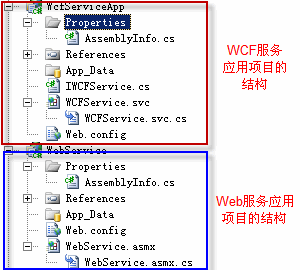
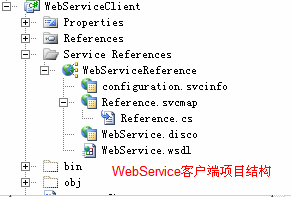
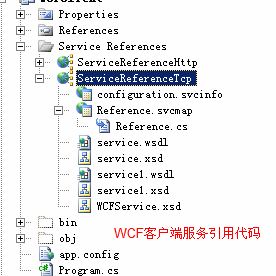
WCF 提供兩種發佈中繼資料的標準方式:
IMetadataExchange 契約,支援 HTTP、HTTPS、TCP、Named Pipe 等多種傳輸繫結(mexHttpBinding、mexHttpsBinding、mexTcpBinding、mexNamedPipeBinding)。對應的列舉 MetadataExchangeClientMode 定義於 System.ServiceModel.Description 命名空間:
public enum MetadataExchangeClientMode
{
    MetadataExchange = 0, // WS-Transfer Get (MEX)
    HttpGet = 1           // HTTP GET
}
啟用中繼資料交換後,必須顯式配置 ServiceMetadataBehavior 行為。接下來將分別示範組態與程式設計兩種實作路徑。
在 <serviceBehaviors> 中設定 httpGetEnabled="true",並指定基底位址:
<service name="WcfServiceApp.WCFService" behaviorConfiguration="WcfServiceApp.WCFServiceBehavior">
  <host>
    <baseAddresses>
      <add baseAddress="https://localhost:8001/" />
    </baseAddresses>
  </host>
</service>

<behaviors>
  <serviceBehaviors>
    <behavior name="WcfServiceApp.WCFServiceBehavior">
      <serviceMetadata httpGetEnabled="true" />
      <serviceDebug includeExceptionDetailInFaults="false" />
    </behavior>
  </serviceBehaviors>
</behaviors>
瀏覽器輸入基底位址即可查看服務說明頁面:
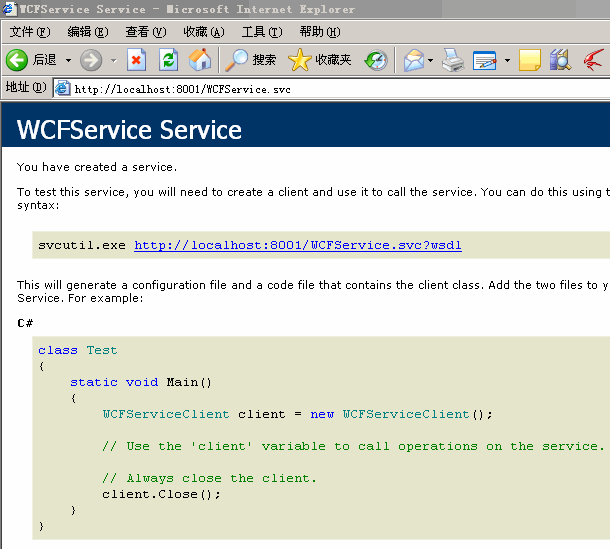
新增三個 <endpoint>,契約均為 IMetadataExchange,並對應不同繫結與基底位址:
<service name="WCFService.WCFService" behaviorConfiguration="WCFService.WCFServiceBehavior">
  <endpoint address="mex" binding="mexHttpBinding" contract="IMetadataExchange" />
  <endpoint address="mex" binding="mexTcpBinding" contract="IMetadataExchange" />
  <endpoint address="mex" binding="mexNamedPipeBinding" contract="IMetadataExchange" />
  <host>
    <baseAddresses>
      <add baseAddress="https://localhost:8001/" />
      <add baseAddress="net.tcp://localhost:8002/" />
      <add baseAddress="net.pipe://localhost/" />
    </baseAddresses>
  </host>
</service>

<serviceBehaviors>
  <behavior name="WCFService.WCFServiceBehavior">
    <serviceMetadata httpGetEnabled="true" />
    <serviceDebug includeExceptionDetailInFaults="false" />
  </behavior>
</serviceBehaviors>
程式設計方式雖較複雜,但能在執行期動態控制中繼資料發佈行為,彈性更高。需引用 System.ServiceModel.Description 命名空間。
ServiceMetadataBehavior metadataBehavior = host.Description.Behaviors.Find<ServiceMetadataBehavior>();
if (metadataBehavior == null)
{
    metadataBehavior = new ServiceMetadataBehavior();
    host.Description.Behaviors.Add(metadataBehavior);
}
metadataBehavior.HttpGetEnabled = true;
metadataBehavior.HttpGetUrl = new Uri("https://localhost:8001/");
// 定義三種傳輸繫結元素
BindingElement tcpBindingElement = new TcpTransportBindingElement();
BindingElement httpBindingElement = new HttpsTransportBindingElement(); // 注意:原文為 HttpsTransportBindingElement,實際常用 HttpTransportBindingElement
BindingElement pipeBindingElement = new NamedPipeTransportBindingElement();

// 建立自訂繫結
Binding tcpBinding = new CustomBinding(tcpBindingElement);
Binding httpBinding = new CustomBinding(httpBindingElement);
Binding pipeBinding = new CustomBinding(pipeBindingElement);

// 服務基底位址
Uri tcpBaseAddress = new Uri("net.tcp://localhost:9001/");
Uri httpBaseAddress = new Uri("https://localhost:9002/");
Uri pipeBaseAddress = new Uri("net.pipe://localhost/");

// 新增服務端點
host.AddServiceEndpoint(typeof(WCFService.IWCFService), new NetTcpBinding(), tcpBaseAddress);
host.AddServiceEndpoint(typeof(WCFService.IWCFService), new WSHttpBinding(), httpBaseAddress);
host.AddServiceEndpoint(typeof(WCFService.IWCFService), new NetNamedPipeBinding(), pipeBaseAddress);

// 確保中繼資料行為存在
ServiceMetadataBehavior metadataBehavior = host.Description.Behaviors.Find<ServiceMetadataBehavior>();
if (metadataBehavior == null)
{
    metadataBehavior = new ServiceMetadataBehavior();
    host.Description.Behaviors.Add(metadataBehavior);
}

// 新增 MEX 端點
host.AddServiceEndpoint(typeof(IMetadataExchange), tcpBinding, "mex");
host.AddServiceEndpoint(typeof(IMetadataExchange), httpBinding, "mex");
host.AddServiceEndpoint(typeof(IMetadataExchange), pipeBinding, "mex");
啟動宿主程式後,用戶端以不同中繼資料位址加入服務參考,均可成功解析服務契約:
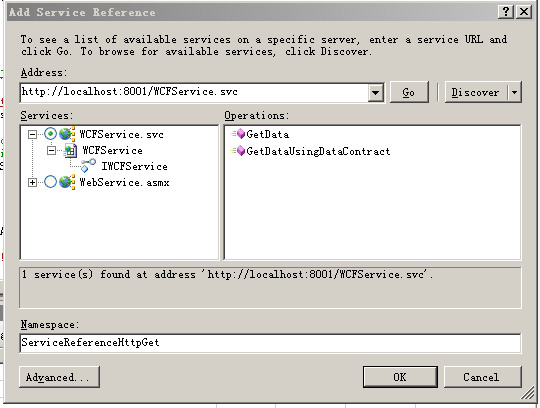
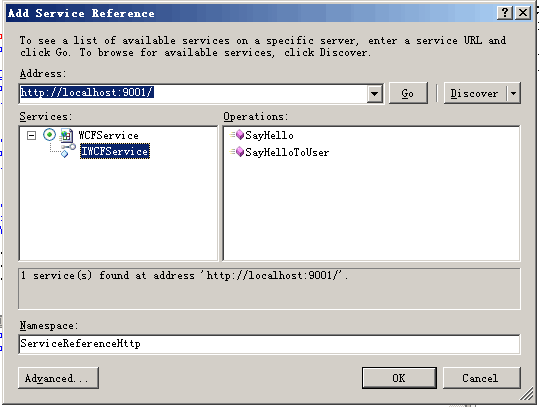
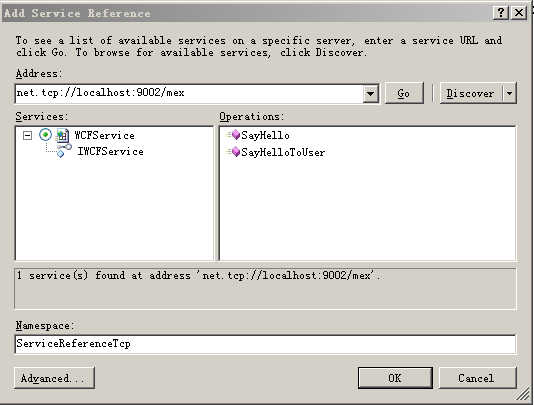
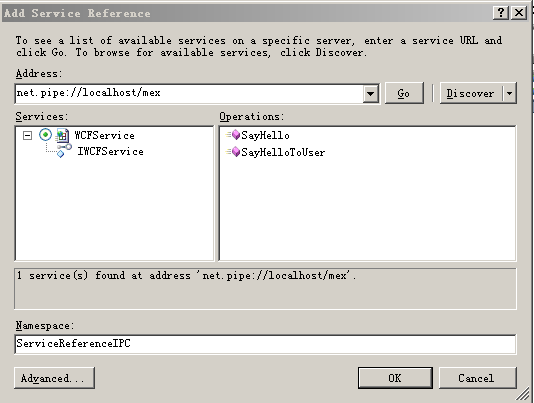
掌握 HTTP-GET 與 MEX 多協定配置與程式化控制,即可在實際專案中靈活部署 WCF 服務中繼資料交換,奠定異構系統整合的堅實基礎。
文章來源:https://www.cnblogs.com/frank_xl/