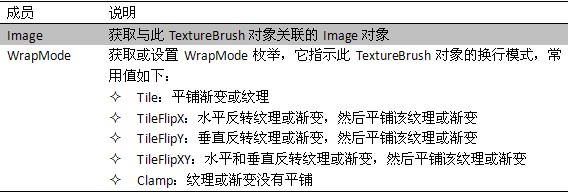
Brush 為抽象基類,用於定義填充圖形內部(矩形、橢圓、扇形、多邊形、封閉路徑)的物件。無法直接實例化,需使用衍生類:SolidBrush(單色)、TextureBrush(紋理)、LinearGradientBrush(漸層)。
System.Drawing.Brushes 提供預定義筆刷,如 Brushes.Blue。自訂紅色筆刷:
System.Drawing.Brush brush = new System.Drawing.SolidBrush(System.Drawing.Color.Red);
使用圖片作為填充紋理:
string brushfile = Server.MapPath("~/logo.gif");
string file = Server.MapPath("~/Element.jpg");
System.Drawing.Image brushimg = System.Drawing.Image.FromFile(brushfile);
System.Drawing.TextureBrush texture = new System.Drawing.TextureBrush(brushimg);
texture.WrapMode = System.Drawing.Drawing2D.WrapMode.Tile;

System.Drawing.Image img = System.Drawing.Image.FromFile(file);
System.Drawing.Graphics g = System.Drawing.Graphics.FromImage(img);
// 以紋理填充橢圓
g.FillEllipse(texture, new System.Drawing.RectangleF(90.0f, 110.0f, 100, 100));
g.Dispose();

Response.ContentType = "image/JPEG";
img.Save(Response.OutputStream, System.Drawing.Imaging.ImageFormat.Jpeg);
Font 定義文字格式(字體、大小、樣式)。常用屬性方法:
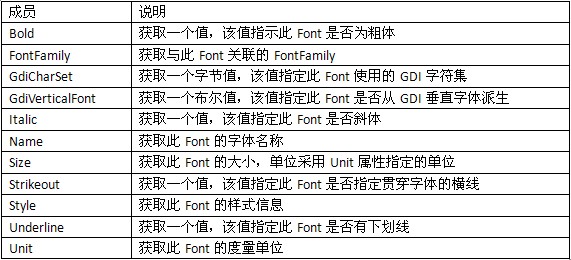

建立 10 點大小的新細明體:
System.Drawing.Font f1 = new System.Drawing.Font("新細明體", 10);Image 為 Bitmap 與 Metafile 的抽象基類。常用成員:
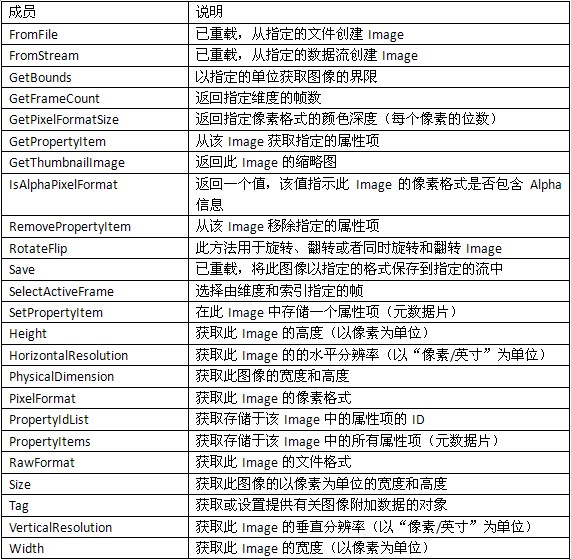
Image 不可直接實例化,透過靜態方法建構:
System.Drawing.Image img1 = System.Drawing.Image.FromFile(Server.MapPath("~/logo.gif"));實務上常用衍生類 Bitmap 處理像素資料。建構方式多樣:
System.Drawing.Bitmap bmp1 = new System.Drawing.Bitmap(Server.MapPath("~/logo.gif")); // 從檔案
System.Drawing.Bitmap bmp2 = new System.Drawing.Bitmap(300, 200); // 新建 300x200 畫布
Bitmap 提供 RotateFlip 實現圖像翻轉旋轉,參數為 RotateFlipType:
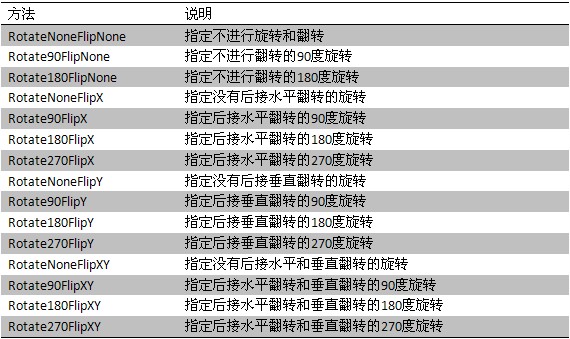
System.Drawing.Bitmap bmp1 = new System.Drawing.Bitmap(Server.MapPath("~/logo.gif"));
bmp1.RotateFlip(System.Drawing.RotateFlipType.Rotate90FlipX); // 水平翻轉 90 度

Response.ContentType = "image/JPEG";
bmp1.Save(Response.OutputStream, System.Drawing.Imaging.ImageFormat.Jpeg);