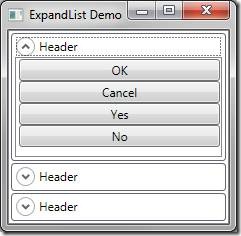
目標效果:多個面板垂直排列,點擊展開該面板填滿可用空間,其餘自動收合。


ListBoxExpanderExpander.IsExpanded 與 ListBox.SelectedItem 綁定ControlTemplate:
<ControlTemplate x:Key="ExpandListItemTemplate" TargetType="{x:Type ListBoxItem}">
  <Border BorderThickness="1">
    <Border CornerRadius="3" Padding="2,1,2,2" BorderThickness="1" BorderBrush="#FF666670">
      <Expander Header="Header" Content="{TemplateBinding Content}"
        IsExpanded="{Binding IsSelected, RelativeSource={RelativeSource TemplatedParent}}"/>
    </Border>
  </Border>
</ControlTemplate>
Style 串聯:
<Style x:Key="MostSimple" TargetType="{x:Type ListBox}">
  <Setter Property="SelectionMode" Value="Single"/>
  <Setter Property="ScrollViewer.VerticalScrollBarVisibility" Value="Disabled"/>
  <Setter Property="ItemContainerStyle" Value="{StaticResource ExpandListItemStyle}"/>
</Style>
主體 XAML:
<ListBox Style="{StaticResource MostSimple}">
  <ListBoxItem><ListBox><Button Content="OK"/>...</ListBox></ListBoxItem>
  <ListBoxItem><ListBox><CheckBox Content="Close"/>...</ListBox></ListBoxItem>
  <ListBoxItem><ListBox><RadioButton Content="Stay"/>...</ListBox></ListBoxItem>
</ListBox>
問題: 展開的 Expander 未填滿空間(預設 VirtualizingStackPanel 向上對齊)。
DockPanel.LastChildFill 需動態改變 LastChild,無簡單方法實現(重排 Item 過於變態)。
邏輯:找出最高的 Child(展開項),讓它填滿剩餘空間,其餘按期望大小排列。
public class GroupPanel : Panel {
    private UIElement largestChild;
    private double totalHeight;

    protected override Size MeasureOverride(Size availableSize) {
        totalHeight = 0; double width = 0; largestChild = null;
        foreach (UIElement child in Children) {
            child.Measure(availableSize);
            if (largestChild == null || child.DesiredSize.Height >= largestChild.DesiredSize.Height)
                largestChild = child;
            totalHeight += child.DesiredSize.Height;
            if (child.DesiredSize.Width > width) width = child.DesiredSize.Width;
        }
        return new Size(width, totalHeight);
    }

    protected override Size ArrangeOverride(Size finalSize) {
        double yOffset = 0;
        foreach (UIElement child in Children) {
            if (child == largestChild) {
                double finalHeight = child.DesiredSize.Height + finalSize.Height - totalHeight;
                child.Arrange(new Rect(0, yOffset, finalSize.Width, finalHeight));
                yOffset += finalHeight;
            } else {
                child.Arrange(new Rect(0, yOffset, finalSize.Width, child.DesiredSize.Height));
                yOffset += child.DesiredSize.Height;
            }
        }
        return finalSize;
    }
}
套用: <ItemsPanelTemplate><c:GroupPanel/></ItemsPanelTemplate>
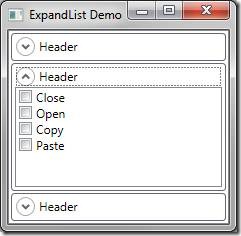
結語:WPF 內建 Panel 功能基礎,掌握自定義 Panel 開發對實現常見佈局極有幫助。博客已分享三款自定義 Panel 實戰。