承接《DeepEarth 幾何圖形基礎框架模型》,本文實戰示範 **點圖層、線條圖層、多邊形** 繪製,並深入實作 **自訂圖片圖層 (繼承 PointBase + ControlTemplate)** 含事件互動。
DeepEarth.dll、DeepEarth.Geometry.dll)Map 已初始化並加入視覺樹
var transformLayer = new GeometryLayer(map)
{
    UpdateMode = GeometryLayer.UpdateModes.TransformUpdate,
    ID = Guid.NewGuid().ToString()
};
map.Layers.Add(transformLayer);

var dot = new PointBase
{
    X = 106.5726,    // 經度
    Y = 29.5627,     // 緯度
    Width = 100,     // 像素寬度
    Opacity = 0.88   // 透明度
};
transformLayer.Add(dot);
💡 PointBase 為幾何圖形基類,**單一地理座標點**,支援寬高、不透明度、旋轉等視覺屬性。
var transformLayer = new GeometryLayer(map)
{
    UpdateMode = GeometryLayer.UpdateModes.TransformUpdate,
    ID = Guid.NewGuid().ToString()
};
map.Layers.Add(transformLayer);

var line = new LineString(Colors.Yellow, 2) // 前景色、線寬
{
    Points = new ObservableCollection
    {
        new Point(104.062021177233, 30.6666587469201), // 起點
        new Point(106.489384971208, 29.5076372217973)  // 終點
    }
};

// 滑鼠互動:進入變綠、離開還原黃
line.MouseEnter += (s, e) => ((LineString)s).LineColor = Colors.Green;
line.MouseLeave += (s, e) => ((LineString)s).LineColor = Colors.Yellow;

transformLayer.Add(line);
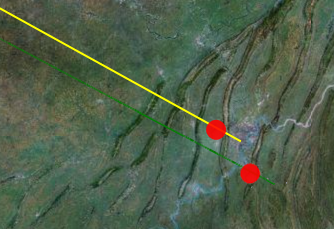
💡LineString繼承PointBase,**Points 集合** 定義折線頂點,自動投影至地圖投影坐標系。
public class ImageLayer : PointBase
{
    protected Grid RootElement;

    public ImageLayer(Point point)
    {
        base.X = point.X;
        base.Y = point.Y;
        // 套用定義於 App.xaml/ResourceDictionary 的 Style
        this.Style = Application.Current.Resources["ImageLayerStyle"] as Style;
    }

    public override void OnApplyTemplate()
    {
        base.OnApplyTemplate();
        // 設定預設圖片
        this.ImagePath = new BitmapImage(new Uri("Resources/arrow.png", UriKind.Relative)) as ImageSource;
        RootElement = GetTemplateChild("RootElement") as Grid;
    }

    #region 依賴屬性:ImagePath
    public ImageSource ImagePath
    {
        get { return (ImageSource)GetValue(ImagePathProperty); }
        set { SetValue(ImagePathProperty, value); }
    }

    public static readonly DependencyProperty ImagePathProperty =
        DependencyProperty.Register("ImagePath", typeof(ImageSource), typeof(ImageLayer),
            new PropertyMetadata(null, (sender, e) =>
            {
                var layer = sender as ImageLayer;
                var img = layer?.GetTemplateChild("imageName") as Image;
                if (img != null) img.Source = e.NewValue as ImageSource;
            }));
    #endregion
}
💡PointBase間接繼承Control,**完整擁有 Silverlight 控制項特性**:模板、視覺狀態、事件 (MouseLeftButtonDown/Up、MouseEnter/Leave)、動畫、資料繫結。
var imageLayer = new GeometryLayer(map)
{
    UpdateMode = GeometryLayer.UpdateModes.TransformUpdate,
    ID = Guid.NewGuid().ToString()
};
map.Layers.Add(imageLayer);

var layer = new ImageLayer(new Point(106.5834, 29.5708));
imageLayer.Add(layer);
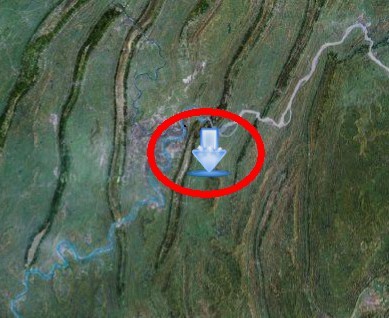
因 ImageLayer 為 Control 子類別,**原生支援所有 UI 事件**:
layer.MouseLeftButtonDown += (s, e) => { /* 點擊處理 */ };
layer.MouseLeftButtonUp += (s, e) => { /* 釋放處理 */ };
layer.MouseEnter += (s, e) => { /* 滑鼠進入:可觸發動畫/顯示 ToolTip */ };
layer.MouseLeave += (s, e) => { /* 滑鼠離開 */ };
進階需求:可定義自訂路由事件 (CustomRoutedEvent)、命令繫結 (ICommand)、視覺狀態群組 (VisualStateManager) 實現豐富互動。
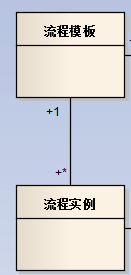
| 類別 | 繼承 | 用途 | 關鍵屬性 |
|---|---|---|---|
| PointBase | Control | 單點幾何基類 | X, Y, Width, Height, Opacity, Rotation |
| LineString | PointBase | 折線/線段 | Points (ObservableCollection<Point>), LineColor, StrokeThickness |
| Polygon | PointBase | 多邊形 (自動閉合) | Points, Fill, Stroke |
| GeometryLayer | LayerBase | 幾何圖形容器圖層 | UpdateMode (TransformUpdate/Redraw), Children |
DeepEarth 提供 **靈活的幾何圖形模型**:PointBase 為根,**單點用 PointBase、線用 LineString、面用 Polygon**,皆可直接加入 GeometryLayer。**自訂圖層只需繼承 PointBase、覆寫 ControlTemplate、定義依賴屬性**,即獲得完整 Silverlight 控制項能力 (模板、事件、動畫、繫結)。此架構讓地圖標繪從「死板 API」進化為「可組合、可樣式化、可互動」的現代 UI 開發體驗。