本文示範在 Visual Studio 中建立 SQL Server Project,完整實作五類 CLR 資料庫物件:使用者定義函數 (UDF)、資料流表值函數 (TVF)、預存程序、觸發器、使用者定義型別 (UDT)、使用者定義彙總 (UDA),涵蓋編碼、部署、驗證全流程。
EXEC sp_configure 'clr enabled', 1; RECONFIGURE WITH OVERRIDE;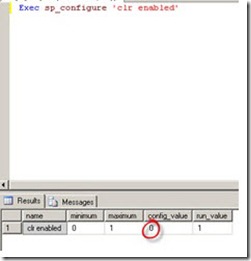
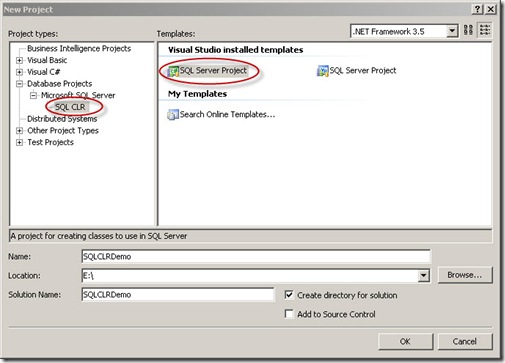
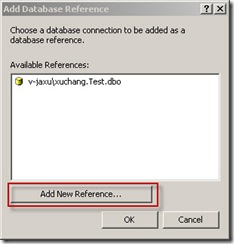
範本:User-Defined Function → DateTimePre.cs
[SqlFunction]
public static SqlString DateTimePre(string input, string format) {
    return new SqlString($"{DateTime.Now.ToString(format)}:{input}");
}
partial,方法 public static,標記 [SqlFunction]SqlString 等 SQL 型別部署驗證:SSMS → Programmability → Functions → Scalar-valued Functions 見 DateTimePre
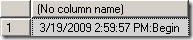
SELECT dbo.DateTimePre('Begin', 'yyyy-MM-dd HH:mm:ss')
-- 2024-01-15 14:30:00:Begin
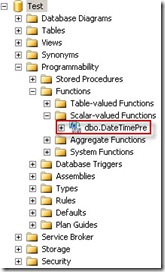
關鍵屬性:FillRowMethodName、TableDefinition、DataAccess = DataAccessKind.Read
[SqlFunction(DataAccess = DataAccessKind.Read,
              FillRowMethodName = "BuildRow",
              TableDefinition = "Name nvarchar(32), Length bigint, Modified DateTime")]
public static IEnumerable FileListCs(string directoryName, string pattern) {
    WindowsImpersonationContext ctx = SqlContext.WindowsIdentity.Impersonate();
    try {
        var di = new DirectoryInfo(directoryName);
        return di.GetFiles(pattern); // 回傳 FileInfo[] 實作 IEnumerable
    } finally { if (ctx != null) ctx.Undo(); }
}

private static void BuildRow(object obj,
    ref SqlString fileName, ref SqlInt64 fileLength, ref SqlDateTime fileModified) {
    if (obj is FileInfo fi) {
        fileName = fi.Name; fileLength = fi.Length; fileModified = fi.LastWriteTime;
    } else { fileName = SqlString.Null; fileLength = SqlInt64.Null; fileModified = SqlDateTime.Null; }
}
FillRowMethodName 指定將每列物件轉為資料行的方法TableDefinition 定義輸出資料表結構DataAccessKind.Read 必須宣告,否則存取 SqlContext.WindowsIdentity 會報錯WindowsImpersonationContext 必須 Undo()驗證:
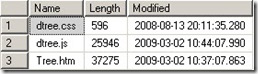
SELECT * FROM dbo.FileListCs('D:\TreeView', '*.*')
-- Name | Length | Modified
[SqlProcedure]
public static void GetData(string tableName) {
    using (var cn = new SqlConnection("context connection=true")) {
        using (var cmd = cn.CreateCommand()) {
            cmd.CommandText = $"SELECT * FROM {tableName}";
            cn.Open();
            SqlContext.Pipe.Send(cmd.ExecuteReader()); // 直接輸出結果集
        }
    }
}
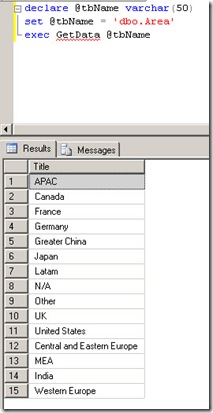
context connection=true 使用內部連線,效能最佳SqlContext.Pipe.Send 接受 SqlDataReader/SqlDataRecord/string驗證:Programmability → Stored Procedures → 右鍵執行
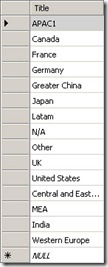
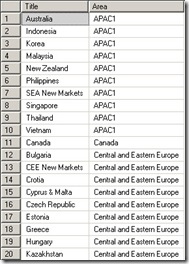
屬性:[SqlTrigger(Name="Triggers", Target="Area", Event="FOR UPDATE")]
[SqlTrigger(Name = "Triggers", Target = "Area", Event = "FOR UPDATE")]
public static void TriggersTest() {
    string sql = @"
        DECLARE @oldTitle VARCHAR(50), @newTitle VARCHAR(50);
        SELECT @oldTitle = Title FROM DELETED;
        SELECT @newTitle = Title FROM INSERTED;
        UPDATE Region SET Area = @newTitle WHERE Area = @oldTitle;";

    using (var cn = new SqlConnection("context connection=true")) {
        cn.Open();
        using (var cmd = cn.CreateCommand()) {
            cmd.CommandText = sql;
            SqlContext.Pipe.ExecuteAndSend(cmd);
        }
    }
}
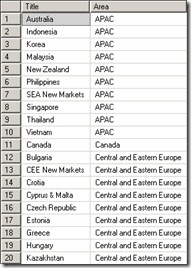
UPDATE Area SET Title='APAC' WHERE Title='APAC1' → Region 同步更新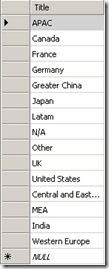
範本:User-Defined Type → 結構體實作 INullable,標記 [SqlUserDefinedType(Format.Native)]
[Serializable]
[SqlUserDefinedType(Format.Native)]
public struct Point : INullable {
    public int X, Y; private bool _null;
    public bool IsNull { get => _null; set => _null = value; }
    public static Point Null { get => new Point { _null = true }; }
    public static Point Parse(SqlString s) { /* 解析 "x:y" 格式 */ }
    public override string ToString() => IsNull ? "NULL" : $"{X}:{Y}";
    public SqlString Quadrant() { /* 依 X/Y 正負回傳 "right top" 等 */ }
}
驗證:
CREATE TABLE test_table (col1 Point);
INSERT INTO test_table VALUES ('1:2'), ('-2:3'), ('-3:-4');
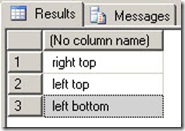
SELECT col1.Quadrant() FROM test_table;
-- right top / left top / left bottom
範本:Aggregate → 結構體標記 [SqlUserDefinedAggregate(Format.Native)]
[Serializable]
[SqlUserDefinedAggregate(Format.Native)]
public struct VowelCount {
    private SqlInt32 _count;
    public void Init() => _count = 0;
    public void Accumulate(SqlString value) {
        var vowels = new[] {"a","e","i","o","u"};
        foreach (char c in value.Value.ToLower())
            if (vowels.Contains(c.ToString())) _count++;
    }
    public void Merge(VowelCount other) => Accumulate(other.Terminate());
    public SqlString Terminate() => _count.ToString();
}
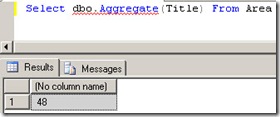
驗證:Programmability → Functions → Aggregate Functions
SELECT dbo.VowelCount(name) FROM some_table;
| 物件類型 | 適用場景 | 權限建議 |
|---|---|---|
| UDF (Scalar/TVF) | 計算、轉換、目錄掃描 | SAFE / EXTERNAL_ACCESS (需外部資源) |
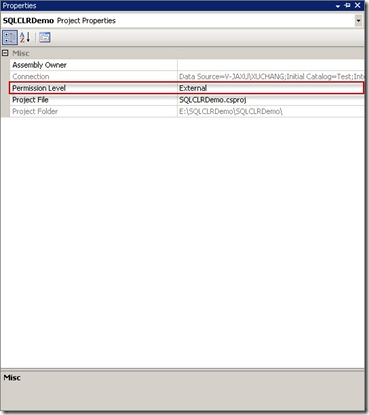
| 預存程序 | 複雜業務邏輯、結果集輸出 | EXTERNAL_ACCESS (常需外部存取) |
| 觸發器 | 資料完整性、跨表同步 | SAFE (純資料庫內部) |
| UDT | 複雜結構化資料 | SAFE |
| UDA | 自訂彙總邏輯 | SAFE |
VS 整合讓 SQL CLR 開發如同一般 .NET 專案:編碼 → 建置 → 右鍵 Deploy → SSMS 驗證。掌握六大物件類型與權限模型,即可將 .NET 生態能力無縫延伸至資料庫層。