本專案在 VS2008 環境下高仿 QQMusic 2008 播放器界面,核心挑戰在於實現非矩形、帶弧角、支援皮膚換膚的 WinForm 介面。本文分享從素材提取、XML 佈局解析到自繪渲染的完整製作方法論。
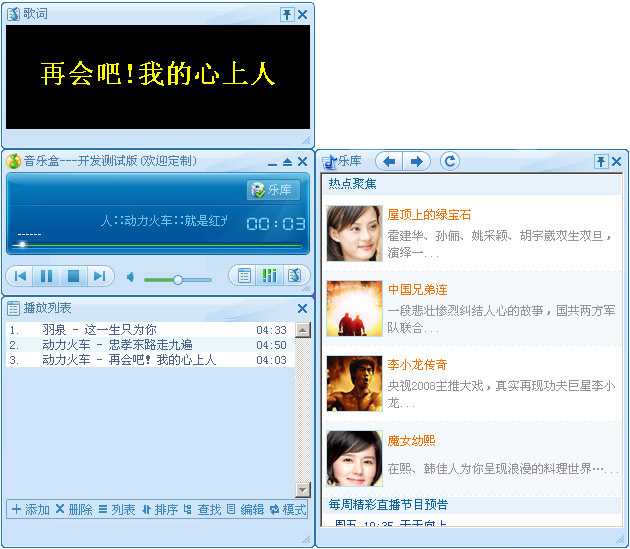
直接使用 QQMusic 安裝目錄下的皮膚資源(QQMusic2008\Player\),包含背景圖、按鈕狀態圖等。關鍵發現 config.xml 定義了介面佈局規則:
<theme version="1.0">
  <Window width="290" height="360" clippingColor="#FF00FF" style="hard">
    <!-- 背景三段式:左、中、右 -->
    <Picture id="Pic_BG_Left" image="..\Common\mainboard.bmp" x="5" y="23" w="92" h="123"
             left="0" top="0" width="92" height="123" relative="lt" ... />
    <Picture id="Pic_BG_Mid" image="..\Common\mainboard.bmp" x="98" y="23" w="5" h="123"
             left="92" top="0" width="76" height="123" relative="ltr" ... />
    <Picture id="Pic_BG_Right" image="..\Common\mainboard.bmp" x="103" y="23" w="122" h="123"
             left="168" top="0" width="122" height="123" relative="tr" ... />

    <!-- 搜尋框三段式 -->
    <Picture id="Pic_SearchLeft" image="..\Common\Search.bmp" ... relative="lt" />
    <Picture id="Pic_SearchMid" image="..\Common\Search.bmp" ... relative="ltr" />
    <Picture id="Pic_SearchRight" image="..\Common\Search.bmp" ... relative="tr" />

    <!-- 按鈕:多狀態圖片 -->
    <Button id="Btn_Search" transparentColor="#FF00FF" left="195" top="7" width="23" height="20">
      <Normal image="..\Common\SearchBtn.bmp" x="0" y="0" w="23" h="20" />
      <Over image="..\Common\SearchBtn.bmp" x="23" y="0" w="23" h="20" />
      <Down image="..\Common\SearchBtn.bmp" x="46" y="0" w="23" h="20" />
      <Event OnClick="1041" />
    </Button>
  </Window>
</theme>
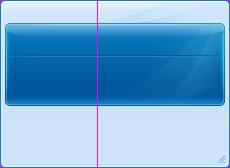
背景圖 mainboard.bmp 被切割為左、中、三三塊:
視窗寬度變化時:左塊靠左、右塊靠右、中塊平鋪填充。此即 QQ 系列軟體標誌性非矩形視窗的實現原理。
參考 QQ 結構,設計更簡潔的配置格式:
<player_window name="音樂盒Beta" transparent="Transparent" frontcolor="-11698270"
               x="20" y="20" w="314" h="147" icon="Logo.png">
  <!-- 九宮格:四角 + 四邊 + 中心 -->
  <window x="0" y="0" w="50" h="106" image="mainboard.bmp" direction="top_left" />
  <window x="50" y="0" w="70" h="106" image="mainboard.bmp" direction="top_middle" />
  <window x="120" y="0" w="109" h="106" image="mainboard.bmp" direction="top_right" />
  <window x="0" y="106" w="50" h="37" image="mainboard.bmp" direction="left" />
  <window x="120" y="106" w="109" h="37" image="mainboard.bmp" direction="right" />
  <window x="0" y="143" w="50" h="25" image="mainboard.bmp" direction="bottom_left" />
  <window x="50" y="143" w="70" h="25" image="mainboard.bmp" direction="bottom_middle" />
  <window x="120" y="143" w="109" h="25" image="mainboard.bmp" direction="bottom_right" />
</player_window>
| 屬性 | 含義 |
|---|---|
direction | 九宮格定位:四角/四邊/中心,決定繪製邏輯與拉伸行為 |
x, y, w, h | 源圖片上的裁剪矩形 |
transparent | 透明色鍵 (如 Transparent / #FF00FF) |
frontcolor | 前景文字顏色 (ARGB 整數) |
FormBorderStyle = None,自繪標題列與邊框Region = new Region(GraphicsPath),配合透明色鍵實現弧角SetStyle(ControlStyles.AllPaintingInWmPaint | ControlStyles.UserPaint | ControlStyles.OptimizedDoubleBuffer, true) 避免閃爍LayoutElement 繼承樹)Event OnClick="1041" 映射至命令處理器,解耦 UI 與業務邏輯WinForm 製作炫酷非標準 UI 的核心在於:素材三段式/九宮格切割 + XML 驅動佈局 + 自繪渲染管線 + 狀態機交互。此方法論不限於 QQMusic,可廣泛應用於任何需要高度客製化介面的 WinForm 專案。