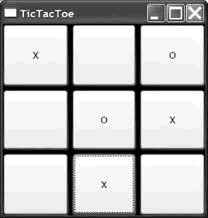
為了展示樣式在 WPF 中的重要性,我們以一個簡單的井字遊戲為例。以下是完全不使用樣式的 XAML 實作,使用 Grid 排列 9 個按鈕組成 3x3 棋盤:
<Window x:Class="TicTacToe.Window1"
        xmlns="https://schemas.microsoft.com/winfx/avalon/2005"
        xmlns:x="https://schemas.microsoft.com/winfx/xaml/2005"
        Title="TicTacToe">
  <Grid Background="Black">
    <Grid.RowDefinitions>
      <RowDefinition /><RowDefinition /><RowDefinition />
    </Grid.RowDefinitions>
    <Grid.ColumnDefinitions>
      <ColumnDefinition /><ColumnDefinition /><ColumnDefinition />
    </Grid.ColumnDefinitions>
    <Button Margin="0,0,2,2" Grid.Row="0" Grid.Column="0" x:Name="cell00" />
    <Button Margin="2,0,2,2" Grid.Row="0" Grid.Column="1" x:Name="cell01" />
    <Button Margin="2,0,0,2" Grid.Row="0" Grid.Column="2" x:Name="cell02" />
    <Button Margin="0,2,2,2" Grid.Row="1" Grid.Column="0" x:Name="cell10" />
    <Button Margin="2,2,2,2" Grid.Row="1" Grid.Column="1" x:Name="cell11" />
    <Button Margin="2,2,0,2" Grid.Row="1" Grid.Column="2" x:Name="cell12" />
    <Button Margin="0,2,2,0" Grid.Row="2" Grid.Column="0" x:Name="cell20" />
    <Button Margin="2,2,2,0" Grid.Row="2" Grid.Column="1" x:Name="cell21" />
    <Button Margin="2,2,0,0" Grid.Row="2" Grid.Column="2" x:Name="cell22" />
  </Grid>
</Window>
黑色背景配合按鈕間的間距,形成類似手繪棋盤的交叉線效果。遊戲邏輯在代碼後置檔案中實作,使用字串追蹤當前玩家(X 或 O),按鈕陣列追蹤格子狀態。
public partial class Window1 : Window {
  string currentPlayer;
  Button[] cells;

  public Window1() {
    InitializeComponent();
    this.cells = new Button[] { this.cell00, this.cell01, ... };
    foreach (Button cell in this.cells) {
      cell.Click += cell_Click;
    }
    NewGame();
  }
  // ... 遊戲邏輯:NewGame、cell_Click、HasWon、TieGame 等方法
}執行畫面顯示棋盤背景來自頁面空白,看似手繪木板,但按鈕上的 X 和 O 字體大小未與線條粗細匹配。若要修正,最直接的方式是為每個按鈕單獨設定字體屬性:
<Button FontSize="32" FontWeight="Bold" x:Name="cell00" />
<Button FontSize="32" FontWeight="Bold" x:Name="cell01" />
<Button FontSize="32" FontWeight="Bold" x:Name="cell02" />
...(共 9 個按鈕)
雖然視覺效果改善了,但未來若要調整字體大小或粗細,必須修改 9 個獨立位置的程式碼。這種重複性工作違反了程式設計的「不要重複自己」原則,也增加了維護成本與出錯風險。我們真正需要的是將所有棋盤格子的外觀定義集中在一個共同的地方——這正是樣式機制派上用場的時刻。