HKEY_CLASSES_ROOT\http\shell\open\command(預設值)HKEY_CLASSES_ROOT\http\shell\open\ddeexec\Application(預設值)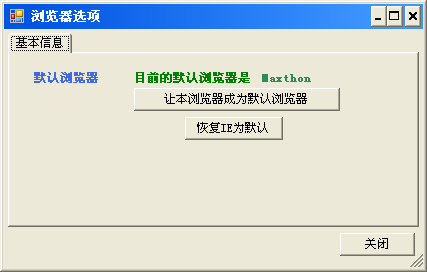
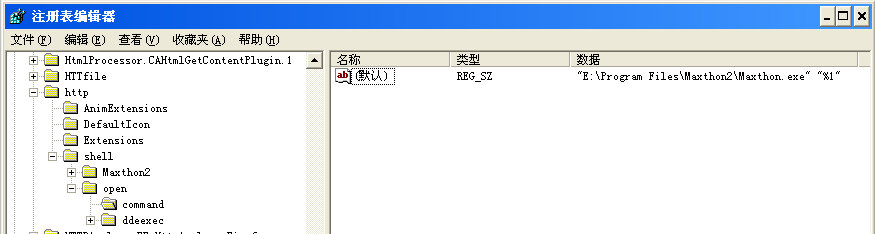
public static class RegistryHelper
{
    private const string MainKey = @"http\shell\open\command";
    private const string NameKey = @"http\shell\open\ddeexec\Application";

    /// 獲取預設瀏覽器命令字串
    public static string GetDefaultBrowserCommand()
    {
        try
        {
            using (RegistryKey regKey = Registry.ClassesRoot.OpenSubKey(MainKey))
            {
                return regKey?.GetValue("")?.ToString() ?? "";
            }
        }
        catch { return ""; }
    }

    /// 解析瀏覽器可執行檔路徑
    public static string GetDefaultBrowserPath()
    {
        string cmd = GetDefaultBrowserCommand();
        // 格式通常為: "C:\Path\Browser.exe" "%1"
        Match match = Regex.Match(cmd, @"""(?.*?)""");
        return match.Success ? match.Groups["path"].Value : "";
    }

    /// 設置自定義瀏覽器為預設
    public static bool SetDefaultBrowser(string browserExePath)
    {
        try
        {
            string value = $@"""{browserExePath}"" ""%1""";
            using (RegistryKey regKey = Registry.ClassesRoot.OpenSubKey(MainKey, true))
            {
                regKey?.SetValue("", value);
            }

            FileInfo fi = new FileInfo(browserExePath);
            string name = fi.Name.Replace(fi.Extension, "");
            using (RegistryKey regKey = Registry.ClassesRoot.OpenSubKey(NameKey, true))
            {
                regKey?.SetValue("", name);
            }
            return true;
        }
        catch (Exception ex)
        {
            LogHelper.Error(ex);
            return false;
        }
    }

    /// 恢復 IE 為預設瀏覽器
    public static bool ResetIEDefaultBrowser()
    {
        const string iePath = @"C:\Program Files\Internet Explorer\iexplore.exe";
        try
        {
            string value = $@"""{iePath}"" -- ""%1""";
            using (RegistryKey regKey = Registry.ClassesRoot.OpenSubKey(MainKey, true))
            {
                regKey?.SetValue("", value);
            }
            using (RegistryKey regKey = Registry.ClassesRoot.OpenSubKey(NameKey, true))
            {
                regKey?.SetValue("", "IExplore");
            }
            return true;
        }
        catch { return false; }
    }
} private void FrmOptions_Load(object sender, EventArgs e)
{
InitDefaultBrowser();
}
private void InitDefaultBrowser()
{
string path = RegistryHelper.GetDefaultBrowserPath();
try
{
FileInfo fi = new FileInfo(path);
this.lblDefaultName.Text = fi.Name.Replace(fi.Extension, "");
}
catch { this.lblDefaultName.Text = "未知"; }
}
private void btnSetDefault_Click(object sender, EventArgs e)
{
if (RegistryHelper.SetDefaultBrowser(Application.ExecutablePath))
{
MessageUtil.ShowTips("設置預設瀏覽器成功");
InitDefaultBrowser();
}
}
private void btnReset_Click(object sender, EventArgs e)
{
if (RegistryHelper.ResetIEDefaultBrowser())
{
MessageUtil.ShowTips("恢復 IE 為預設瀏覽器成功");
InitDefaultBrowser();
}
}HKCR 需管理員權限,應用程式需配置 requireAdministrator 清單"path" "%1",用 @"""(?.*?)""" 擷取路徑Registry.ClassesRoot 自動重導向,通常無需特殊處理透過操作 HKCR\http\shell\open\command 與 ddeexec\Application 兩個鍵值,即可完整實現預設瀏覽器的查詢、設置與重置。本文提供生產級輔助類與 WinForms 整合範例,含權限、解析、異常處理等實戰細節,可直接應用於瀏覽器類應用程式。