系列文從基礎開始,照顧無組件開發經驗的讀者。本章講解 Component 的屬性與事件特性。
BrowsableAttribute、CategoryAttribute、DescriptionAttribute、DefaultEventAttributeBrowsableAttribute、CategoryAttribute、DescriptionAttribute、DefaultPropertyAttribute、DefaultValueAttribute、EditorAttribute、DesignerSerializationVisibilityAttribute、TypeConverterAttribute、BindableAttribute、LocalizableAttribute本章重點講解紅色項目(Browsable、Category、Description、DefaultEvent、DefaultProperty、DefaultValue),藍色項目留待 Designer UI 章節,紫色不講。
Browsable:屬性視窗是否可見Category:所屬分組Description:簡短說明DefaultEvent:預設事件DefaultProperty:選中組件時屬性視窗預選屬性DefaultValue:預設值(註:設計時不自動賦值,僅影響代碼生成)[DefaultEvent("CustomerLogout")]
public class Customer : Component {
private string _id, _sex, _address;
private int _age;
private DateTime _createTime;
public string Id { get { return _id; } set { _id = value; } }
[Category("Customer's Details"), Description("Customer's Sex")]
public string Sex { get { return _sex; } set { _sex = value; } }
[Category("Customer's Details"), Description("Customer's Age"), DefaultValue(20)]
public int Age { get { return _age; } set { _age = value; } }
[DefaultValue("shanghai"), Category("Customer's Details")]
public string Address { get { return _address; } set { _address = value; } }
[Browsable(false)]
public DateTime CreateTime { get { return _createTime; } set { _createTime = value; } }
// 事件定義略...
}
效果:屬性視窗分組顯示、Age 預設值 20、Address 預設值 shanghai、CreateTime 隱藏、事件視窗預選 CustomerLogout。
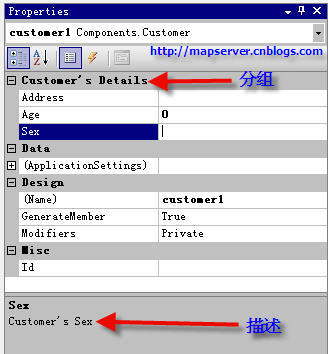
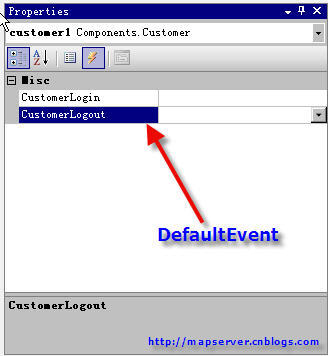
註:DefaultValueAttribute 不會在建立元件時自動賦值,後續章節補充說明。