SharePoint 2010 內建 RESTful WCF 服務 ListData.svc(位於 /_vti_bin/ListData.svc),支援 LINQ 查詢與 CRUD 操作。本文以「客戶」與「城市」兩個列表為例,示範在 Console 應用程式中加入服務參考後的完整操作範式。
https:///_vti_bin/ListData.svc → 命名空間 ListDataService。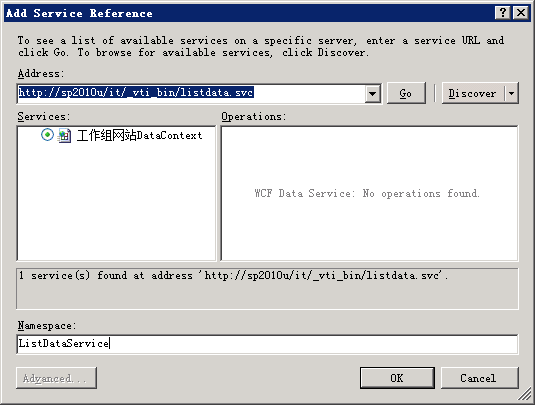
static ListDataService.工作組網站DataContext Ctx;
static void Main()
{
    Ctx = new ListDataService.工作組網站DataContext(
        new Uri("https://sp2010u/it/_vti_bin/listdata.svc"));
    Ctx.Credentials = System.Net.CredentialCache.DefaultCredentials; // Windows 整合驗證
    // 或 Ctx.Credentials = new NetworkCredential("user", "pwd", "domain");
}
// 關聯查詢:客戶 + 城市 + 國家
static void ListCustomerAndCityDetails()
{
    var q = from c in Ctx.客戶
            where c.城市 != null && c.城市.國家 != null
            select new { c.客戶, City = c.城市.城市, Country = c.城市.國家 };
    foreach (var r in q)
        Console.WriteLine($"客戶 {r.客戶} 生活在 {r.Country} 的 {r.City}");
}

// 簡單查詢
static void ListCustomers()
{
    foreach (var c in Ctx.客戶)
        Console.WriteLine($"{c.Id} - 客戶 {c.客戶}");
}
Fiddler 捕獲的實際 HTTP 請求:
GET /it/_vti_bin/listdata.svc/客戶()?$filter=(城市 ne null) and (城市/國家 ne null)
    &$expand=城市&$select=客戶,城市/城市,城市/國家

OData 查詢選項($filter、$expand、$select)自動轉換為 REST URL,極具可讀性。
static void AddCustomer(string cityName, string customerName)
{
    var city = Ctx.城市.Where(c => c.城市 == cityName).FirstOrDefault()
             ?? BuildNewCity(cityName); // 不存在則建立

    var client = new ListDataService.客戶Item
    {
        城市 = city,
        城市Id = city.Id, // 必須同時指定導覽屬性與 FK
        客戶 = customerName
    };
    Ctx.AddTo客戶(client);
    Ctx.SaveChanges(); // 送出 POST 請求
}

static ListDataService.城市Item BuildNewCity(string name)
{
    var city = new ListDataService.城市Item { 城市 = name };
    Ctx.AddTo城市(city);
    Ctx.SaveChanges();
    return Ctx.城市.Where(c => c.城市 == name).FirstOrDefault();
}
static void DeleteCustomer(int id)
{
    try
    {
        var client = Ctx.客戶.Where(c => c.Id == id).FirstOrDefault();
        if (client != null)
        {
            Ctx.DeleteObject(client);
            Ctx.SaveChanges(); // 送出 DELETE 請求
        }
    }
    catch (DataServiceQueryException)
    {
        Console.WriteLine("找不到該客戶!");
    }
}
static void ModifyCustomerSetNewCity(int id, string newCityName)
{
    var client = Ctx.客戶.Where(c => c.Id == id).FirstOrDefault();
    if (client == null) throw new ApplicationException("目標客戶不存在!");

    var city = Ctx.城市.Where(c => c.城市 == newCityName).FirstOrDefault()
             ?? BuildNewCity(newCityName);

    client.城市 = city;
    client.城市Id = city.Id; // 同新增:雙重指定
    Ctx.UpdateObject(client); // 標記為修改
    Ctx.SaveChanges(); // 送出 MERGE/PUT 請求
}
client.城市)與外鍵 ID(client.城市Id)兩者皆需賦值,否則更新不生效。NetworkCredential。SaveChanges 可能拋出 DataServiceRequestException,內含批次回應細節,需解析 ResponseBatch 取得具體錯誤。DataServiceQuery<T>.Skip/Take。ListData.svc 為 SharePoint 2010 提供了標準化、可程式化的資料存取介面,配合 LINQ 語法極大降低開發門檻。掌握 OData 查詢選項、實體狀態管理(Add/Update/DeleteObject)、查閱欄位雙重指定規則,即可高效實現各類整合案例。