內建 LinkLabel 強制底線、僅能改連結色、無法改背景色。自製元件可完整自訂 Hover/Active/Visited 狀態的前景、背景、字型、底線等。
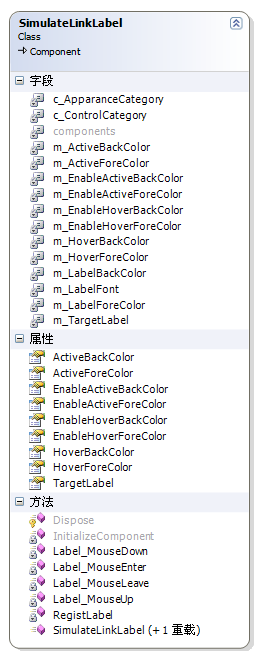
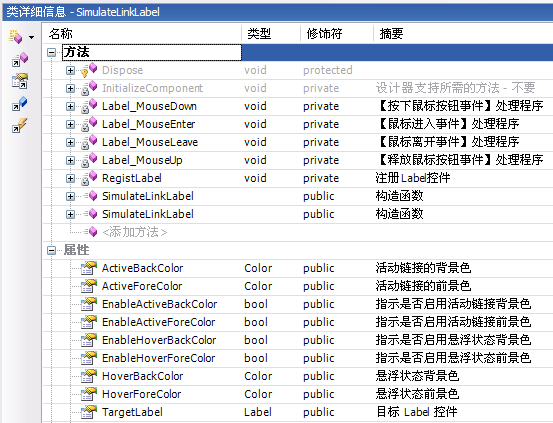
SimulateLinkLabel。System.Drawing、System.Windows.Forms。using System.Drawing; using System.Windows.Forms; using System.ComponentModel;。| 屬性 | 說明 |
|---|---|
| TargetLabel | 目標 Label,設定時自動解綁舊控件事件、綁定新控件 |
| EnableHoverForeColor / HoverForeColor | 滑鼠進入前景色 |
| EnableHoverBackColor / HoverBackColor | 滑鼠進入背景色 |
| EnableActiveForeColor / ActiveForeColor | 滑鼠按下前景色 |
| EnableActiveBackColor / ActiveBackColor | 滑鼠按下背景色 |
每個顏色屬性對應一個 EnableXxx 布林開關,預設 false,配合 DefaultValue(typeof(Color), "ColorName") 讓設計器正確序列化。
public Label TargetLabel
{
    get => m_TargetLabel;
    set
    {
        if (m_TargetLabel != value)
        {
            RemoveEventHandlers(); // 關鍵:避免多重綁定
            m_TargetLabel = value;
            AddEventHandlers();
        }
    }
}

void AddEventHandlers()
{
    if (m_TargetLabel != null && !DesignMode)
    {
        m_TargetLabel.MouseEnter += Label_MouseEnter;
        m_TargetLabel.MouseLeave += Label_MouseLeave;
        m_TargetLabel.MouseDown += Label_MouseDown;
        m_TargetLabel.MouseUp += Label_MouseUp;
    }
}
DesignMode 判斷:設計時不綁定事件,避免設計器誤觸發。
void Label_MouseEnter(...)
{
    if (item.Enabled)
    {
        // 備份原始樣式
        m_LabelForeColor = item.ForeColor;
        m_LabelBackColor = item.BackColor;
        m_LabelFont = item.Font;

        item.Cursor = Cursors.Hand;
        item.Font = new Font(m_LabelFont, m_LabelFont.Style | FontStyle.Underline); // 底線

        if (m_EnableHoverForeColor) item.ForeColor = m_HoverForeColor;
        if (m_EnableHoverBackColor) item.BackColor = m_HoverBackColor;
    }
}

void Label_MouseLeave(...) => 恢復備份的 ForeColor/BackColor/Font/Cursor;

void Label_MouseDown(...) => 啟用 Active 顏色;

void Label_MouseUp(...) => 根據 Hover 開關決定恢復 Hover 或原始顏色;
Font 不可變:需 new Font(...) 重建以加底線。
[DefaultProperty("TargetLabel")]
public class SimulateLinkLabel : Component { ... }
選中元件時屬性視窗自動聚焦 TargetLabel,加速設定。
SimulateLinkLabel。TargetLabel 為表單上既有 Label。VisitedLinkColor (需記錄點擊狀態)、圖片切換等。