NHibernate.Search 是 NHibernate Contrib 專案,移植自 Hibernate Search,將 NHibernate ORM 與 Lucene.NET 全文搜尋引擎無縫整合:資料持久化到資料庫,索引與查詢交給 Lucene.NET。
<configSections>
  <section name="hibernate-configuration" type="NHibernate.Cfg.ConfigurationSectionHandler, NHibernate"/>
  <section name="nhs-configuration" type="NHibernate.Search.Cfg.ConfigurationSectionHandler, NHibernate.Search" requirePermission="false"/>
</configSections>
<hibernate-configuration xmlns="urn:nhibernate-configuration-2.2">
  <session-factory name="NHibernateSearch.Demo">
    <property name="connection.driver_class">NHibernate.Driver.SQLite20Driver</property>
    <property name="connection.connection_string">Data Source=|DataDirectory|Demo.db3;Version=3;</property>
    <property name="dialect">NHibernate.Dialect.SQLiteDialect</property>
    <property name="show_sql">true</property>
    <mapping assembly="NHibernateSearch.Demo.Model"/>
  </session-factory>
</hibernate-configuration>
<nhs-configuration xmlns='urn:nhs-configuration-1.0'>
  <search-factory sessionFactoryName="NHibernateSearch.Demo">
    <property name='hibernate.search.default.directory_provider'>NHibernate.Search.Store.FSDirectoryProvider, NHibernate.Search</property>
    <property name='hibernate.search.default.indexBase'>~/Index</property>
    <property name='hibernate.search.default.indexBase.create'>true</property>
  </search-factory>
</nhs-configuration>
索引檔案將存放在專案根目錄下的 Index 資料夾。
需在程式碼中手動註冊(目前不支援純組態):
Configuration cfg = new Configuration();
cfg.SetListener(ListenerType.PostInsert, new FullTextIndexEventListener());
cfg.SetListener(ListenerType.PostUpdate, new FullTextIndexEventListener());
cfg.SetListener(ListenerType.PostDelete, new FullTextIndexEventListener());
cfg.Configure();
sessionFactory = cfg.BuildSessionFactory();
新增、修改、刪除實體時,索引將自動更新,支援批次提交以優化效能。
[Indexed(Index = "Book")]
public class Book
{
    [DocumentId]
    public virtual string BookID { get; set; }

    [Field(Index.Tokenized, Store = Store.Yes)]
    public virtual string Title { get; set; }

    [Field(Index.Tokenized, Store = Store.Yes)]
    public virtual string Authors { get; set; }

    [Field(Index.Tokenized, Store = Store.Yes)]
    public virtual string Publisher { get; set; }

    [Field(Index.Tokenized, Store = Store.Yes)]
    public virtual string Summary { get; set; }
}
屬性標記即完成索引定義,CRUD 操作自動觸發索引維護。
public static IList<BookSearchResult> FindBooks(string query)
{
    var results = new List<BookSearchResult>();
    var analyzer = new StandardAnalyzer();
    var parser = new MultiFieldQueryParser(new[] { "Title", "Summary", "Authors", "Publisher" }, analyzer);
    Query luceneQuery;
    try { luceneQuery = parser.Parse(query); }
    catch (ParseException) { return results; }

    IFullTextSession fts = Search.CreateFullTextSession(NHibernateHelper.GetCurrentSession());
    var books = fts.CreateFullTextQuery(luceneQuery, typeof(Book)).List<Book>();

    // 高亮器建立
    var formatter = new SimpleHTMLFormatter("<b class='term'>", "</b>");
    var highlighter = new Highlighter(formatter);

    foreach (var book in books)
    {
        var result = new BookSearchResult(book);
        result.HighlightedTitle = highlighter.GetBestFragment(analyzer, "Title", book.Title);
        result.HighlightedSummary = highlighter.GetBestFragments(analyzer, "Summary", book.Summary, 3, "...<br/><br/>...");
        // ... 其他欄位同理
        results.Add(result);
    }
    return results;
}
關鍵點:
IFullTextSession 執行全文查詢。MultiFieldQueryParser 支援多欄位同時搜尋。Highlighter 配合 SimpleHTMLFormatter 實現關鍵字高亮。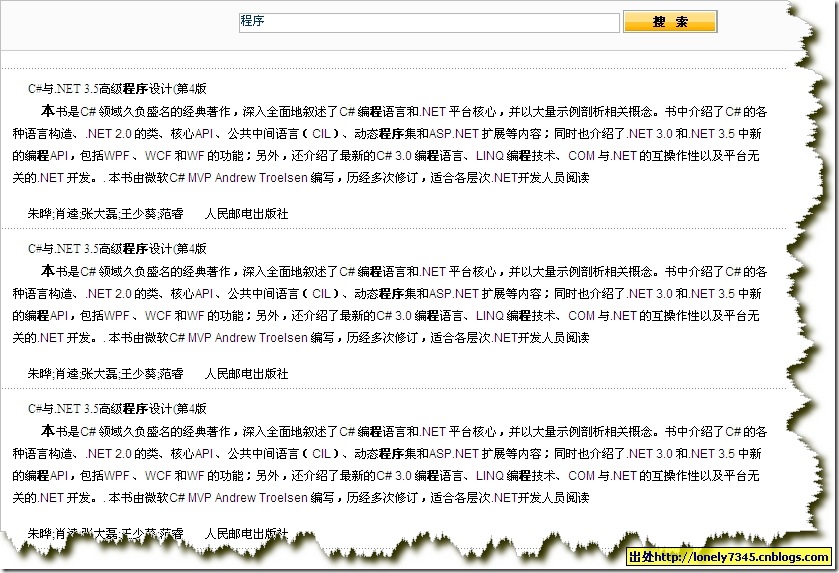
輸入關鍵字「程式」即時顯示符合記錄,關鍵字以粗體標示,效能遠優於資料庫 LIKE 查詢。