向程式輸入大量隨機/半隨機/惡意構造資料,觀察是否崩潰。三大結果:
策略:已知合法輸入 (繞過驗證層) + 故意錯誤輸入 (針對可疑邊界) + 隨機輸入 (探索未知) — 迭代微調,人機結合。
MyTest 範例為起點MyTestAdapter → FuzzTestAdaptermytest.ico、mytestui.rcmytestui 專案後建置事件路徑 (ctc.exe 絕對路徑)
public void Run(ITestElement testElement, ITestContext testContext) {
    var test = (MyTest)testElement;
    var result = new MyTestResult(...);
    var timer = Stopwatch.StartNew();
    bool errorFound = false;

    for (int i = 0; i < char.MaxValue; i++) {
        char ch = Convert.ToChar(i);
        string cmdLine = test.CommandLine.Replace("", "\"" + ch + "\"");

        var p = new Process {
            StartInfo = {
                FileName = cmdLine.Substring(0, exeEnd),
                Arguments = cmdLine.Substring(exeEnd + 1),
                UseShellExecute = false, CreateNoWindow = true,
                RedirectStandardInput = true, RedirectStandardOutput = true, RedirectStandardError = true
            }
        };
        p.Start();
        p.StandardInput.WriteLine();
        string err = p.StandardError.ReadToEnd();
        p.WaitForExit();

        if (!string.IsNullOrEmpty(err)) {
            errorFound = true;
            result.Outcome = TestOutcome.Failed;
            result.ErrorMessage = $"Input: {cmdLine}, Error: {err}";
            break;
        }
    }

    if (!errorFound) result.Outcome = TestOutcome.Passed;
    timer.Stop(); result.Duration = timer.Elapsed;
    testContext.ResultSink.AddResult(result);
}
關鍵點:
<FuzzTestString> 支援參數化SuppressMessage 屬性允許捕獲所有異常
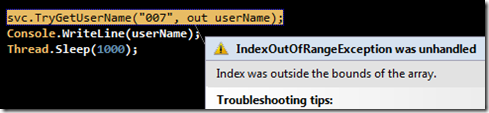
Int32 arraySize = Math.Max(Math.Max('Z', 'A'), Math.Max('z', 'a')) + 1;
int[] charCountArray = new int[arraySize];
char c = inputString[0];
charCountArray[c] += 1; // 非字母字元導致 IndexOutOfRange
模糊測試快速觸發陣列越界異常。
deploy.bat (複製組件、regpkg.exe 註冊)devenv /setup 合併封裝中繼資料TestProject 為啟動專案Run 斷點觀察每次迴圈啟動過程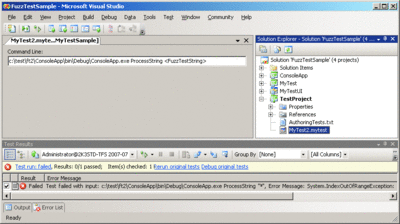
Microsoft.VisualStudio.QualityTools.Samples.MyTestTIP.dll 至 PrivateAssemblies自適應模糊測試 + VSTS 自動化框架 = **人類直覺 + 機器耐力** = 完美測試覆蓋。專案源碼:下載連結。