TFS 服務集合中的支援服務,觸發事件後可發送 Email 或呼叫 SOAP Web Service。適用 TFS 2005/2008。
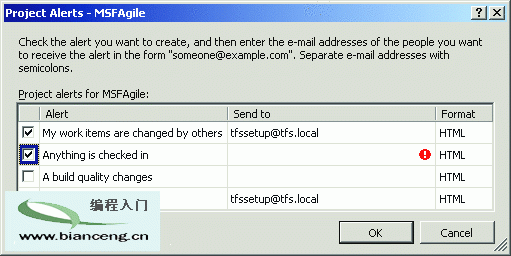
四大事件:簽入、建置完成、建置狀態變更、指派工作項目變更。可設多 Email、HTML/純文字格式。
C:\Program Files\Microsoft Visual Studio 2008 Team Foundation Server\Web Services\Services\v1.0\Transforms 目錄下 28 個檔案:eMailTemplate、plaintextXsl、XSD、XSL。修改 XSL 即可客製化 Email 版面,修改後下次事件自動生效。
| 服務 | 事件 | 註冊服務列出 |
|---|---|---|
| 工作項目追蹤 | WorkItemChangedEvent | 否 |
| 版本控制 | CheckinEvent | 是 |
| 團隊專案建置 | BuildCompletionEvent2 | 是 |
| 團隊專案建置 | BuildStatusChangeEvent | 是 |
| 團隊專案建置 | BuildCompletionEvent | 是 (升級相容) |
| 公共結構服務 | ProjectCreatedEvent / ProjectDeletedEvent | 是 |
| GSS/授權/CSS | DataChangedEvent (子類型:結構/安全性/身分) | 否 |
註冊服務列舉代碼:
Dim rs As IRegistration = mtfs.GetService(GetType(IRegistration))
For Each re In rs.GetRegistrationEntries(String.Empty)
    Debug.WriteLine(re.Type)
    For Each et In re.EventTypes : Debug.WriteLine("-->" & et.Name) : Next
Nextbissubscribe /eventType CheckinEvent /address user@domain /deliveryType EmailHtml /server tfs08
bissubscribe /eventType CheckinEvent /address https://host/Service.asmx /deliveryType Soap /server tfs08
bissubscribe unsubscribe /id 7 /server tfs08支援篩選器(如 /filter "'Artifacts/Artifact[@TeamProject = MSFAgile]' <> null")。
Dim es As IEventService = mtfs.GetService(GetType(IEventService))
Dim userSubs = es.EventSubscriptions(Environment.UserDomainName & "\" & Environment.UserName)
' 列舉/刪除 userSubs(i).ID

Dim dp As New DeliveryPreference()
dp.Address = $"https://{mtfs.Uri.Authority}/MSDNMagTFSEvents/ProcessEvents.asmx"
dp.Schedule = DeliverySchedule.Immediate
dp.Type = DeliveryType.Soap
Dim filter = If(chkProject.Checked, $"PortfolioProject = '{cboProject.Text}'", Nothing)
Dim subId = es.SubscribeEvent(mtfs.AuthenticatedUserName, "WorkItemChangedEvent", filter, dp)Notify 方法:<SoapDocumentMethod("https://schemas.microsoft.com/TeamFoundation/2005/06/Services/Notification/03/Notify", ...)>
<WebMethod()>
Public Sub Notify(ByVal eventXml As String, ByVal tfsIdentityXml As String)
' eventXml 含事件完整資料,可用 LINQ to XML 解析
' 範例:偵測 Title 變更並寫入 Windows 事件日誌
End Subtfsservice 帳戶執行,具備存取其他 TFS 特權服務能力。tfseventsubscription。EventService 提供強大彈性,配合 Email/XSLT 或自定義 Web Service 可滿足各式整合與通知需求。