綁定由有序綁定元素組成,每個元素對應一個處理步驟,運行時建立通道堆疊:
提供 WS-ReliableMessaging 可靠會話,保證訊息不重複、順序正確。配置:
<customBinding>
  <binding name="reliabilityhttp">
    <reliableSession />
  </binding>
</customBinding>三種具體實現對應 WS-SecurityPolicy:
SymmetricSecurityBindingElement:對稱加密AsymmetricSecurityBindingElement:非對稱加密TransportSecurityBindingElement:混合模式(傳輸層安全)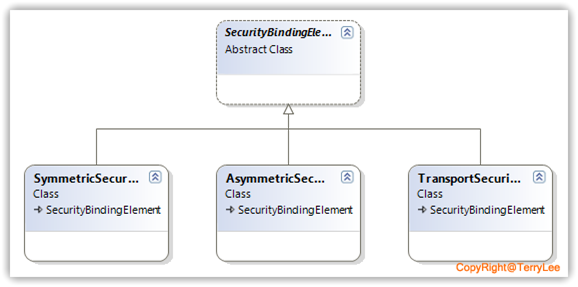
啟用傳入交易流,指定協定格式(WS-AtomicTransaction 等)。
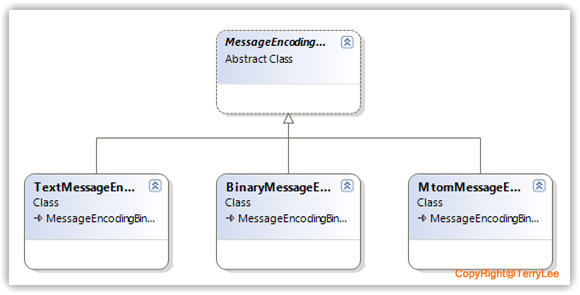
| 元素 | 特點 | 適用場景 |
|---|---|---|
| TextMessageEncodingBindingElement | 互操作性最強、效率最低 | 跨平台、非二進制資料 |
| BinaryMessageEncodingBindingElement | 效率最高、互操作性最低 | .NET 之間、高效能 |
| MtomMessageEncodingBindingElement | 效率與互操作平衡、大型二進制優化 | 含大量二進制資料的跨平台 |
TcpTransportBindingElement
HttpTransportBindingElement
HttpsTransportBindingElement
NamedPipeTransportBindingElement
PeerTransportBindingElement
MsmqTransportBindingElement
MsmqIntegrationBindingElement
ConnectionOrientedTransportBindingElement
亦可自訂傳輸元素。
程式碼範例:
var reliable = new ReliableSessionBindingElement { Ordered = false };
var text = new TextMessageEncodingBindingElement { MessageVersion = MessageVersion.Soap11WSAddressingAugust2004 };
var http = new HttpTransportBindingElement { TransferMode = TransferMode.Streamed, UseDefaultWebProxy = true };

var binding = new CustomBinding();
binding.Elements.Add(reliable);
binding.Elements.Add(text);
binding.Elements.Add(http);繼承 BindingElement 抽象基類,核心覆寫 Clone()、GetProperty<T>():
public class LoggingBindingElement : BindingElement
{
    public override BindingElement Clone() => new LoggingBindingElement(this);
    public override T GetProperty<T>(BindingContext context)
    {
        if (context == null) throw new ArgumentNullException("context");
        return context.GetInnerProperty<T>();
    }
}
完整自訂綁定元素範例將於後續通道模型文章示範。
本文詳細解析 WCF 內建綁定元素分類、特性、順序規則與自訂開發基礎,為構建高階自訂綁定奠基。