WPF 將圖形物件提升至與控制項近乎同等地位:參與版面配置、接收輸入事件、保留模式免重繪、支援資料繫結與轉換。System.Windows.Shapes 命名空間提供 Shape 抽象基類與六個密封衍生類:Line、Polyline、Polygon、Path、Rectangle、Ellipse。其中 Path 最強大,對應 DrawingContext.DrawGeometry,支援 XAML 路徑微型語言。
Line、Polyline、Polygon、Path 指定實際座標點:
Line line = new Line { X1=100, Y1=50, X2=200, Y2=150,
                       Stroke=Brushes.Blue, StrokeThickness=12 };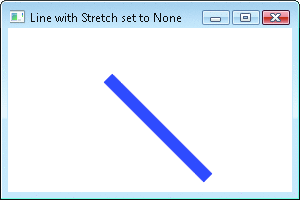
預設 Stretch=None。設 Stretch=Fill 可填滿父容器:
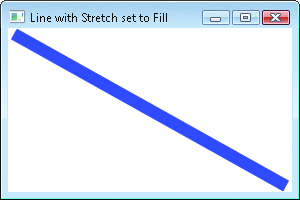
Rectangle、Ellipse 無需座標,預設填滿父容器內部區域:
Ellipse el = new Ellipse { Fill=Brushes.Red, Stroke=Brushes.Blue, StrokeThickness=12 };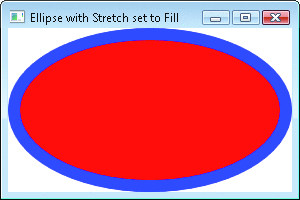
預設 Stretch=Fill。設 Stretch=None 則縮為小圓點:
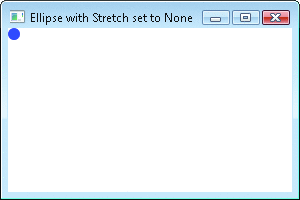
可透過 Width/Height/Alignment 控制具體大小。Canvas 父容器下必須明確設定尺寸。
Stroke、StrokeThickness、StrokeStartLineCap、StrokeEndLineCap、StrokeDashArray 等,內部構建 Pen 物件,XAML 使用極便利None/Fill/Uniform/UniformToFillDefiningGeometry (protected abstract):衍生類必須實作,回傳定義圖形的 GeometryGeometryTransform (public virtual):Shape 計算的縮放/平移轉換RenderedGeometry (public virtual):GeometryTransform(DefiningGeometry) 實際繪製幾何DefiningGeometry 會頻繁呼叫 (屬性變更、版面重算),實作必須避免每次 new Geometry() 造成 GC 壓力。
public class PointLine : Shape {
    LineGeometry linegeo = new LineGeometry(); // 單一實例重用

    public static readonly DependencyProperty StartPointProperty =
        LineGeometry.StartPointProperty.AddOwner(typeof(PointLine),
            new FrameworkPropertyMetadata(new Point(0,0), FrameworkPropertyMetadataOptions.AffectsMeasure));
    public static readonly DependencyProperty EndPointProperty =
        LineGeometry.EndPointProperty.AddOwner(typeof(PointLine),
            new FrameworkPropertyMetadata(new Point(0,0), FrameworkPropertyMetadataOptions.AffectsMeasure));

    public Point StartPoint { get => (Point)GetValue(StartPointProperty); set => SetValue(StartPointProperty, value); }
    public Point EndPoint { get => (Point)GetValue(EndPointProperty); set => SetValue(EndPointProperty, value); }

    protected override Geometry DefiningGeometry {
        get { linegeo.StartPoint = StartPoint; linegeo.EndPoint = EndPoint; return linegeo; }
    }
}關鍵:linegeo 為欄位單一實例,DefiningGeometry 僅更新屬性並回傳同一物件。
public class CenteredEllipse : Shape {
    EllipseGeometry elipGeo = new EllipseGeometry();
    RotateTransform xform = new RotateTransform();

    // 相依性屬性:Center, RadiusX, RadiusY, RotationAngle
    // 屬性變更處理器更新欄位並呼叫 InvalidateMeasure()

    public CenteredEllipse() { elipGeo.Transform = xform; }
    protected override Geometry DefiningGeometry => elipGeo;
}
使用 RotateTransform 欄位重用,屬性變更時更新角度與中心點。
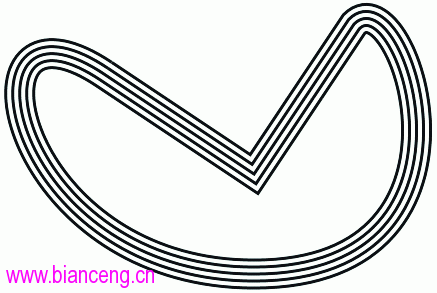
功能:輸入任意 Geometry,輸出平行多條線條 (指定 Number、Gap)。支援直線、Bézier 曲線、弧線。
<ps:ParallelPath Stroke="Black" StrokeThickness="3" Number="5" Gap="4" Tolerance="10">
  <ps:ParallelPath.Data>
    <PathGeometry>
      <PathFigure StartPoint="200 100">
        <PolyLineSegment Points="350 200, 450 50" />
        <PolyBezierSegment Points="500 0, 600 300, 350 300, 100 300, 50 0, 200 100" />
      </PathFigure>
    </PathGeometry>
  </ps:ParallelPath.Data>
</ps:ParallelPath>GetFlattenedPathGeometry 折線化 (近似曲線)PathGeometry、PathFigure、PolyLineSegment、List<Point> 物件,避免 GCStreamGeometry、CombinedGeometry 直接呼叫系統 GetFlattenedPathGeometry解決 Geometry.GetWidenedPathGeometry 必須重複呼叫、人為誤差大的問題。支援 StartLineCap/EndLineCap/LineJoin 自動添加端點圓弧與連接處理:
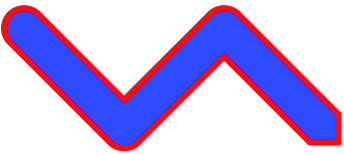
WidenedPath widePath = new WidenedPath();
widePath.Data = geo;
widePath.WideningPen = new Pen(null, 40); // 僅用幾何尺寸
widePath.Stroke = Brushes.Red; widePath.StrokeThickness = 6;
widePath.Fill = Brushes.Blue;
可調整 Tolerance 減少人為誤差。
將頂點置於半徑 1 圓周,交由 WPF Stretch 機制縮放。Width/Height=NaN + Stretch=Uniform/Fill 時表現優於 Ellipse (後者會縮成小球)。
Path 最靈活DefiningGeometry,善用相依性屬性與欄位重用避免 GCGeometryTransform/RenderedGeometry 由基類自動處理縮放邏輯ParallelPath、WidenedPath 等可重用元件