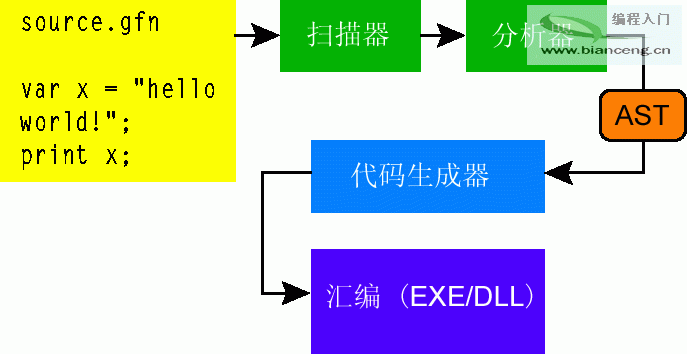
本文帶領讀者完成一個名為「Good for Nothing」的玩具語言編譯器,涵蓋詞法分析、語法分析、AST 構建、IL 代碼生成全流程,揭示 .NET 編譯器開發的核心原理與 System.Reflection.Emit 實戰技巧。
<stmt> := var <ident> = <expr> | <ident> = <expr> | for <ident> = <expr> to <expr> do <stmt> end
         | read_int <ident> | print <expr> | <stmt> ; <stmt>
<expr> := <string> | <int> | <arith_expr> | <ident>
<arith_expr> := <expr> <arith_op> <expr>
<arith_op> := + | - | * | /
<ident> := <char> <ident_rest>*
<ident_rest> := <char> | <digit>
支援變量聲明、賦值、for 循環、控制台 I/O、算術表達式,類型系統含 int/string 映射至 System.Int32/System.String。
public Scanner(TextReader input) {
    while (input.Peek() != -1) {
        char ch = (char)input.Peek();
        if (char.IsWhiteSpace(ch)) { input.Read(); continue; }
        if (ch == '"') {  // 字符串字面量
            input.Read(); var sb = new StringBuilder();
            while ((ch = (char)input.Peek()) != '"') { sb.Append(ch); input.Read(); }
            input.Read(); tokens.Add(sb.ToString()); continue;
        }
        if (char.IsLetter(ch) || ch == '_') { /* 標識符/關鍵字 */ }
        if (char.IsDigit(ch)) { /* 數字字面量 */ }
        /* 運算符、分號等單字符 Token */
    }
}public abstract class Stmt { }
public class DeclareVar : Stmt { public string Ident; public Expr Expr; }
public class Assign : Stmt { public string Ident; public Expr Expr; }
public class ForLoop : Stmt { public string Ident; public Expr From, To; public Stmt Body; }
public class Print : Stmt { public Expr Expr; }
public class ReadInt : Stmt { public string Ident; }
public class Sequence : Stmt { public Stmt First, Second; }
public abstract class Expr { }
public class IntLiteral : Expr { public int Value; }
public class StringLiteral : Expr { public string Value; }
public class Variable : Expr { public string Ident; }
public class ArithExpr : Expr { public Expr Left, Right; public ArithOp Op; }private Stmt ParseStmt() {
if (tokens[index].Equals("print")) { index++; return new Print { Expr = ParseExpr() }; }
if (tokens[index].Equals("var")) { index++; /* 解析聲明 */ }
if (tokens[index].Equals("for")) { index++; /* 解析 for 循環 */ }
if (tokens[index] is string ident) { /* 解析賦值 */ }
/* 分號處理:構建 Sequence 節點串聯語句 */
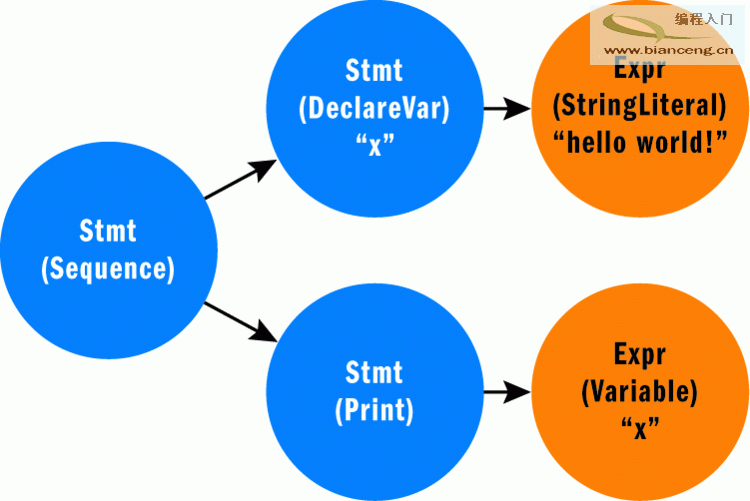
}
public CodeGen(Stmt stmt, string moduleName) {
    var name = new AssemblyName(Path.GetFileNameWithoutExtension(moduleName));
    var asm = AppDomain.CurrentDomain.DefineDynamicAssembly(name, AssemblyBuilderAccess.Save);
    var mod = asm.DefineDynamicModule(moduleName);
    var type = mod.DefineType("Foo");
    var method = type.DefineMethod("Main", MethodAttributes.Static, typeof(void), Type.EmptyTypes);
    method.SetEntryPoint();  // 關鍵:設置入口點
    _il = method.GetILGenerator();
    _symbolTable = new Dictionary<string, LocalBuilder>();

    GenStmt(stmt);
    _il.Emit(OpCodes.Ret);
    type.CreateType();
    asm.Save(moduleName);
}| AST 節點 | IL 指令序列 |
|---|---|
| IntLiteral | Ldc_I4 value |
| StringLiteral | Ldstr "value" |
| Variable | Ldloc localBuilder |
| ArithExpr (+) | Ldloc left; Ldloc right; Add |
| Assign | GenExpr(expr); Stloc localBuilder |
GenExpr(expr); Call Console.WriteLine(string) | |
| ForLoop | 初始化 → Br test → Body Label → 體 → 遞增 → Test Label → Ldloc; Ldc_I4 limit; Blt body |
// for x = 0 to 100 do print "hello" end
IL_0006: ldc.i4 0          // x = 0
IL_000b: stloc.0
IL_000c: br IL_0023        // 跳轉測試
IL_0011: ...               // 循環體
IL_001b: ldloc.0           // 遞增
IL_001c: ldc.i4 1
IL_0021: add
IL_0022: stloc.0
IL_0023: ldloc.0           // 測試 x < 100
IL_0024: ldc.i4 100
IL_0029: blt IL_0011DynamicMethod (LCG) 可生成樁代碼,將調用轉為快速 call 指令,首次 JIT 後性能接近靜態調用。peverify.exe:驗證 IL 正確性(堆棧平衡、類型安全),定位「Expected numeric type on the stack」等錯誤。ildasm.exe:反編譯程序集查看 IL,對標商業編譯器生成模式。ilasm.exe:從 IL 文本構建程序集,快速原型驗證指令序列。