OfficeApplication,目標 .NET 4.0。Microsoft.Office.Interop.Excel、Microsoft.Office.Interop.Word(版本 12.0.0.0)。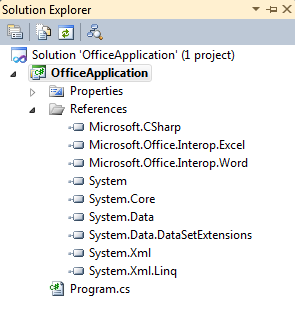
C# 使用自動實作屬性;VB 10 新增「自動實作屬性」語法,無需後端欄位:
// C#
public class Account
{
    public int ID { get; set; }
    public double Balance { get; set; }
    public string AccountHolder { get; set; }
}

' VB
Public Class Account
    Property ID As Integer
    Property Balance As Double
    Property AccountHolder As String
End Class
C# 3.0 / VB 10 均支援集合初始化器:
// C#
private static List<Account> CreateAccountList()
{
    return new List<Account> {
        new Account { ID = 1, Balance = 285.93, AccountHolder = "John Doe" },
        new Account { ID = 2, Balance = 2349.23, AccountHolder = "Richard Roe" },
        new Account { ID = 3, Balance = -39.46, AccountHolder = "I Dunoe" }
    };
}
// C# 擴充方法
static void DisplayInExcel(this IEnumerable<Account> accounts,
    Action<Account, Excel.Range> displayFunc)
{
    var xl = new Excel.Application();
    xl.Workbooks.Add();          // C# 4.0 可選參數簡化呼叫
    xl.Visible = true;
    xl.get_Range("A1").Value2 = "ID";
    xl.get_Range("B1").Value2 = "Balance";
    xl.get_Range("C1").Value2 = "Account Holder";
    xl.get_Range("A2").Select();

    foreach (var ac in accounts)
    {
        displayFunc(ac, xl.ActiveCell);
        xl.ActiveCell.get_Offset(1, 0).Select();
    }
    ((Excel.Range)xl.Columns[1]).AutoFit();
    ((Excel.Range)xl.Columns[2]).AutoFit();
    ((Excel.Range)xl.Columns[3]).AutoFit();
}
呼叫端以 Lambda 指定欄位對應與負餘額紅字標示:
checkAccounts.DisplayInExcel((account, cell) =>
{
    cell.Value2 = account.ID;
    cell.get_Offset(0, 1).Value2 = account.Balance;
    cell.get_Offset(0, 2).Value2 = account.AccountHolder;
    if (account.Balance < 0)
    {
        cell.Interior.Color = 255;
        cell.get_Offset(0, 1).Interior.Color = 255;
        cell.get_Offset(0, 2).Interior.Color = 255;
    }
});
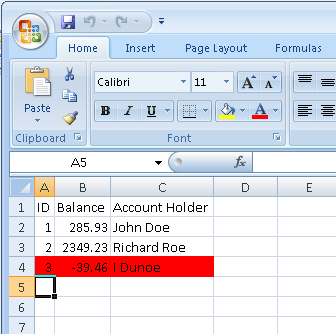
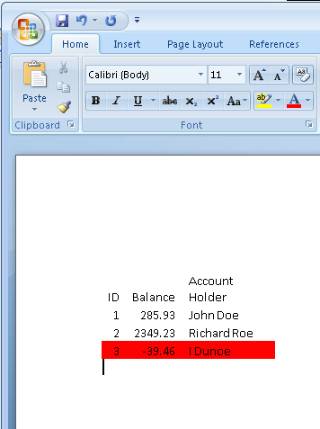
DisplayInExcel 結尾複製範圍:xl.get_Range("A1:C4").Copy()。EmbedInWordDocument 方法,利用 PasteSpecial 貼上連結:// C# 4.0 可選參數大幅簡化 7 參數呼叫
word.Selection.PasteSpecial(Link: true, DisplayAsIcon: false);
早期 C# 需逐一傳遞 Missing.Value,現僅需命名必要參數。
此特性極大簡化 Office 方案部署,開發者只需部署自身組件即可。