分散在各處的驗證邏輯是維護噩夢。ASP.NET MVC 2.0 引入 System.ComponentModel.DataAnnotations,配合 ModelMetadata 與 DataAnnotationsModelMetadataProvider,讓驗證規則集中宣告於 ViewModel 屬性上,由預設 Model Binder 自動執行,大幅簡化開發。
MVC 2.0 的 DefaultModelBinder 會透過 DataAnnotationsModelMetadataProvider 讀取屬性上的驗證屬性 (Attribute),在模型繫結階段自動驗證,結果存放於 ModelState,Controller 僅需檢查 ModelState.IsValid。
public class ContactPersonViewModel
{
    public int Id { get; set; }

    [Required(ErrorMessage = "請輸入名字!")]
    [StringLength(25, ErrorMessage = "名字不可超過 25 字元!")]
    [DisplayName("名字")]
    public string FirstName { get; set; }

    [DisplayName("中間名")]
    public string MiddleName { get; set; }

    [Required(ErrorMessage = "請輸入姓氏!")]
    [StringLength(25, ErrorMessage = "姓氏不可超過 25 字元!")]
    [DisplayName("姓氏")]
    public string LastName { get; set; }

    [Required(ErrorMessage = "必須提供出生日期!")]
    [BeforeTodaysDate(ErrorMessage = "無法新增尚未出生的聯絡人!")]
    [DisplayName("出生日期")]
    public DateTime? DateOfBirth { get; set; }

    public IEnumerable<SelectListItem> Type { get; set; }
}
public class BeforeTodaysDateAttribute : ValidationAttribute
{
    public override bool IsValid(object value)
    {
        if (value == null) return true;
        DateTime result;
        return DateTime.TryParse(value.ToString(), out result) && result < DateTime.Now;
    }
}
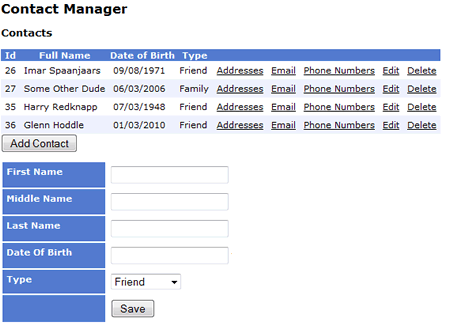
<%@ Control Language="C#" Inherits="System.Web.Mvc.ViewUserControl<ContactPersonViewModel>" %>
<% using (Html.BeginForm("Add", "Contact", FormMethod.Post, new { id = "AddContact" })) { %>
    <table>
        <tr>
            <td class="LabelCell"><%= Html.LabelFor(m => m.FirstName) %></td>
            <td><%= Html.TextBoxFor(m => m.FirstName) %>
                <%= Html.ValidationMessageFor(m => m.FirstName) %></td>
        </tr>
        <!-- 其他欄位類同 -->
        <tr>
            <td class="LabelCell"><%= Html.LabelFor(m => m.DateOfBirth) %></td>
            <td><%= Html.EditorFor(m => m.DateOfBirth) %>
                <%= Html.ValidationMessageFor(m => m.DateOfBirth) %></td>
        </tr>
        <tr>
            <td class="LabelCell"></td>
            <td><input type="button" name="save" id="save" value="Save" /></td>
        </tr>
    </table>
<% } %>

<script type="text/javascript">
$('#save').click(function () {
    $.ajax({
        type: "POST",
        url: $("#AddContact").attr('action'),
        data: $("#AddContact").serialize(),
        dataType: "text/plain",
        success: function (response) {
            if (response == "Saved") window.location = "/";
            else $("#details").html(response); // 顯示驗證錯誤
        }
    });
});
</script>
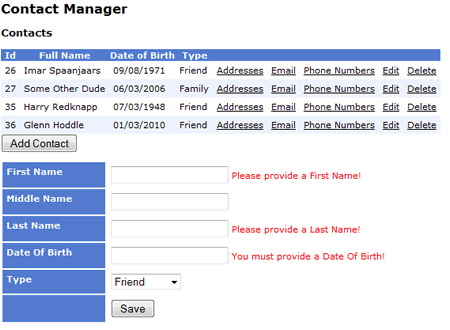
[AcceptVerbs(HttpVerbs.Post)]
public ActionResult Add([Bind(Exclude = "Id, Type")] ContactPersonViewModel person)
{
    if (ModelState.IsValid)
    {
        var p = new ContactPerson
        {
            FirstName = person.FirstName,
            MiddleName = person.MiddleName,
            LastName = person.LastName,
            Type = Request.Form["Type"].ParseEnum<PersonType>()
        };
        if (person.DateOfBirth != null) p.DateOfBirth = (DateTime)person.DateOfBirth;
        ContactPersonManager.Save(p);
        return Content("Saved");
    }
    // 驗證失敗:重新準備下拉清單資料並回傳 PartialView
    var personTypes = Enum.GetValues(typeof(PersonType))
        .Cast<PersonType>()
        .Select(p => new { ID = p, Name = p.ToString() });
    person.Type = new SelectList(personTypes, "ID", "Name");
    return PartialView(person);
}
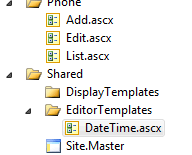
在 Views/Shared/EditorTemplates/DateTime.ascx 定義:
<%@ Control Language="C#" Inherits="System.Web.Mvc.ViewUserControl<System.DateTime?>" %>
<%= Html.TextBox("", Model.HasValue ? Model.Value.ToShortDateString() : string.Empty) %>
View 中使用 Html.EditorFor(m => m.DateOfBirth) 即可套用。
DataAnnotations 將驗證規則集中於 ViewModel,配合 MVC 2.0 的模型繫結與強型別 HTML Helper,實現伺服器端與用戶端 (透過 AJAX 回傳錯誤) 的無縫驗證體驗。自訂屬性擴充性強,編輯器樣板更提供 UI 顯示的統一管控。