需求:輕量、無外部強依賴、支援 MVP 模式、事件總線、依賴注入 (IOC)、模組動態替換。
包含:Model、View、IView、Presenter、EventPublication、EventSubscription。
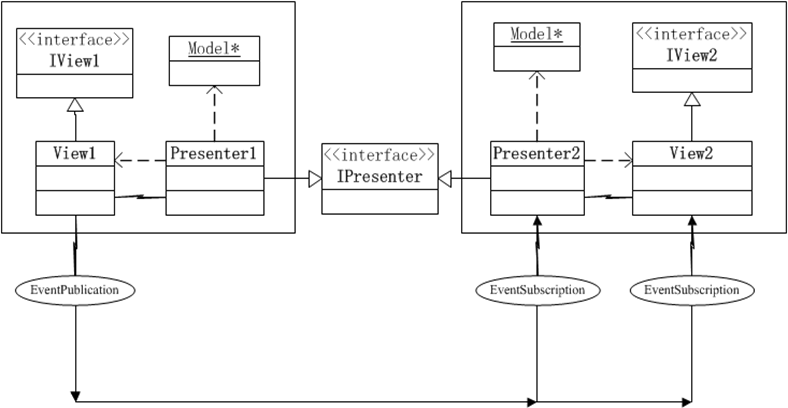
// 視圖介面
public interface IForm1 {
    void ShowDialog();
    IUC1 UC1 { set; }
    IUC2 UC2 { set; }
}

// Presenter 基類
public abstract class MPresenter<TView> where TView : class {
    protected TView View { get; private set; }
    public MPresenter(TView view) { View = view; }
}

// 事件發佈/訂閱屬性
[AttributeUsage(AttributeTargets.Event)]
public class EventPublicationAttribute : Attribute {
    public string Topic { get; }
    public PublicationScope Scope { get; }
    public EventPublicationAttribute(string topic, PublicationScope scope) { ... }
}

[AttributeUsage(AttributeTargets.Method)]
public class EventSubscriptionAttribute : Attribute {
    public string Topic { get; }
    public ThreadOption ThreadOption { get; }
    public EventSubscriptionAttribute(string topic, ThreadOption option) { ... }
}public partial class Form1 : Form, IForm1 {
private IUC1 _uc1; public IUC1 UC1 { set { _uc1 = value; AddToPanel(panelEx1, _uc1); } }
private IUC2 _uc2; public IUC2 UC2 { set { _uc2 = value; AddToPanel(panelEx2, _uc2); } }
public new void ShowDialog() { base.ShowDialog(); }
private void AddToPanel(Panel p, IView v) { ((Control)v).Dock = DockStyle.Fill; p.Controls.Add((Control)v); }
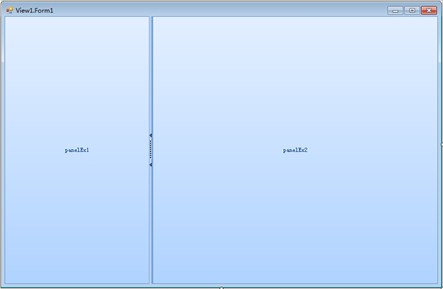
}
public interface IUC1 {
    void ShowDialog1();
    IUC3 UC3 { set; }
    [EventPublication("TestEvent", PublicationScope.Global)]
    event EventHandler AfterClickButton;
}

public partial class UC1 : UserControl, IUC1 {
    private IUC3 _uc3; public IUC3 UC3 { set { _uc3 = value; AddToPanel(panelEx1, _uc3); } }
    public void ShowDialog1() { MessageBox.Show("I am UC1"); }
    public event EventHandler AfterClickButton;
    private void buttonX1_Click(object sender, EventArgs e) => AfterClickButton?.Invoke(this, e);
}

// Presenter 訂閱事件並操作 View
public class PUC1 : MPresenter<IUC1> {
    [EventSubscription("TestEvent", ThreadOption.UserInterface)]
    private void OnAfterClickButton(object sender, EventArgs args) => View.ShowDialog1();
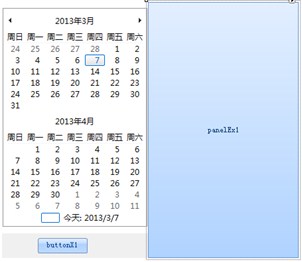
}
<Framework>
  <objects>
    <object name="Form1" assembly="View1.dll" className="View1.Views.Form1">
      <property name="UC1" refObject="thisIsUC1" />
      <property name="UC2" refObject="thisIsUC2" />
    </object>
    <object name="thisIsUC1" assembly="View1.dll" className="View1.Views.UC1">
      <property name="UC3" refObject="thisIsUC3" />
    </object>
    <object name="thisIsUC2" assembly="View1.dll" className="View1.Views.UC2" />
    <object name="thisIsUC3" assembly="View3.dll" className="View3.UC3" />  @* 可替換為 View1.Views.UC3 *@
    <object name="thisIsPUC1" assembly="View1.dll" className="View1.Presenters.PUC1">
      <property name="View" refObject="thisIsUC1" />
    </object>
  </objects>
  <contexts>
    <context refObject="thisIsPUC1" />
  </contexts>
</Framework>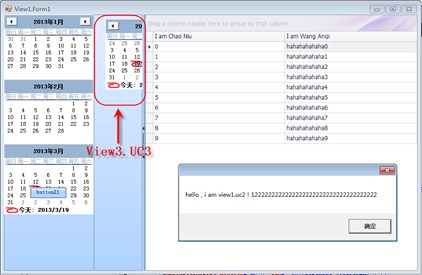
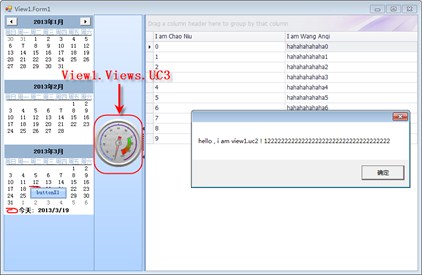
修改配置檔中 thisIsUC3 的 assembly 與 className,無需重新編譯主程式,即可將 UC3 從「日曆」替換為「表盤」或任何實作 IUC3 的元件。
AngelFrame 僅需引用 Framework.dll、Microsoft.Practices.CompositeUI.dll、Microsoft.Practices.ObjectBuilder.dll,即提供:
專注業務邏輯,輕鬆整合至任意大型系統。