Windows 8 (WinRT) 平台的多語言支援較 WP8 稍繁雜,需開發者手動管理資源檔結構與載入邏輯。但良好的習慣是:無論當前是否需要多語言,均應將字串資源抽離至資源檔,便於未來擴展。
在專案中建立 Strings 資料夾,依語言代碼建立子資料夾,各放置 Resources.resw:
Strings/
  ├─ en/          # 英文 (通用)
  │   └─ Resources.resw
  ├─ en-US/       # 英文 (美國)
  │   └─ Resources.resw
  ├─ zh-CN/       # 簡體中文
  │   └─ Resources.resw
  └─ zh-TW/       # 繁體中文
      └─ Resources.resw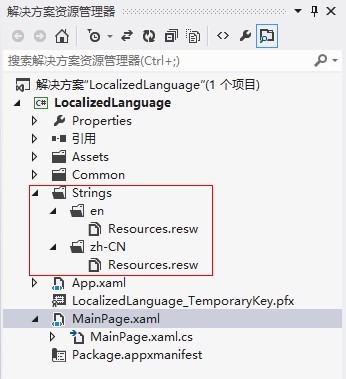
語言代碼遵循 BCP-47 標準:zh-CN、en-US、ja-JP 等。系統會依使用者語言偏好順序自動回退匹配 (如 en-US → en → en-GB...)。
zh-CN/Resources.resw

en/Resources.resw

x:Uid 關聯 (標準方式)<TextBlock x:Uid="Greeting" Text="" />資源檔中需定義鍵 Greeting.Text、Greeting.FontSize 等屬性專屬資源。缺點:相同文字在不同控件需重複定義 (如 Button 與 TextBlock 皆需「確定」)。
ResourceLoadervar loader = new Windows.ApplicationModel.Resources.ResourceLoader();
string title = loader.GetString("AppTitle"); // 對應 Resources.resw 中的 AppTitle適用於動態產生 UI、ViewModel 屬性綁定等場景。
步驟:
LocalizedStrings:using Windows.ApplicationModel.Resources;
using System.Diagnostics.CodeAnalysis;
namespace HuiZhang212
{
[SuppressMessage("Microsoft.Design", "CA1053:StaticHolderTypesShouldNotHaveConstructors",
Justification = "Required for XAML resource usage.")]
public class LocalizedStrings
{
private static readonly ResourceLoader _loader = new ResourceLoader();
public static string AppTitle => _loader.GetString("AppTitle");
// 依需求添加更多屬性...
}
}App.xaml 宣告為全域資源:<Application ... xmlns:local="using:HuiZhang212">
<Application.Resources>
<local:LocalizedStrings x:Key="LocalizedStrings" />
</Application.Resources>
</Application>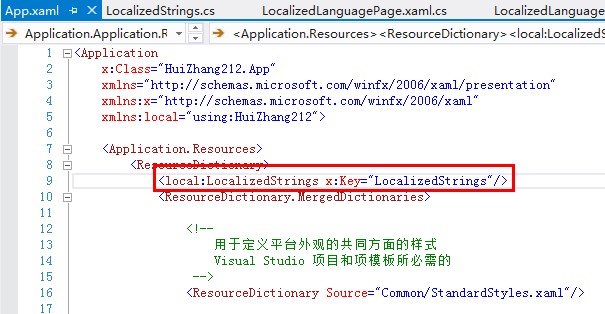
<TextBlock Text="{Binding AppTitle, Source={StaticResource LocalizedStrings}}" />優點:同一字串資源可在多處複用,避免重複定義。
ResourceLoader 實例上處理 DefaultContext 變更事件)。Win8 多語言核心在於:規範的 Strings/語言代碼/Resources.resw 結構 + 三種存取方式按需選擇。建議專案初期即導入資源檔管理,採用「程式碼 ResourceLoader + XAML 靜態資源包裝」組合,兼顧效能與維護性。