EF 6.1 引入 `System.Data.Entity.Infrastructure.Interception` 命名空間,透過 `DbCommandInterceptor` 可輕鬆攔截 SQL 執行前後、記錄語句、效能監控、錯誤處理。
建立攔截器
using System.Data.Common;
using System.Data.Entity.Infrastructure.Interception;
using System.Diagnostics;
using System.Text;

public class EfCommandInterceptor : DbCommandInterceptor
{
    private readonly Stopwatch _stopwatch = new Stopwatch();

    // Scalar (ExecuteScalar) 執行前
    public override void ScalarExecuting(DbCommand command, DbCommandInterceptionContext interceptionContext)
    {
        _stopwatch.Restart();
        base.ScalarExecuting(command, interceptionContext);
    }

    // Scalar 執行後
    public override void ScalarExecuted(DbCommand command, DbCommandInterceptionContext interceptionContext)
    {
        _stopwatch.Stop();
        Log(command, interceptionContext, "Scalar");
    }

    // NonQuery (ExecuteNonQuery) 執行前
    public override void NonQueryExecuting(DbCommand command, DbCommandInterceptionContext interceptionContext)
    {
        _stopwatch.Restart();
        base.NonQueryExecuting(command, interceptionContext);
    }

    // NonQuery 執行後
    public override void NonQueryExecuted(DbCommand command, DbCommandInterceptionContext interceptionContext)
    {
        _stopwatch.Stop();
        Log(command, interceptionContext, "NonQuery");
    }

    // Reader (ExecuteReader) 執行前
    public override void ReaderExecuting(DbCommand command, DbCommandInterceptionContext interceptionContext)
    {
        _stopwatch.Restart();
        base.ReaderExecuting(command, interceptionContext);
    }

    // Reader 執行後
    public override void ReaderExecuted(DbCommand command, DbCommandInterceptionContext interceptionContext)
    {
        _stopwatch.Stop();
        Log(command, interceptionContext, "Reader");
    }

    private void Log(DbCommand command, DbCommandInterceptionContext context, string type)
    {
        var sb = new StringBuilder();
        sb.AppendLine($"--- EF SQL [{type}] ---");
        sb.AppendLine($"Elapsed: {_stopwatch.ElapsedMilliseconds} ms");
        sb.AppendLine($"CommandText: {command.CommandText}");

        if (command.Parameters.Count > 0)
        {
            sb.AppendLine("Parameters:");
            foreach (DbParameter p in command.Parameters)
            {
                sb.AppendLine($"  {p.ParameterName} = {p.Value ?? "NULL"} ({p.DbType})");
            }
        }

        if (context.Exception != null)
        {
            sb.AppendLine($"EXCEPTION: {context.Exception}");
            Trace.TraceError(sb.ToString());
        }
        else
        {
            Trace.TraceInformation(sb.ToString());
        }
    }
}
註冊攔截器
方式一:Code-based (推薦,啟動時一次註冊)
// Global.asax Application_Start 或 DbConfiguration 子類
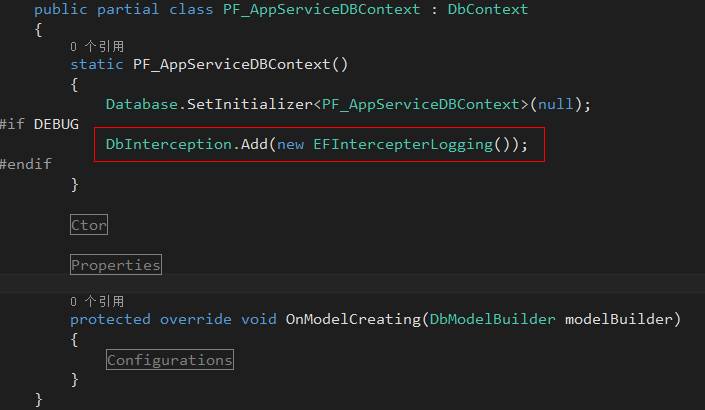
DbInterception.Add(new EfCommandInterceptor());
方式二:Config-based (web.config/app.config)
<entityFramework>
  <interceptors>
    <interceptor type="MyNamespace.EfCommandInterceptor, MyAssembly" />
  </interceptors>
</entityFramework>
實戰應用場景
場景 實作要點
開發環境 SQL 記錄 輸出至 Debug/Trace/Console,搭配 Glimpse/Prefix 視覺化 生產環境慢查詢告警 `_stopwatch.ElapsedMilliseconds > 1000` 發送監控通知 參數化查詢審計 記錄參數值,防止 SQL Injection 風險 錯誤 SQL 完整保留 攔截 `Exception` 時記錄 `CommandText` + 參數,快速重現 多租戶自動加 Where 在 `ReaderExecuting` 修改 `command.CommandText` 注入租戶 ID (高風險,需極謹慎)
進階:攔截並修改 SQL (慎用)
public override void ReaderExecuting(DbCommand command, DbCommandInterceptionContext interceptionContext)
{
    // 例:自動為軟刪除實體加上 IsDeleted = 0
    if (command.CommandText.Contains("FROM [dbo].[Users]")
        && !command.CommandText.Contains("IsDeleted"))
    {
        command.CommandText = command.CommandText.Replace(
            "WHERE ", "WHERE [IsDeleted] = 0 AND ");
    }
    base.ReaderExecuting(command, interceptionContext);
}
警告: 修改 SQL 字串極易破壞 EF 內部邏輯,僅建議用於極簡單、固定模式的全域規則。複雜查詢修改請改用 `IDbCommandTreeInterceptor` (EF 6.1+) 操作命令樹。
效能影響與最佳實踐
攔截器會增加每次 DB 呼叫的微小開銷 (微秒級),生產環境建議關閉詳細記錄,僅保留慢查詢/錯誤記錄
使用 `Async` 版本方法 (`ReaderExecutingAsync` 等) 避免阻塞執行緒
記錄輸出導向結構化日誌 (Serilog/NLog/ELK),而非純文字檔
單元測試中驗證攔截器行為:`DbInterception.Dispatch` 手動觸發
圖示說明
EF 6.1+ 的攔截機制是 AOP 在資料存取層的經典應用,善用它能大幅提升可觀測性與維運效率。