螢幕鍵盤視窗不可搶奪輸入焦點 (否則目標應用程式失去焦點),但標題列點擊需可拖曳移動視窗。
UserActivityHook hook = new UserActivityHook(true, true);
hook.MouseActivity += HookOnMouseActivity;

private void HookOnMouseActivity(object sender, HookEx.MouseExEventArgs e)
{
    Point location = e.Location;
    if (e.Button == MouseButtons.Left)
    {
        Rectangle captionRect = new Rectangle(this.Location,
            new Size(this.Width, SystemInformation.CaptionHeight));

        if (captionRect.Contains(location))
        {
            // 標題列點擊:移除 WS_DISABLED,允許取得焦點並置前
            NativeMethods.SetWindowLong(this.Handle, KeyboardConstaint.GWL_EXSTYLE,
                (int)NativeMethods.GetWindowLong(this.Handle, KeyboardConstaint.GWL_EXSTYLE)
                & (~KeyboardConstaint.WS_DISABLED));
            NativeMethods.SendMessage(this.Handle, KeyboardConstaint.WM_SETFOCUS, IntPtr.Zero, IntPtr.Zero);
        }
        else
        {
            // 非標題列:加上 WS_DISABLED,不可取得焦點
            NativeMethods.SetWindowLong(this.Handle, KeyboardConstaint.GWL_EXSTYLE,
                (int)NativeMethods.GetWindowLong(this.Handle, KeyboardConstaint.GWL_EXSTYLE)
                | KeyboardConstaint.WS_DISABLED);
        }
    }
}
WS_DISABLED 樣式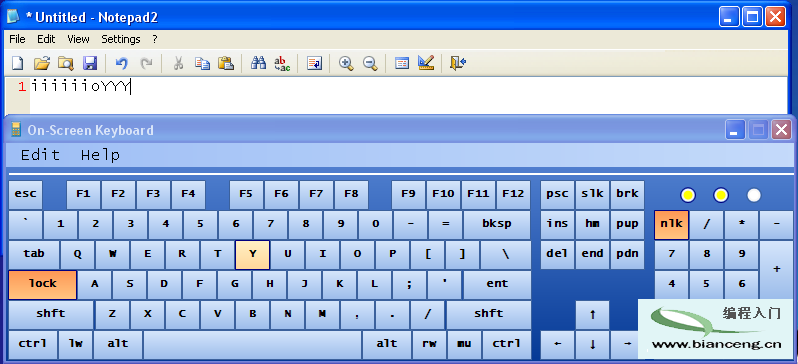
六部分完整涵蓋:鉤子理論 → API 封裝 → 鍵盤/滑鼠鉤子安裝 → 訊息模擬 → 按鈕 UI 綁定 → 無焦點視窗技巧。實現與實體鍵盤完全同步的虛擬鍵盤。