模板中用 $字段名 標記待填充單元格(如 $Name),程序掃描所有單元格,匹配標記並按 DataTable 列名填充,實現模板與代碼解耦。
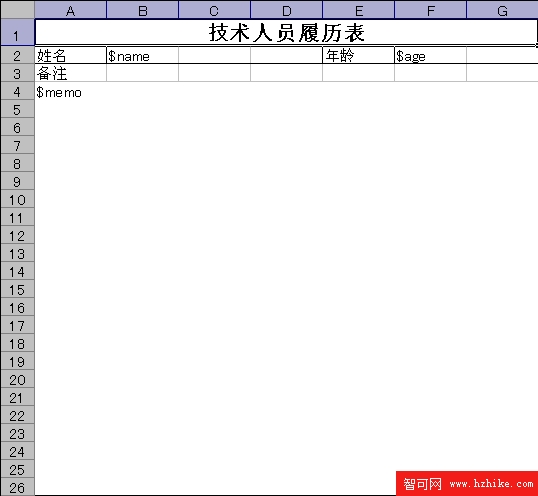
$Name、D1: $Age、F1: $Memo
private void BtnCreateXml_Click(object sender, EventArgs e)
{
    DataTable dt = new DataTable();
    dt.Columns.Add("Name", typeof(string));
    dt.Columns.Add("Age", typeof(int));
    dt.Columns.Add("Memo", typeof(string));
    dt.Rows.Add("dahuzizyd", 20, "dahuzizyd.cnblogs.com");
    dt.AcceptChanges();

    DataSet ds = new DataSet(); ds.Tables.Add(dt);
    ds.WriteXml(Application.StartupPath + @"\ExcelBindingXml.xml");
}
private void BtnFillExcel_Click(object sender, EventArgs e)
{
    // 1. 讀取 XML 數據
    DataSet ds = new DataSet();
    ds.ReadXml(Application.StartupPath + @"\ExcelBindingXml.xml");
    DataTable dt = ds.Tables[0];
    DataRow dr = dt.Rows[0];

    // 2. 打開模板
    Excel.Application app = new Excel.Application();
    Excel._Workbook wb = app.Workbooks.Open(Application.StartupPath + @"\Template.xls", Missing.Value, ...);
    app.DisplayAlerts = false;
    Excel.Worksheet ws = (Excel.Worksheet)wb.Worksheets[1];

    // 3. 遍歷已使用區域
    Excel.Range used = ws.UsedRange;
    foreach (Excel.Range cell in used)
    {
        if (cell.Value2 is string txt && txt.StartsWith("$"))
        {
            string field = txt.Substring(1); // 去掉 $
            if (dt.Columns.Contains(field))
            {
                cell.Value = dr[field];
                cell.NumberFormatLocal = "@"; // 防止長數字科學計數法
            }
        }
    }

    // 4. 另存結果
    wb.SaveAs(Application.StartupPath + @"\Result.xls", ...);
    // 5. 清理 COM
    wb.Close(...); app.Quit();
    Marshal.ReleaseComObject(wb); Marshal.ReleaseComObject(app);
    GC.Collect(); GC.WaitForPendingFinalizers();
}
$NewField 並確保 DataTable 有同名列。$Photo:Path,代碼識別插入圖片。UsedRange.Value 讀取為 object[,] 內存處理後回寫,避免逐單元格 COM 呼叫。